- PHP 教程
- PHP - 首页
- PHP - 简介
- PHP - 安装
- PHP - 历史
- PHP - 特性
- PHP - 语法
- PHP - Hello World
- PHP - 注释
- PHP - 变量
- PHP - Echo/Print
- PHP - var_dump
- PHP - $ 和 $$ 变量
- PHP - 常量
- PHP - 魔术常量
- PHP - 数据类型
- PHP - 类型转换
- PHP - 类型强制转换
- PHP - 字符串
- PHP - 布尔值
- PHP - 整数
- PHP - 文件与I/O
- PHP - 数学函数
- PHP - Heredoc & Nowdoc
- PHP - 复合类型
- PHP - 文件包含
- PHP - 日期与时间
- PHP - 标量类型声明
- PHP - 返回类型声明
- PHP 运算符
- PHP - 运算符
- PHP - 算术运算符
- PHP - 比较运算符
- PHP - 逻辑运算符
- PHP - 赋值运算符
- PHP - 字符串运算符
- PHP - 数组运算符
- PHP - 条件运算符
- PHP - 展开运算符
- PHP - 空值合并运算符
- PHP - 比较运算符(太空船运算符)
- PHP 控制语句
- PHP - 决策
- PHP - If…Else 语句
- PHP - Switch 语句
- PHP - 循环类型
- PHP - For 循环
- PHP - Foreach 循环
- PHP - While 循环
- PHP - Do…While 循环
- PHP - Break 语句
- PHP - Continue 语句
- PHP 函数
- PHP - 函数
- PHP - 函数参数
- PHP - 按值传递
- PHP - 按引用传递
- PHP - 默认参数
- PHP - 具名参数
- PHP - 可变参数
- PHP - 返回值
- PHP - 传递函数
- PHP - 递归函数
- PHP - 类型提示
- PHP - 变量作用域
- PHP - 严格类型
- PHP - 匿名函数
- PHP - 箭头函数
- PHP - 可变函数
- PHP - 局部变量
- PHP - 全局变量
- PHP 超全局变量
- PHP - 超全局变量
- PHP - $GLOBALS
- PHP - $_SERVER
- PHP - $_REQUEST
- PHP - $_POST
- PHP - $_GET
- PHP - $_FILES
- PHP - $_ENV
- PHP - $_COOKIE
- PHP - $_SESSION
- PHP 文件处理
- PHP - 文件处理
- PHP - 打开文件
- PHP - 读取文件
- PHP - 写入文件
- PHP - 文件是否存在
- PHP - 下载文件
- PHP - 复制文件
- PHP - 追加文件
- PHP - 删除文件
- PHP - 处理CSV文件
- PHP - 文件权限
- PHP - 创建目录
- PHP - 列出文件
- 面向对象PHP
- PHP - 面向对象编程
- PHP - 类和对象
- PHP - 构造函数和析构函数
- PHP - 访问修饰符
- PHP - 继承
- PHP - 类常量
- PHP - 抽象类
- PHP - 接口
- PHP - Traits
- PHP - 静态方法
- PHP - 静态属性
- PHP - 命名空间
- PHP - 对象迭代
- PHP - 封装
- PHP - final 关键字
- PHP - 重载
- PHP - 克隆对象
- PHP - 匿名类
- PHP Web 开发
- PHP - Web 概念
- PHP - 表单处理
- PHP - 表单验证
- PHP - 表单邮件/URL
- PHP - 完整表单
- PHP - 文件包含
- PHP - GET & POST
- PHP - 文件上传
- PHP - Cookie
- PHP - Session
- PHP - Session 选项
- PHP - 发送邮件
- PHP - 输入过滤
- PHP - Post-Redirect-Get (PRG)
- PHP - 闪存消息
- PHP 高级
- PHP - MySQL
- PHP.INI 文件配置
- PHP - 数组解构
- PHP - 代码规范
- PHP - 正则表达式
- PHP - 错误处理
- PHP - Try…Catch
- PHP - Bug 调试
- PHP - 针对C语言开发者
- PHP - 针对Perl开发者
- PHP - 框架
- PHP - Core PHP vs 框架
- PHP - 设计模式
- PHP - 过滤器
- PHP - JSON
- PHP - 异常
- PHP - 特殊类型
- PHP - 哈希
- PHP - 加密
- PHP - is_null() 函数
- PHP - 系统调用
- PHP - HTTP 认证
- PHP - 交换变量
- PHP - Closure::call()
- PHP - 过滤后的 unserialize()
- PHP - IntlChar
- PHP - CSPRNG
- PHP - 预期
- PHP - use 语句
- PHP - 整数除法
- PHP - 已弃用的特性
- PHP - 已移除的扩展和SAPI
- PHP - PEAR
- PHP - CSRF
- PHP - FastCGI 进程
- PHP - PDO 扩展
- PHP - 内置函数
- PHP 有用资源
- PHP - 速查表
- PHP - 问答
- PHP - 快速指南
- PHP - 在线编译器
- PHP - 有用资源
- PHP - 讨论
PHP - 发送邮件
发送电子邮件的功能是典型的PHP驱动Web应用程序中常用的功能之一。您希望通过PHP应用程序本身发送包含通知、更新和其他通信的电子邮件给您的注册用户,而不是使用不同的邮件服务。您可以通过采用本章中描述的技术,将此功能添加到您的PHP应用程序中。
PHP有一个内置的mail()函数来发送电子邮件。但是,您需要正确配置“php.ini”设置才能这样做。首先,您必须知道您正在使用的Web托管平台的SMTP域。例如,如果您的网站托管在GoDaddy托管服务上,则SMTP域为“smtp.secureserver.net”,您应该在配置中使用它。
如果您使用GoDaddy的基于Windows的托管,则应确保在php.ini文件中启用了两个指令。第一个称为SMTP,它定义您的电子邮件服务器地址。第二个称为sendmail_from,它定义您自己的电子邮件地址。
Windows的配置如下所示:
[mail function]
; For Win32 only.
SMTP = smtp.secureserver.net

; For win32 only
sendmail_from = webmaster@tutorialspoint.com
Linux用户只需让PHP知道其sendmail应用程序的位置即可。应将路径和任何所需的开关指定给sendmail_path指令。
Linux的配置如下所示:
[mail function]
; For Win32 only.
SMTP =

; For win32 only
sendmail_from =

; For Unix only
sendmail_path = /usr/sbin/sendmail -t -i
PHP中的mail()函数需要三个必填参数,它们指定收件人的电子邮件地址、邮件主题和实际邮件,此外还有另外两个可选参数。
mail( to, subject, message, headers, parameters );
参数
to − 必需。指定电子邮件的接收者/接收者
subject − 必需。指定电子邮件的主题。此参数不能包含任何换行符
message − 必需。定义要发送的消息。每一行应以LF(\n)分隔。行数不应超过70个字符
headers − 可选。指定其他标头,如From、Cc和Bcc。其他标头应以CRLF(\r\n)分隔
parameters − 可选。向sendmail程序指定附加参数
可以使用逗号分隔的列表,在mail()函数的第一个参数中指定多个收件人。
发送HTML邮件
使用PHP发送文本消息时,所有内容都将被视为纯文本。即使您在文本消息中包含HTML标签,它也会显示为纯文本,并且HTML标签不会根据HTML语法进行格式化。但是PHP提供了将HTML消息作为实际HTML消息发送的选项。
发送电子邮件时,您可以指定Mime版本、内容类型和字符集来发送HTML电子邮件。
示例
以下示例演示如何将HTML电子邮件消息发送给“xyz@somedomain.com”,并将其抄送至“afgh@somedomain.com”。您可以编写此程序,使其可以接收用户的所有内容,然后发送电子邮件。
它应该接收用户的所有内容,然后发送电子邮件。
<?php
   $to = "xyz@somedomain.com";
   $subject = "This is subject";

   $message = "<b>This is HTML message.</b>";
   $message .= "<h1>This is headline.</h1>";

   $header = "From:abc@somedomain.com \r\n";
   $header .= "Cc:afgh@somedomain.com \r\n";
   $header .= "MIME-Version: 1.0\r\n";
   $header .= "Content-type: text/html\r\n";

   $retval = mail ($to,$subject,$message,$header);

   if( $retval == true ) {
      echo "Message sent successfully...";
   }else {
      echo "Message could not be sent...";
   }
?>
它将产生以下输出:
Message could not be sent...
sh: 1: /usr/sbin/sendmail: not found
从本地主机发送邮件
上述调用PHP mail()的方法可能无法在您的本地主机上运行。在这种情况下,有一种替代的发送电子邮件的解决方案。您可以使用PHPMailer通过本地主机的SMTP发送电子邮件。
PHPMailer是一个开源库,用于连接SMTP来发送电子邮件。您可以从PEAR或Composer存储库下载它,也可以从https://github.com/PHPMailer/PHPMailer下载。从此处下载ZIP文件,并将PHPMailer文件夹的内容复制到PHP配置中指定的include_path目录之一,并手动加载每个类文件。
示例
使用以下PHP脚本使用PHPMailer库发送电子邮件:
Phpmailer.php
<?php
   use PHPMailer\PHPMailer\PHPMailer;
   use PHPMailer\PHPMailer\SMTP;
   use PHPMailer\PHPMailer\Exception;

   require_once __DIR__ . '/vendor/phpmailer/src/Exception.php';
   require_once __DIR__ . '/vendor/phpmailer/src/PHPMailer.php';
   require_once __DIR__ . '/vendor/phpmailer/src/SMTP.php';
   require 'vendor/autoload.php';

   $mail = new PHPMailer;
   if(isset($_POST['send'])){

      // getting post values
      $fname=$_POST['fname'];
      $toemail=$_POST['toemail'];
      $subject=$_POST['subject'];
      $message=$_POST['message'];
      $mail->isSMTP();					      // Set mailer to use SMTP
      $mail->Host = 'smtp.gmail.com';
      $mail->SMTPAuth = true;
      $mail->Username = 'myID@gmail.com';	// SMTP username
      $mail->Password = 'mypassword'; 		// SMTP password

      // Enable TLS encryption, 'ssl' also accepted
      $mail->SMTPSecure = 'tls';
      $mail->Port = 587;
      $mail->setFrom(myID@gmail.com', 'My_Name');
      $mail->addReplyTo(myID@gmail.com', 'My_Name');
      $mail->addAddress($toemail);   	  // Add a recipient
      $mail->isHTML(true);                // Set email format to HTML
      $bodyContent=$message;
      $mail->Subject =$subject;
      $body = 'Dear'.$fname;
      $body .='<p>'.$message.'</p>';
      $mail->Body = $body;

      if(!$mail->send()) {
         echo 'Message could not be sent.';
         echo 'Mailer Error: ' . $mail->ErrorInfo;
      } else {
         echo 'Message has been sent';
      }
   }
?>
使用以下HTML表单撰写邮件。该表单提交到上面的phpmail.php脚本
Email.html
<h1>PHP - Sending Email</h1>
<form action="PHPmailer.php" method="post">
   <label for="inputName">Name</label>
   <input type="text" id="inputName" name="fname" required>

   <label for="inputEmail">Email</label>
   <input type="email" id="inputEmail" name="toemail" required>

   <label for="inputSubject">Subject</label>
   <input type="text" id="inputSubject" name="subject" required>

   <label for="inputMessage">Message</label>
   <textarea id="inputMessage" name="message" rows="5" required></textarea>

   <button type="submit" name="send">Send</button>
</form>
发送带附件的邮件
要发送包含混合内容的电子邮件,应将Content-type标头设置为multipart/mixed。然后可以在边界内指定文本和附件部分。
边界以两个连字符开头,后跟一个在邮件正文中不会出现的唯一数字。PHP函数md5()用于创建一个32位十六进制数字来创建唯一数字。表示电子邮件最后一部分的最终边界也必须以两个连字符结尾。
示例
请看下面的例子:
<?php

   // request variables
   $from = $_REQUEST["from"];
   $emaila = $_REQUEST["emaila"];
   $filea = $_REQUEST["filea"];

   if ($filea) {
      function mail_attachment ($from , $to, $subject, $message, $attachment){
         $fileatt = $attachment; 		// Path to the file
         $fileatt_type = "application/octet-stream"; // File Type

         $start = strrpos($attachment, '/') == -1 ?
         strrpos($attachment, '//') : strrpos($attachment, '/')+1;

         // Filename that will be used for the file as the attachment
         $fileatt_name = substr($attachment, $start,
         strlen($attachment));

         $email_from = $from; 		// Who the email is from
         $subject = "New Attachment Message";

         $email_subject =  $subject; // The Subject of the email
         $email_txt = $message;     // Message that the email has in it
         $email_to = $to; 	 	   // Who the email is to

         $headers = "From: ".$email_from;
         $file = fopen($fileatt,'rb');
         $data = fread($file,filesize($fileatt));
         fclose($file);

         $msg_txt="\n\n You have recieved a new attachment message from $from";
         $semi_rand = md5(time());
         $mime_boundary = "==Multipart_Boundary_x{$semi_rand}x";
         $headers .= "\nMIME-Version: 1.0\n" . "Content-Type: multipart/mixed;\n" . "
         boundary=\"{$mime_boundary}\"";

         $email_txt .= $msg_txt;

         $email_message .= "This is a multi-part message in MIME format.\n\n" .
         "--{$mime_boundary}\n" . "Content-Type:text/html;
         charset = \"iso-8859-1\"\n" . "Content-Transfer-Encoding: 7bit\n\n" .
         $email_txt . "\n\n";

         $data = chunk_split(base64_encode($data));

         $email_message .= "--{$mime_boundary}\n" . "Content-Type: {$fileatt_type};\n" .
         " name = \"{$fileatt_name}\"\n" . //"Content-Disposition: attachment;\n" .
         //" filename = \"{$fileatt_name}\"\n" . "Content-Transfer-Encoding:
         "base64\n\n" . $data . "\n\n" . "--{$mime_boundary}--\n";

         $ok = mail($email_to, $email_subject, $email_message, $headers);

         if($ok) {
            echo "File Sent Successfully.";
            // delete a file after attachment sent.
            unlink($attachment);
         } else {
            die("Sorry but the email could not be sent. Please go back and try again!");
         }
      }
      move_uploaded_file($_FILES["filea"]["tmp_name"],
      'temp/'.basename($_FILES['filea']['name']));

      mail_attachment("$from", "youremailaddress@gmail.com",
      "subject", "message", ("temp/".$_FILES["filea"]["name"]));
   }
?>
<html>
<head>
   <script language = "javascript" type = "text/javascript">
      function CheckData45() {
         with(document.filepost) {
            if(filea.value ! = "") {
               document.getElementById('one').innerText = "Attaching File ... Please Wait";
            }
         }
      }
   </script>
</head>
<body>
   <table width = "100%" height = "100%" border = "0"
      cellpadding = "0" cellspacing = "0">
      <tr>
         <td align = "center">
            <form name = "filepost" method = "post"
               action = "file.php" enctype = "multipart/form-data" id = "file">
               <table width = "300" border = "0" cellspacing = "0"
                  cellpadding = "0">
                  <tr valign = "bottom">
                     <td height = "20">Your Name:</td>
                  </tr>
                  <tr>
                     <td><input name = "from" type = "text" id = "from" size = "30"></td>
                  </tr>
                  <tr valign = "bottom">
                     <td height = "20">Your Email Address:</td>
                  </tr>
                  <tr>
                     <td class = "frmtxt2"><input name = "emaila" type = "text" id = "emaila" size = "30"></td>
                  </tr>
                  <tr>
                     <td height = "20" valign = "bottom">Attach File:</td>
                  </tr>
                  <tr valign = "bottom">
                     <td valign = "bottom"><input name = "filea" type = "file" id = "filea" size = "16"></td>
                  </tr>
                  <tr>
                     <td height = "40" valign = "middle">
                        <input name = "Reset2" type = "reset" id = "Reset2" value = "Reset">
                        <input name = "Submit2" type = "submit" value = "Submit" onClick = "return CheckData45()">
                     </td>
                  </tr>
               </table>
            </form>
            <center>
               <table width = "400">
                  <tr>
                     <td id = "one"></td>
                  </tr>
               </table>
            </center>
         </td>
      </tr>
   </table>
</body>
</html>
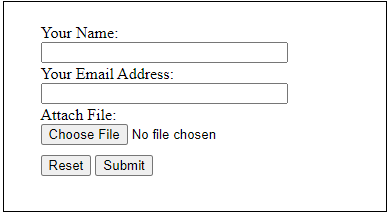
它将产生以下输出: