- Spring Boot 教程
- Spring Boot - 首页
- Spring Boot - 简介
- Spring Boot - 快速入门
- Spring Boot - 引导
- Spring Tool Suite
- Spring Boot - Tomcat 部署
- Spring Boot - 构建系统
- Spring Boot - 代码结构
- Spring Bean 与依赖注入
- Spring Boot - 运行器
- Spring Boot - 启动器
- Spring Boot - 应用属性
- Spring Boot - 配置
- Spring Boot - 注解
- Spring Boot - 日志
- 构建 RESTful Web 服务
- Spring Boot - 异常处理
- Spring Boot - 拦截器
- Spring Boot - Servlet 过滤器
- Spring Boot - Tomcat 端口号
- Spring Boot - Rest 模板
- Spring Boot - 文件处理
- Spring Boot - 服务组件
- Spring Boot - Thymeleaf
- 使用 RESTful Web 服务
- Spring Boot - CORS 支持
- Spring Boot 国际化
- Spring Boot - 调度
- Spring Boot - 启用 HTTPS
- Spring Boot - Eureka 服务器
- 使用 Eureka 注册服务
- 网关代理服务器和路由
- Spring Cloud 配置服务器
- Spring Cloud 配置客户端
- Spring Boot - Actuator
- Spring Boot - Admin 服务器
- Spring Boot - Admin 客户端
- Spring Boot - 启用 Swagger2
- Spring Boot - 使用 SpringDoc OpenAPI
- Spring Boot - 创建 Docker 镜像
- 跟踪微服务日志
- Spring Boot - Flyway 数据库
- Spring Boot - 发送邮件
- Spring Boot - Hystrix
- Spring Boot - WebSocket
- Spring Boot - 批处理服务
- Spring Boot - Apache Kafka
- Spring Boot - Twilio
- Spring Boot - 单元测试用例
- Rest Controller 单元测试
- Spring Boot - 数据库处理
- 保护 Web 应用程序
- Spring Boot - 使用 JWT 的 OAuth2
- Spring Boot - Google Cloud Platform
- Spring Boot - Google OAuth2 登录
- Spring Boot 资源
- Spring Boot - 快速指南
- Spring Boot - 有用资源
- Spring Boot - 讨论
Spring Boot 国际化
国际化是一个使您的应用程序能够适应不同的语言和地区而无需更改源代码的过程。换句话说,国际化是本地化的准备。
在本章中,我们将详细学习如何在 Spring Boot 中实现国际化。
依赖项
我们需要 Spring Boot Starter Web 和 Spring Boot Starter Thymeleaf 依赖项来在 Spring Boot 中开发 Web 应用程序。
Maven
<dependency>
   <groupId>org.springframework.boot</groupId>
   <artifactId>spring-boot-starter-web</artifactId>
</dependency>

<dependency>
   <groupId>org.springframework.boot</groupId>
   <artifactId>spring-boot-starter-thymeleaf</artifactId>
</dependency>
Gradle
compile('org.springframework.boot:spring-boot-starter-web')
compile group: 'org.springframework.boot', name: 'spring-boot-starter-thymeleaf'
LocaleResolver
我们需要确定应用程序的默认区域设置。我们需要在 Spring Boot 应用程序中添加 LocaleResolver bean。
@Bean
public LocaleResolver localeResolver() {
   SessionLocaleResolver sessionLocaleResolver = new SessionLocaleResolver();
   sessionLocaleResolver.setDefaultLocale(Locale.US);
   return sessionLocaleResolver;
}
LocaleChangeInterceptor
LocaleChangeInterceptor 用于根据添加到请求的语言参数的值更改新的区域设置。
@Bean
public LocaleChangeInterceptor localeChangeInterceptor() {
   LocaleChangeInterceptor localeChangeInterceptor = new LocaleChangeInterceptor();
   localeChangeInterceptor.setParamName("language");
   return localeChangeInterceptor;
}
为了实现此效果,我们需要将 LocaleChangeInterceptor 添加到应用程序的注册拦截器中。配置类应扩展 WebMvcConfigurerAdapter 类并覆盖 addInterceptors() 方法。
@Override
public void addInterceptors(InterceptorRegistry registry) {
   registry.addInterceptor(localeChangeInterceptor());
}
消息源
Spring Boot 应用程序默认从类路径下的src/main/resources文件夹获取消息源。默认区域设置的消息文件名应为messages.properties,每个区域设置的文件应命名为messages_XX.properties。“XX”代表区域设置代码。
所有消息属性都应作为键值对使用。如果在区域设置中找不到任何属性,应用程序将使用 messages.properties 文件中的默认属性。
默认的 messages.properties 将如下所示:
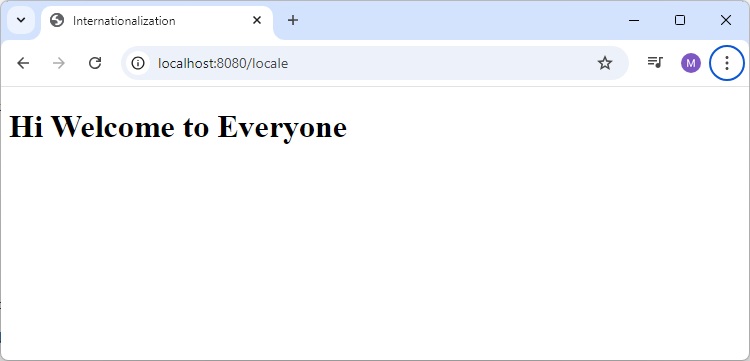
welcome.text=Hi Welcome to Everyone
法语 messages_fr.properties 将如下所示:
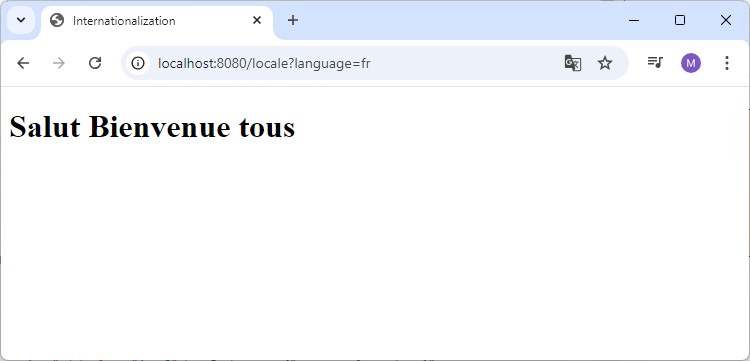
welcome.text=Salut Bienvenue tous
注意 - 消息源文件应保存为“UTF-8”文件格式。
HTML 文件
在 HTML 文件中,使用语法#{key}从属性文件中显示消息。
<h1 th:text = "#{welcome.text}"></h1>
完整的代码如下所示
Maven - pom.xml
<?xml version="1.0" encoding="UTF-8"?>
   <project xmlns="http://maven.apache.org/POM/4.0.0" xmlns:xsi="http://www.w3.org/2001/XMLSchema-instance"
   xsi:schemaLocation="http://maven.apache.org/POM/4.0.0 https://maven.apache.org/xsd/maven-4.0.0.xsd">
   <modelVersion>4.0.0</modelVersion>
   <parent>
      <groupId>org.springframework.boot</groupId>
      <artifactId>spring-boot-starter-parent</artifactId>
      <version>3.3.3</version>
      <relativePath/> <!-- lookup parent from repository -->
   </parent>
   <groupId>com.tutorialspoint</groupId>
   <artifactId>demo</artifactId>
   <version>0.0.1-SNAPSHOT</version>
   <name>demo</name>
   <description>Demo project for Spring Boot</description>
   <url/>
   <licenses>
      <license/>
   </licenses>
   <developers>
      <developer/>
   </developers>
   <scm>
      <connection/>
      <developerConnection/>
      <tag/>
      <url/>
   </scm>
   <properties>
      <java.version>21</java.version>
   </properties>
   <dependencies>
      <dependency>
         <groupId>org.springframework.boot</groupId>
         <artifactId>spring-boot-starter-web</artifactId>
      </dependency>
      <dependency>
         <groupId>org.springframework.boot</groupId>
         <artifactId>spring-boot-starter-test</artifactId>
         <scope>test</scope>
      </dependency>
      <dependency>
         <groupId>org.springframework.boot</groupId>
         <artifactId>spring-boot-starter-thymeleaf</artifactId>
      </dependency>
   </dependencies>
   <build>
      <plugins>
         <plugin>
            <groupId>org.springframework.boot</groupId>
            <artifactId>spring-boot-maven-plugin</artifactId>
         </plugin>
      </plugins>
   </build>
</project>
Gradle – build.gradle
buildscript {
   ext {
      springBootVersion = '3.3.3'
   }
   repositories {
      mavenCentral()
   }
   dependencies {
      classpath("org.springframework.boot:spring-boot-gradle-plugin:${springBootVersion}")
   }
}
apply plugin: 'java'
apply plugin: 'eclipse'
apply plugin: 'org.springframework.boot'

group = 'com.tutorialspoint'
version = '0.0.1-SNAPSHOT'
sourceCompatibility = 21

repositories {
   mavenCentral()
}
dependencies {
   compile('org.springframework.boot:spring-boot-starter-web')
   compile group: 'org.springframework.boot', name: 'spring-boot-starter-thymeleaf'
   testCompile('org.springframework.boot:spring-boot-starter-test')
}
主要的 Spring Boot 应用程序类文件如下所示:
DemoApplication.java
package com.tutorialspoint.demo;

import org.springframework.boot.SpringApplication;
import org.springframework.boot.autoconfigure.SpringBootApplication;

@SpringBootApplication
public class DemoApplication {
   public static void main(String[] args) {
      SpringApplication.run(DemoApplication.class, args);
   }
}
控制器类文件如下所示:
ViewController.java
package com.tutorialspoint.demo.controller;

import org.springframework.stereotype.Controller;
import org.springframework.web.bind.annotation.GetMapping;

@Controller
public class ViewController {
   @GetMapping("/locale")
   public String locale() {
      return "locale";
   }
}
支持国际化的配置类
Internationalization.java
package com.tutorialspoint.demo;

import java.util.Locale;

import org.springframework.context.annotation.Bean;
import org.springframework.context.annotation.Configuration;
import org.springframework.web.servlet.LocaleResolver;
import org.springframework.web.servlet.config.annotation.InterceptorRegistry;
import org.springframework.web.servlet.config.annotation.WebMvcConfigurer;
import org.springframework.web.servlet.i18n.LocaleChangeInterceptor;
import org.springframework.web.servlet.i18n.SessionLocaleResolver;

@Configuration
public class Internationalization implements WebMvcConfigurer {
   @Bean
   public LocaleResolver localeResolver() {
      SessionLocaleResolver sessionLocaleResolver = new SessionLocaleResolver();
      sessionLocaleResolver.setDefaultLocale(Locale.US);
      return sessionLocaleResolver;
   }
   @Bean
   public LocaleChangeInterceptor localeChangeInterceptor() {
      LocaleChangeInterceptor localeChangeInterceptor = new LocaleChangeInterceptor();
      localeChangeInterceptor.setParamName("language");
      return localeChangeInterceptor;
   }
   @Override
   public void addInterceptors(InterceptorRegistry registry) {
      registry.addInterceptor(localeChangeInterceptor());
   }
}
消息源 – messages.properties 如下所示:
messages.properties
welcome.text = Hi Welcome to Everyone
消息源 – message_fr.properties 如下所示:
messages_fr.properties
welcome.text = Salut Bienvenue tous
HTML 文件 locale.html 应放在类路径下的 templates 目录下,如下所示:
locale.html
<!DOCTYPE html>
<html>
   <head>
      <meta charset = "ISO-8859-1"/>
      <title>Internationalization</title>
   </head>
   <body>
      <h1 th:text = "#{welcome.text}"></h1>
   </body>
</html>
编译和输出
您可以创建一个可执行的 JAR 文件,并使用以下 Maven 或 Gradle 命令运行 Spring Boot 应用程序:
对于 Maven,使用以下命令:
mvn clean install
“BUILD SUCCESS”后,您可以在 target 目录下找到 JAR 文件。
对于 Gradle,使用以下命令:
gradle clean build
“BUILD SUCCESSFUL”后,您可以在 build/libs 目录下找到 JAR 文件。
现在,使用如下所示的命令运行 JAR 文件:
java –jar <JARFILE>
您会发现应用程序已在 Tomcat 端口 8080 上启动。
  .   ____          _            __ _ _
 /\\ / ___'_ __ _ _(_)_ __  __ _ \ \ \ \
( ( )\___ | '_ | '_| | '_ \/ _` | \ \ \ \
 \\/  ___)| |_)| | | | | || (_| |  ) ) ) )
  '  |____| .__|_| |_|_| |_\__, | / / / /
 =========|_|==============|___/=/_/_/_/

[32m :: Spring Boot :: [39m              [2m (v3.3.3)[0;39m

[2024-09-09T13:38:37Z] [org.springframework.boot.StartupInfoLogger] [main] [50] [INFO ] Starting DemoApplication using Java 21.0.3 with PID 13004 (E:\Dev\demo\target\classes started by Tutorialspoint in E:\Dev\demo)
[2024-09-09T13:38:37Z] [org.springframework.boot.SpringApplication] [main] [654] [INFO ] No active profile set, falling back to 1 default profile: "default"
[2024-09-09T13:38:37Z] [org.springframework.boot.web.embedded.tomcat.TomcatWebServer] [main] [111] [INFO ] Tomcat initialized with port 8080 (http)
[2024-09-09T13:38:37Z] [org.apache.juli.logging.DirectJDKLog] [main] [173] [INFO ] Initializing ProtocolHandler ["http-nio-8080"]
[2024-09-09T13:38:37Z] [org.apache.juli.logging.DirectJDKLog] [main] [173] [INFO ] Starting service [Tomcat]
[2024-09-09T13:38:37Z] [org.apache.juli.logging.DirectJDKLog] [main] [173] [INFO ] Starting Servlet engine: [Apache Tomcat/10.1.28]
[2024-09-09T13:38:38Z] [org.apache.juli.logging.DirectJDKLog] [main] [173] [INFO ] Initializing Spring embedded WebApplicationContext
[2024-09-09T13:38:38Z] [org.springframework.boot.web.servlet.context.ServletWebServerApplicationContext] [main] [296] [INFO ] Root WebApplicationContext: initialization completed in 897 ms
[2024-09-09T13:38:38Z] [org.springframework.boot.autoconfigure.web.servlet.WelcomePageHandlerMapping] [main] [59] [INFO ] Adding welcome page template: index
[2024-09-09T13:38:38Z] [org.apache.juli.logging.DirectJDKLog] [main] [173] [INFO ] Starting ProtocolHandler ["http-nio-8080"]
[2024-09-09T13:38:38Z] [org.springframework.boot.web.embedded.tomcat.TomcatWebServer] [main] [243] [INFO ] Tomcat started on port 8080 (http) with context path '/'
[2024-09-09T13:38:38Z] [org.springframework.boot.StartupInfoLogger] [main] [56] [INFO ] Started DemoApplication in 1.721 seconds (process running for 2.498)
现在,在您的 Web 浏览器中点击 URL https://:8080/locale,您将看到以下输出:
URL https://:8080/locale?language=fr 将给出如下所示的输出: