- Spring Boot 教程
- Spring Boot - 首页
- Spring Boot - 简介
- Spring Boot - 快速入门
- Spring Boot - 引导
- Spring Tool Suite
- Spring Boot - Tomcat 部署
- Spring Boot - 构建系统
- Spring Boot - 代码结构
- Spring Bean & 依赖注入
- Spring Boot - 运行器
- Spring Boot - 启动器
- Spring Boot - 应用属性
- Spring Boot - 配置
- Spring Boot - 注解
- Spring Boot - 日志
- 构建 RESTful Web 服务
- Spring Boot - 异常处理
- Spring Boot - 拦截器
- Spring Boot - Servlet 过滤器
- Spring Boot - Tomcat 端口号
- Spring Boot - Rest 模板
- Spring Boot - 文件处理
- Spring Boot - 服务组件
- Spring Boot - Thymeleaf
- 使用 RESTful Web 服务
- Spring Boot - CORS 支持
- Spring Boot - 国际化
- Spring Boot - 定时任务
- Spring Boot - 启用 HTTPS
- Spring Boot - Eureka 服务器
- 使用 Eureka 注册服务
- 网关代理服务器和路由
- Spring Cloud 配置服务器
- Spring Cloud 配置客户端
- Spring Boot - Actuator
- Spring Boot - Admin 服务器
- Spring Boot - Admin 客户端
- Spring Boot - 启用 Swagger2
- Spring Boot - 使用 SpringDoc OpenAPI
- Spring Boot - 创建 Docker 镜像
- 追踪微服务日志
- Spring Boot - Flyway 数据库
- Spring Boot - 发送邮件
- Spring Boot - Hystrix
- Spring Boot - WebSocket
- Spring Boot - 批处理服务
- Spring Boot - Apache Kafka
- Spring Boot - Twilio
- Spring Boot - 单元测试用例
- Rest Controller 单元测试
- Spring Boot - 数据库处理
- 保护 Web 应用程序
- Spring Boot - 使用 JWT 的 OAuth2
- Spring Boot - Google Cloud Platform
- Spring Boot - Google OAuth2 登录
- Spring Boot 资源
- Spring Boot - 快速指南
- Spring Boot - 有用资源
- Spring Boot - 讨论
Spring Boot - Rest 模板
Rest Template 用于创建使用 RESTful Web 服务的应用程序。您可以使用exchange()方法使用所有 HTTP 方法使用 web 服务。下面给出的代码展示了如何创建 Rest Template 的 Bean 来自动装配 Rest Template 对象。
...
public class DemoApplication {
   public static void main(String[] args) {
      SpringApplication.run(DemoApplication.class, args);
   }
   @Bean
   public RestTemplate getRestTemplate() {
      return new RestTemplate();
   }
}
GET
使用 RestTemplate - exchange() 方法使用 GET API
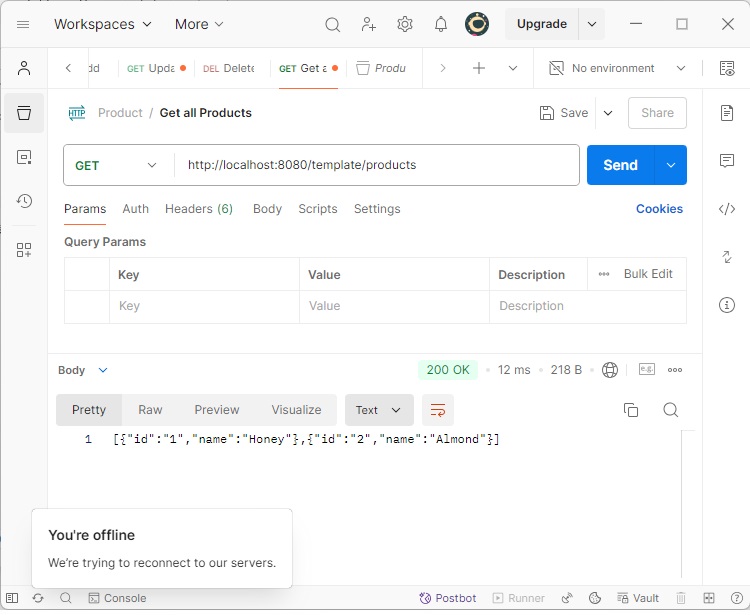
假设此 URL https://:8080/products 返回以下 JSON,我们将使用以下代码使用 Rest Template 使用此 API 响应:
[
   {
      "id": "1",
      "name": "Honey"
   },
   {
      "id": "2",
      "name": "Almond"
   }
]
您需要遵循以下几点来使用 API:
自动装配 Rest Template 对象。
使用 HttpHeaders 设置请求头。
使用 HttpEntity 包装请求对象。
为 Exchange() 方法提供 URL、HttpMethod 和返回类型。
...
public class ConsumeWebService {
   @Autowired
   RestTemplate restTemplate;

   @GetMapping(value = "/template/products")
   public String getProductList() {
      HttpHeaders headers = new HttpHeaders();
      headers.setAccept(Arrays.asList(MediaType.APPLICATION_JSON));
      HttpEntity <String> entity = new HttpEntity<String>(headers);

      return restTemplate.exchange("
         https://:8080/products", HttpMethod.GET, entity, String.class).getBody();
   }
}
POST
使用 RestTemplate - exchange() 方法使用 POST API
假设此 URL https://:8080/products 返回如下所示的响应,我们将使用 Rest Template 使用此 API 响应。
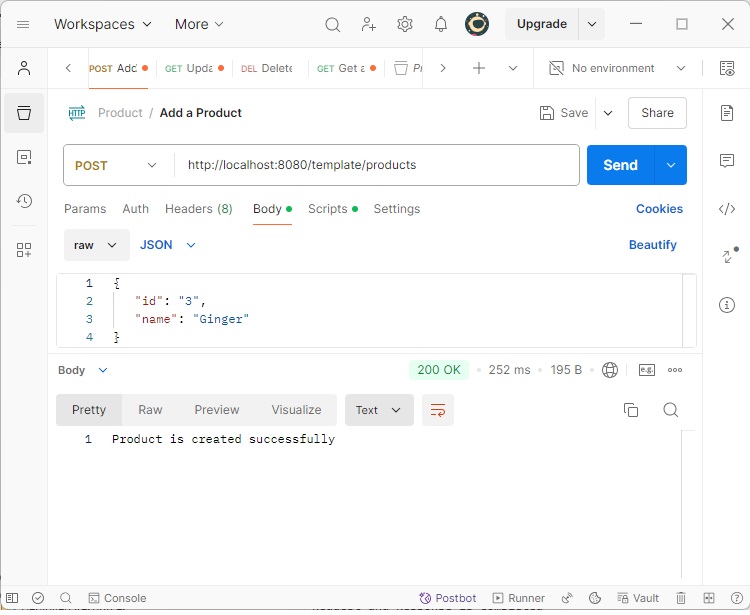
下面给出的代码是请求体:
{
   "id":"3",
   "name":"Ginger"
}
下面给出的代码是响应体:
Product is created successfully
您需要遵循以下几点来使用 API:
自动装配 Rest Template 对象。
使用 HttpHeaders 设置请求头。
使用 HttpEntity 包装请求对象。在这里,我们将 Product 对象包装起来发送到请求体。
为 exchange() 方法提供 URL、HttpMethod 和返回类型。
...
public class ConsumeWebService {
   @Autowired
   RestTemplate restTemplate;

   @PostMapping(value = "/template/products")
   public String createProducts(@RequestBody Product product) {
      HttpHeaders headers = new HttpHeaders();
      headers.setAccept(Arrays.asList(MediaType.APPLICATION_JSON));
      HttpEntity<Product> entity = new HttpEntity<Product>(product,headers);

      return restTemplate.exchange(
         "https://:8080/products", HttpMethod.POST, entity, String.class).getBody();
   }
}
PUT
使用 RestTemplate - exchange() 方法使用 PUT API
假设此 URL https://:8080/products/3 返回以下响应,我们将使用 Rest Template 使用此 API 响应。
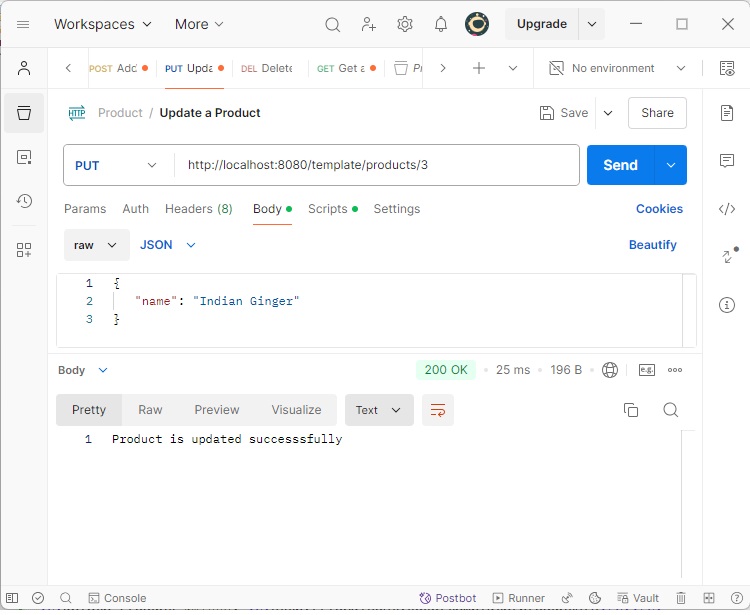
下面给出的代码是请求体:
{
   "name":"Indian Ginger"
}
下面给出的代码是响应体:
Product is updated successfully
您需要遵循以下几点来使用 API:
自动装配 Rest Template 对象。
使用 HttpHeaders 设置请求头。
使用 HttpEntity 包装请求对象。在这里,我们将 Product 对象包装起来发送到请求体。
为 exchange() 方法提供 URL、HttpMethod 和返回类型。
...
public class ConsumeWebService {
   @Autowired
   RestTemplate restTemplate;

   @PutMapping(value = "/template/products/{id}")
   public String updateProduct(@PathVariable("id") String id, @RequestBody Product product) {
      HttpHeaders headers = new HttpHeaders();
      headers.setAccept(Arrays.asList(MediaType.APPLICATION_JSON));
      HttpEntity<Product> entity = new HttpEntity<Product>(product,headers);

      return restTemplate.exchange(
         "https://:8080/products/"+id, HttpMethod.PUT, entity, String.class).getBody();
   }
}
DELETE
使用 RestTemplate - exchange() 方法使用 DELETE API
假设此 URL https://:8080/products/3 返回以下响应,我们将使用 Rest Template 使用此 API 响应。
下面显示的代码行是响应体:
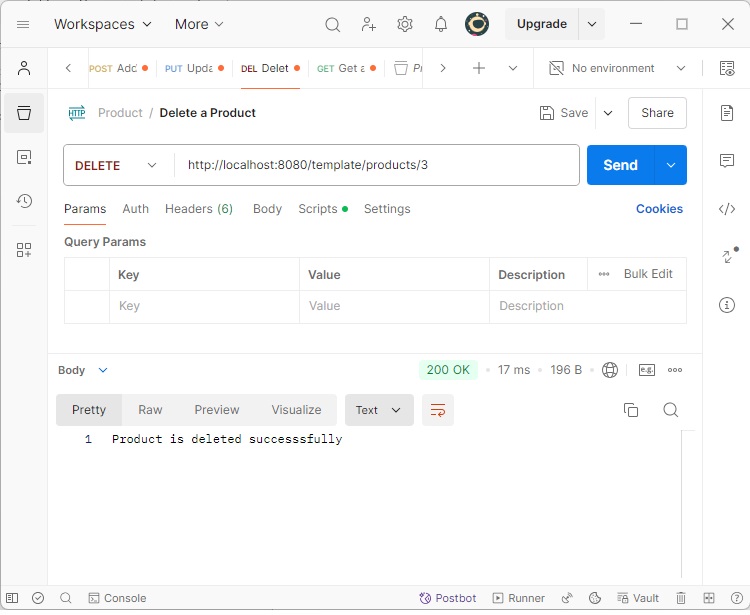
Product is deleted successfully
您需要遵循以下几点来使用 API:
自动装配 Rest Template 对象。
使用 HttpHeaders 设置请求头。
使用 HttpEntity 包装请求对象。
为 exchange() 方法提供 URL、HttpMethod 和返回类型。
...
public class ConsumeWebService {
   @Autowired
   RestTemplate restTemplate;

   @DeleteMapping(value = "/template/products/{id}")
   public String deleteProduct(@PathVariable("id") String id) {
      HttpHeaders headers = new HttpHeaders();
      headers.setAccept(Arrays.asList(MediaType.APPLICATION_JSON));
      HttpEntity<Product> entity = new HttpEntity<Product>(headers);

      return restTemplate.exchange(
         "https://:8080/products/"+id, HttpMethod.DELETE, entity, String.class).getBody();
   }
}
完整的 Rest Template Controller 类文件如下:
ConsumeWebService.java
package com.tutorialspoint.demo.controller;

import java.util.Arrays;

import org.springframework.beans.factory.annotation.Autowired;
import org.springframework.http.HttpEntity;
import org.springframework.http.HttpHeaders;
import org.springframework.http.HttpMethod;
import org.springframework.http.MediaType;
import org.springframework.web.bind.annotation.DeleteMapping;
import org.springframework.web.bind.annotation.GetMapping;
import org.springframework.web.bind.annotation.PathVariable;
import org.springframework.web.bind.annotation.PostMapping;
import org.springframework.web.bind.annotation.PutMapping;
import org.springframework.web.bind.annotation.RequestBody;
import org.springframework.web.bind.annotation.RestController;
import org.springframework.web.client.RestTemplate;

import com.tutorialspoint.demo.model.Product;

@RestController
public class ConsumeWebService {
   @Autowired
   RestTemplate restTemplate;

   @GetMapping(value = "/template/products")
   public String getProductList() {
      HttpHeaders headers = new HttpHeaders();
      headers.setAccept(Arrays.asList(MediaType.APPLICATION_JSON));
      HttpEntity<String> entity = new HttpEntity<String>(headers);

      return restTemplate.exchange(
         "https://:8080/products", HttpMethod.GET, entity, String.class).getBody();
   }
   @PostMapping(value = "/template/products")
   public String createProducts(@RequestBody Product product) {
      HttpHeaders headers = new HttpHeaders();
      headers.setAccept(Arrays.asList(MediaType.APPLICATION_JSON));
      HttpEntity<Product> entity = new HttpEntity<Product>(product,headers);

      return restTemplate.exchange(
         "https://:8080/products", HttpMethod.POST, entity, String.class).getBody();
   }
   @PutMapping(value = "/template/products/{id}")
   public String updateProduct(@PathVariable("id") String id, @RequestBody Product product) {
      HttpHeaders headers = new HttpHeaders();
      headers.setAccept(Arrays.asList(MediaType.APPLICATION_JSON));
      HttpEntity<Product> entity = new HttpEntity<Product>(product,headers);

      return restTemplate.exchange(
         "https://:8080/products/"+id, HttpMethod.PUT, entity, String.class).getBody();
   }
   @DeleteMapping(value = "/template/products/{id}")
   public String deleteProduct(@PathVariable("id") String id) {
      HttpHeaders headers = new HttpHeaders();
      headers.setAccept(Arrays.asList(MediaType.APPLICATION_JSON));
      HttpEntity<Product> entity = new HttpEntity<Product>(headers);

      return restTemplate.exchange(
         "https://:8080/products/"+id, HttpMethod.DELETE, entity, String.class).getBody();
   }
}
充当 REST 服务的 Rest Controller 类,我们的 Web 服务正在调用。
ProductServiceController.java
package com.tutorialspoint.demo.controller;

import java.util.HashMap;
import java.util.Map;

import org.springframework.http.HttpStatus;
import org.springframework.http.ResponseEntity;
import org.springframework.web.bind.annotation.DeleteMapping;
import org.springframework.web.bind.annotation.GetMapping;
import org.springframework.web.bind.annotation.PathVariable;
import org.springframework.web.bind.annotation.PostMapping;
import org.springframework.web.bind.annotation.PutMapping;
import org.springframework.web.bind.annotation.RequestBody;
import org.springframework.web.bind.annotation.RestController;

import com.tutorialspoint.demo.model.Product;

@RestController
public class ProductServiceController {
   private static Map<String, Product> productRepo = new HashMap<>();
   static {
      Product honey = new Product();
      honey.setId("1");
      honey.setName("Honey");
      productRepo.put(honey.getId(), honey);

      Product almond = new Product();
      almond.setId("2");
      almond.setName("Almond");
      productRepo.put(almond.getId(), almond);
   }

   @DeleteMapping(value = "/products/{id}")
   public ResponseEntity<Object> delete(@PathVariable("id") String id) {
      productRepo.remove(id);
      return new ResponseEntity<>("Product is deleted successsfully", HttpStatus.OK);
   }

   @PutMapping(value = "/products/{id}")
   public ResponseEntity<Object> updateProduct(@PathVariable("id") String id, @RequestBody Product product) {
      productRepo.remove(id);
      product.setId(id);
      productRepo.put(id, product);
      return new ResponseEntity<>("Product is updated successsfully", HttpStatus.OK);
   }

   @PostMapping(value = "/products")
   public ResponseEntity<Object> createProduct(@RequestBody Product product) {
      productRepo.put(product.getId(), product);
      return new ResponseEntity<>("Product is created successfully", HttpStatus.CREATED);
   }

   @GetMapping(value = "/products")
   public ResponseEntity<Object> getProduct() {
      return new ResponseEntity<>(productRepo.values(), HttpStatus.OK);
   }
}
Spring Boot Application 类 – DemoApplication.java 的代码如下:
DemoApplication.java
package com.tutorialspoint.demo;

import org.springframework.boot.SpringApplication;
import org.springframework.boot.autoconfigure.SpringBootApplication;
import org.springframework.context.annotation.Bean;
import org.springframework.web.client.RestTemplate;

@SpringBootApplication
public class DemoApplication {
   public static void main(String[] args) {
      SpringApplication.run(DemoApplication.class, args);
   }
   @Bean
   public RestTemplate getRestTemplate() {
      return new RestTemplate();
   }
}
Maven 构建 – pom.xml 的代码如下:
pom.xml
<?xml version="1.0" encoding="UTF-8"?>
   <project xmlns="http://maven.apache.org/POM/4.0.0" xmlns:xsi="http://www.w3.org/2001/XMLSchema-instance"
   xsi:schemaLocation="http://maven.apache.org/POM/4.0.0 https://maven.apache.org/xsd/maven-4.0.0.xsd">
   <modelVersion>4.0.0</modelVersion>
   <parent>
      <groupId>org.springframework.boot</groupId>
      <artifactId>spring-boot-starter-parent</artifactId>
      <version>3.3.3</version>
      <relativePath/> <!-- lookup parent from repository -->
   </parent>
   <groupId>com.tutorialspoint</groupId>
   <artifactId>demo</artifactId>
   <version>0.0.1-SNAPSHOT</version>
   <name>demo</name>
   <description>Demo project for Spring Boot</description>
   <url/>
   <licenses>
      <license/>
   </licenses>
   <developers>
      <developer/>
   </developers>
   <scm>
      <connection/>
      <developerConnection/>
      <tag/>
      <url/>
   </scm>
   <properties>
      <java.version>21</java.version>
   </properties>
   <dependencies>
      <dependency>
         <groupId>org.springframework.boot</groupId>
         <artifactId>spring-boot-starter-web</artifactId>
      </dependency>
      <dependency>
         <groupId>org.springframework.boot</groupId>
         <artifactId>spring-boot-starter-test</artifactId>
         <scope>test</scope>
      </dependency>
   </dependencies>
   <build>
      <plugins>
         <plugin>
            <groupId>org.springframework.boot</groupId>
            <artifactId>spring-boot-maven-plugin</artifactId>
         </plugin>
      </plugins>
   </build>
</project>
Gradle 构建 – build.gradle 的代码如下:
build.gradle
buildscript {
   ext {
      springBootVersion = '3.3.3'
   }
   repositories {
      mavenCentral()
   }
   dependencies {
      classpath("org.springframework.boot:spring-boot-gradle-plugin:${springBootVersion}")
   }
}

apply plugin: 'java'
apply plugin: 'eclipse'
apply plugin: 'org.springframework.boot'

group = 'com.tutorialspoint'
version = '0.0.1-SNAPSHOT'
sourceCompatibility = 21

repositories {
   mavenCentral()
}
dependencies {
   compile('org.springframework.boot:spring-boot-starter-web')
   testCompile('org.springframework.boot:spring-boot-starter-test')
}
您可以创建一个可执行的 JAR 文件,并使用以下 Maven 或 Gradle 命令运行 Spring Boot 应用程序:
对于 Maven,您可以使用以下命令:
mvn clean install
“BUILD SUCCESS”之后,您可以在 target 目录下找到 JAR 文件。
对于 Gradle,您可以使用以下所示的命令:
gradle clean build
“BUILD SUCCESSFUL”之后,您可以在 build/libs 目录下找到 JAR 文件。
现在,使用以下命令运行 JAR 文件:
java –jar <JARFILE>
现在,应用程序已在 Tomcat 端口 8080 上启动。
  .   ____          _            __ _ _
 /\\ / ___'_ __ _ _(_)_ __  __ _ \ \ \ \
( ( )\___ | '_ | '_| | '_ \/ _` | \ \ \ \
 \\/  ___)| |_)| | | | | || (_| |  ) ) ) )
  '  |____| .__|_| |_|_| |_\__, | / / / /
 =========|_|==============|___/=/_/_/_/

[32m :: Spring Boot :: [39m              [2m (v3.3.3)[0;39m

[2024-09-05T13:35:28Z] [org.springframework.boot.StartupInfoLogger] [main] [50] [INFO ] Starting DemoApplication using Java 21.0.3 with PID 9476 (E:\Dev\demo\target\classes started by Tutorialspoint in E:\Dev\demo)
[2024-09-05T13:35:28Z] [org.springframework.boot.SpringApplication] [main] [654] [INFO ] No active profile set, falling back to 1 default profile: "default"
[2024-09-05T13:35:29Z] [org.springframework.boot.web.embedded.tomcat.TomcatWebServer] [main] [111] [INFO ] Tomcat initialized with port 8080 (http)
[2024-09-05T13:35:29Z] [org.apache.juli.logging.DirectJDKLog] [main] [173] [INFO ] Initializing ProtocolHandler ["http-nio-8080"]
[2024-09-05T13:35:29Z] [org.apache.juli.logging.DirectJDKLog] [main] [173] [INFO ] Starting service [Tomcat]
[2024-09-05T13:35:29Z] [org.apache.juli.logging.DirectJDKLog] [main] [173] [INFO ] Starting Servlet engine: [Apache Tomcat/10.1.28]
[2024-09-05T13:35:29Z] [org.apache.juli.logging.DirectJDKLog] [main] [173] [INFO ] Initializing Spring embedded WebApplicationContext
[2024-09-05T13:35:29Z] [org.springframework.boot.web.servlet.context.ServletWebServerApplicationContext] [main] [296] [INFO ] Root WebApplicationContext: initialization completed in 928 ms
[2024-09-05T13:35:29Z] [org.apache.juli.logging.DirectJDKLog] [main] [173] [INFO ] Starting ProtocolHandler ["http-nio-8080"]
[2024-09-05T13:35:29Z] [org.springframework.boot.web.embedded.tomcat.TomcatWebServer] [main] [243] [INFO ] Tomcat started on port 8080 (http) with context path '/'
[2024-09-05T13:35:29Z] [org.springframework.boot.StartupInfoLogger] [main] [56] [INFO ] Started DemoApplication in 1.852 seconds (process running for 2.829)
现在在 POSTMAN 应用程序中点击以下 URL,您可以看到输出。
通过 Rest Template 获取产品 - https://:8080/template/products
创建产品 POST - https://:8080/template/products
更新产品 PUT - https://:8080/template/products/3
删除产品 - https://:8080/template/products/3