
- AJAX 教程
- AJAX - 首页
- AJAX - 什么是 AJAX?
- AJAX - 历史
- AJAX - 动态网站与静态网站
- AJAX - 技术
- AJAX - 操作
- AJAX - XMLHttpRequest
- AJAX - 发送请求
- AJAX - 请求类型
- AJAX - 处理响应
- AJAX - 处理二进制数据
- AJAX - 提交表单
- AJAX - 文件上传
- AJAX - FormData 对象
- AJAX - 发送 POST 请求
- AJAX - 发送 PUT 请求
- AJAX - 发送 JSON 数据
- AJAX - 发送数据对象
- AJAX - 监控进度
- AJAX - 状态码
- AJAX - 应用
- AJAX - 浏览器兼容性
- AJAX - 示例
- AJAX - 浏览器支持
- AJAX - XMLHttpRequest
- AJAX - 数据库操作
- AJAX - 安全性
- AJAX - 问题
- Fetch API 基础
- Fetch API - 基础
- Fetch API 与 XMLHttpRequest
- Fetch API - 浏览器兼容性
- Fetch API - 头部信息
- Fetch API - 请求
- Fetch API - 响应
- Fetch API - 主体数据
- Fetch API - 凭据
- Fetch API - 发送 GET 请求
- Fetch API - 发送 POST 请求
- Fetch API - 发送 PUT 请求
- Fetch API - 发送 JSON 数据
- Fetch API - 发送数据对象
- Fetch API - 自定义请求对象
- Fetch API - 上传文件
- Fetch API - 处理二进制数据
- Fetch API - 状态码
- 流 API 基础
- Stream API - 基础
- Stream API - 可读流
- Stream API - 可写流
- Stream API - 变换流
- Stream API - 请求对象
- Stream API - 响应主体
- Stream API - 错误处理
- AJAX 有用资源
- AJAX - 快速指南
- AJAX - 有用资源
- AJAX - 讨论
Fetch API - 请求
在 Fetch API 中,Request 接口用于创建资源请求。它是除了 fetch() 函数之外创建请求的另一种方法。它还提供了各种属性和方法,我们可以将它们应用于请求。因此,首先,我们将学习 Request() 构造函数,然后学习如何发送请求,以及 Request 接口提供的方法和属性。
构造函数
要创建请求对象,我们可以使用 Request() 构造函数以及 new 关键字。此构造函数包含一个必填参数,即资源的 URL,另一个参数是可选的。
语法
const newRequest = new Request(resourceURL)
Or
const newRequest = new Request(resourceURL, optional)
Request() 构造函数具有以下参数:
resourceURL − 我们想要获取的资源。其值可以是资源 URL 或 Request 对象。
Options − 提供请求附加设置和自定义选项的对象,如下所示:
method − 表示请求方法,例如 GET、POST、PUT 和 DELETE。
headers − 为请求设置头部信息。
body − 向请求添加数据。此参数不被 GET 或 HEAD 方法使用。
mode − 设置请求模式,例如 cors、same-origin、no-cors 或 navigate。默认情况下,mode 参数的值为 cors。
credentials − 它设置您要用于请求的凭据,例如 omit、same-origin 或 include。此参数的默认值为 same-origin。
cache − 设置您想要用于请求的缓存模式。
redirect − 用于重定向模式,例如 follow、error 或 manual。默认情况下,参数设置为 follow 值。
referrer − 表示请求的引荐来源的字符串,例如 client、URL 或 no-referrer。此参数的默认值为关于客户端的信息。
referrerPolicy − 用于设置引荐来源策略。
integrity − 用于设置给定请求的子资源完整性值。
keepalive − 用于检查是否为多个请求/响应创建持久连接。
signal − 表示 AbortSignal 对象,用于与请求通信或中止请求。
priority − 用于设置请求相对于其他请求的优先级。此参数的可能值为
high − 将当前 fetch 请求的优先级设置为高,相对于其他请求。
low − 将当前 fetch 请求的优先级设置为低,相对于其他请求。
auto − 自动查找当前 fetch 请求的优先级。
发送请求
要发送请求,我们必须首先使用 Request 构造函数以及 header、body、method、resource URL 等附加参数创建 Request 对象。然后将此对象传递给 fetch() 函数以将请求发送到服务器。现在 fetch() 函数返回一个 promise,它将解析为 response 对象。如果我们遇到错误,则执行 catch 块。
示例
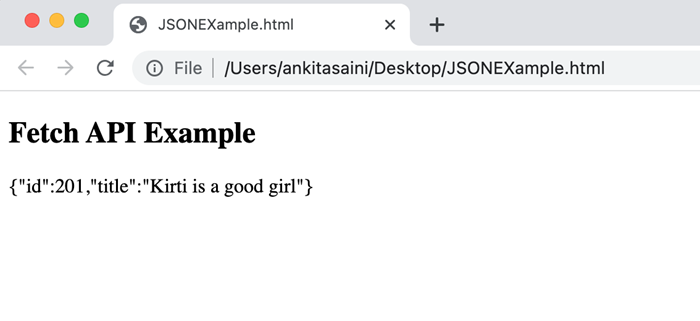
在以下程序中,我们创建一个脚本以使用 Request 对象发送数据。为此,我们使用 Request() 构造函数以及以下参数创建请求对象:
URL − 表示资源 URL。
method − 在这里我们使用 POST 方法,表示我们正在向服务器发送数据。
body − 包含我们想要发送的数据。
header − 它表示数据是 JSON 数据。
现在我们将请求对象传递给 fetch() 函数以发送请求并处理服务器返回的响应,并在发生错误时处理错误。
<!DOCTYPE html>
<html>
<body>
<script>
   // Creating request object
   const myRequest = new Request("https://jsonplaceholder.typicode.com/todos", {
      // Setting POST request
      method: "POST",

      // Add body which contains data
      body: JSON.stringify({
      id: 321,
      title: "Kirti is a good girl",
      }),

      // Setting header
      headers:{"Content-type": "application/json; charset=UTF-8"}
   });
   fetch(myRequest)

   // Handling response
   .then(response => response.json())
   .then(myData => {
      console.log("Data Sent Successfully");
      // Display output
      document.getElementById("sendData").innerHTML = JSON.stringify(myData);
   })

   // Handling error
   .catch(err=>{
      console.error("We get an error:", err);
   });
</script>
   <h2>Fetch API Example</h2>
   <div>
      <!-- Displaying retrieved data-->
      <p id="sendData"></p>
   </div>
</body>
</html>
输出
实例属性
Request 接口提供的属性是只读属性。因此,常用的属性有:
| 序号 | 属性及描述 |
|---|---|
| 1 | Request.url 此属性包含给定请求的 URL。 |
| 2 | Request.body 此属性包含给定请求的主体。 |
| 3 | Request.bodyUsed 此属性用于指示请求中存在的主体是否已使用。其值为布尔值。 |
| 4 | Request.destination 此属性用于指示请求的目标。 |
| 5 | Request.method 此属性包含请求方法,例如 GET、POST、PUT 和 DELETE。 |
| 6 | Request.headers 此属性包含请求的头部对象。 |
| 7 | Request.cache 此属性包含给定请求的缓存模式。 |
| 8 | Request.credentials 此属性包含给定请求的凭据。 |
| 9 | Request.mode 此属性包含给定请求的模式。 |
示例
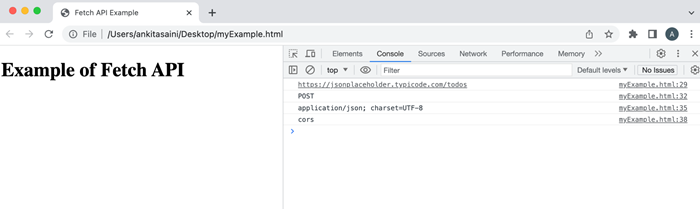
在以下程序中,我们使用 Request 接口提供的属性(例如 url、method、headers 和 mode)。
<!DOCTYPE html>
<html>
<head>
   <title>Fetch API Example</title>
</head>
<body>
   <h1>Example of Fetch API</h1>
<script>
   // Creating request object
   const myRequest = new Request("https://jsonplaceholder.typicode.com/todos", {
      // Setting POST request
      method: "POST",

      // Add body which contains data
      body: JSON.stringify({
         id: 321,
         title: "Kirti is a good girl",
      }),
      // Setting header
      headers:{"Content-type": "application/json; charset=UTF-8"},
      mode: "cors"
   });
   // Display url of the request
   console.log(myRequest.url);

   // Display request method
   console.log(myRequest.method);

   // Display header of the request
   console.log(myRequest.headers.get('content-Type'));

   // Display mode of the request
   console.log(myRequest.mode);
</script>
</body>
</html>
输出
方法
以下是 Request 接口常用的方法:
| 序号 | 方法及描述 |
|---|---|
| 1 | Request.arrayBuffer() 此方法用于解析一个 promise,该 promise 包含请求主体的 ArrayBuffer 表示形式。 |
| 2 | Request.blob() 此方法用于解析一个 promise,该 promise 包含请求主体的 Blob 表示形式。 |
| 3 | Request.clone() 此方法用于创建当前请求的副本。 |
| 4 | Request.json() 此方法用于将请求主体解析为 JSON 并解析一个 promise,其中包含解析结果。 |
| 5 | Request.text() 此方法用于解析一个 promise,该 promise 包含请求主体的文本表示形式。 |
| 6 | Request.formData() 此方法用于解析一个 promise,该 promise 包含请求主体的 formData 表示形式。 |
示例
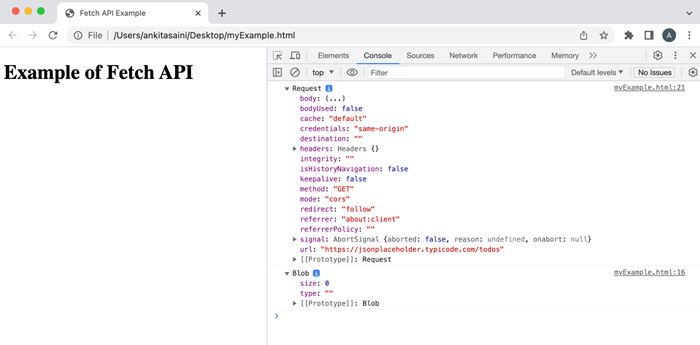
在以下程序中,我们使用 Request 接口提供的方法(例如 blob、clone 等)。
<!DOCTYPE html>
<html>
<head>
   <title>Fetch API Example</title>
</head>
<body>
   <h1>Example of Fetch API</h1>
<script>
   // Creating request object
   const myRequest = new Request("https://jsonplaceholder.typicode.com/todos");

   // Using blob() method
   myRequest.blob()
   .then(data =>{
      console.log(data)
   });

   // Creating a copy of the request using the clone() method
   const duplicate = myRequest.clone();
   console.log(duplicate);
</script>
</body>
</html>
输出
结论
这就是 Fetch API 中 Request 接口的工作原理。它提供了各种构建和自定义请求的方法。或者我们可以说它提供了灵活性和对请求的更多控制。现在在下一篇文章中,我们将了解 Response 接口如何在 Fetch API 中使用。