
- Yii 教程
- Yii - 首页
- Yii - 概述
- Yii - 安装
- Yii - 创建页面
- Yii - 应用结构
- Yii - 入口脚本
- Yii - 控制器
- Yii - 使用控制器
- Yii - 使用操作
- Yii - 模型
- Yii - 小部件
- Yii - 模块
- Yii - 视图
- Yii - 布局
- Yii - 资源
- Yii - 资源转换
- Yii - 扩展
- Yii - 创建扩展
- Yii - HTTP 请求
- Yii - 响应
- Yii - URL 格式
- Yii - URL 路由
- Yii - URL 规则
- Yii - HTML 表单
- Yii - 验证
- Yii - 特设验证
- Yii - AJAX 验证
- Yii - 会话
- Yii - 使用 Flash 数据
- Yii - Cookie
- Yii - 使用 Cookie
- Yii - 文件上传
- Yii - 格式化
- Yii - 分页
- Yii - 排序
- Yii - 属性
- Yii - 数据提供者
- Yii - 数据小部件
- Yii - ListView 小部件
- Yii - GridView 小部件
- Yii - 事件
- Yii - 创建事件
- Yii - 行为
- Yii - 创建行为
- Yii - 配置
- Yii - 依赖注入
- Yii - 数据库访问
- Yii - 数据访问对象
- Yii - 查询构造器
- Yii - 活动记录
- Yii - 数据库迁移
- Yii - 主题
- Yii - RESTful API
- Yii - RESTful API 实战
- Yii - 字段
- Yii - 测试
- Yii - 缓存
- Yii - 片段缓存
- Yii - 别名
- Yii - 日志记录
- Yii - 错误处理
- Yii - 身份验证
- Yii - 授权
- Yii - 本地化
- Yii - Gii
- Gii – 创建模型
- Gii – 生成控制器
- Gii – 生成模块
- Yii 有用资源
- Yii - 快速指南
- Yii - 有用资源
- Yii - 讨论
Yii - 身份验证
验证用户身份的过程称为身份验证。它通常使用用户名和密码来判断用户是否为其自称的用户。
要使用 Yii 身份验证框架,您需要:
- 配置用户应用程序组件。
- 实现 yii\web\IdentityInterface 接口。
基本应用程序模板带有一个内置的身份验证系统。它使用用户应用程序组件,如下面的代码所示:
<?php
   $params = require(__DIR__ . '/params.php');
   $config = [
      'id' => 'basic',
      'basePath' => dirname(__DIR__),
      'bootstrap' => ['log'],
      'components' => [
         'request' => [
            // !!! insert a secret key in the following (if it is empty) - this
               //is required by cookie validation
            'cookieValidationKey' => 'ymoaYrebZHa8gURuolioHGlK8fLXCKjO',
         ],
         'cache' => [
            'class' => 'yii\caching\FileCache',
         ],
         'user' => [
            'identityClass' => 'app\models\User',
            'enableAutoLogin' => true,
         ],
         //other components...
         'db' => require(__DIR__ . '/db.php'),
      ],
      'modules' => [
         'hello' => [
            'class' => 'app\modules\hello\Hello',
         ],
      ],
      'params' => $params,
   ];
   if (YII_ENV_DEV) {
      // configuration adjustments for 'dev' environment
      $config['bootstrap'][] = 'debug';
      $config['modules']['debug'] = [
         'class' => 'yii\debug\Module',
      ];
      $config['bootstrap'][] = 'gii';
      $config['modules']['gii'] = [
         'class' => 'yii\gii\Module',
      ];
   }
   return $config;
?>
在上述配置中,用户的身份类配置为 app\models\User。
身份类必须实现yii\web\IdentityInterface,其中包含以下方法:
findIdentity() - 使用指定的 User ID 查找身份类的实例。
findIdentityByAccessToken() - 使用指定的访问令牌查找身份类的实例。
getId() - 返回用户的 ID。
getAuthKey() - 返回用于验证基于 Cookie 的登录的密钥。
validateAuthKey() - 实现验证基于 Cookie 的登录密钥的逻辑。
基本应用程序模板中的 User 模型实现了所有上述功能。用户数据存储在$users属性中:
<?php
   namespace app\models;
   class User extends \yii\base\Object implements \yii\web\IdentityInterface {
      public $id;
      public $username;
      public $password;
      public $authKey;
      public $accessToken;
      private static $users = [
         '100' => [
            'id' => '100',
            'username' => 'admin',
            'password' => 'admin',
            'authKey' => 'test100key',
            'accessToken' => '100-token',
         ],
         '101' => [
            'id' => '101',
            'username' => 'demo',
            'password' => 'demo',
            'authKey' => 'test101key',
            'accessToken' => '101-token',
         ],
      ];
      /**
      * @inheritdoc
      */
      public static function findIdentity($id) {
         return isset(self::$users[$id]) ? new static(self::$users[$id]) : null;
      }
      /**
      * @inheritdoc
      */
      public static function findIdentityByAccessToken($token, $type = null) {
         foreach (self::$users as $user) {
            if ($user['accessToken'] === $token) {
               return new static($user);
            }
         }
         return null;
      }
      /**
      * Finds user by username
      *
      * @param string $username
      * @return static|null
      */
      public static function findByUsername($username) {
         foreach (self::$users as $user) {
            if (strcasecmp($user['username'], $username) === 0) {
               return new static($user);
            }
         }
         return null;
      }
      /**
      * @inheritdoc
      */
      public function getId() {
         return $this->id;
      }
      /**
      * @inheritdoc
      */
      public function getAuthKey() {
         return $this->authKey;
      }
      /**
      * @inheritdoc
      */
      public function validateAuthKey($authKey) {
         return $this->authKey === $authKey;
      }
      /**
      * Validates password
      *
      * @param string $password password to validate
      * @return boolean if password provided is valid for current user
      */
      public function validatePassword($password) {
         return $this->password === $password;
      }
   }
?>
步骤 1 - 前往 URL https://:8080/index.php?r=site/login 并使用 admin 作为登录名和密码登录网站。
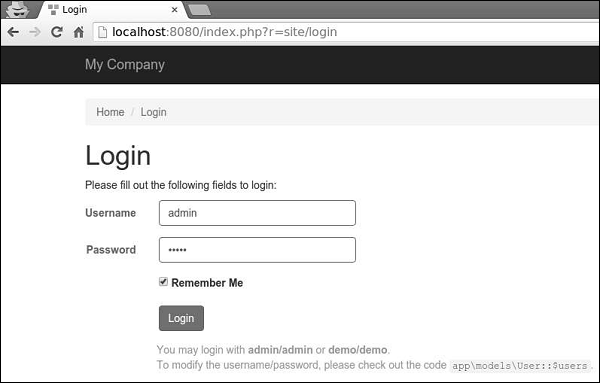
步骤 2 - 然后,向 SiteController 添加一个名为actionAuth()的新函数。
public function actionAuth(){
   // the current user identity. Null if the user is not authenticated.
   $identity = Yii::$app->user->identity;
   var_dump($identity);
   // the ID of the current user. Null if the user not authenticated.
   $id = Yii::$app->user->id;
   var_dump($id);
   // whether the current user is a guest (not authenticated)
   $isGuest = Yii::$app->user->isGuest;
   var_dump($isGuest);
}
步骤 3 - 在 Web 浏览器中键入地址https://:8080/index.php?r=site/auth,您将看到有关admin用户的详细信息。
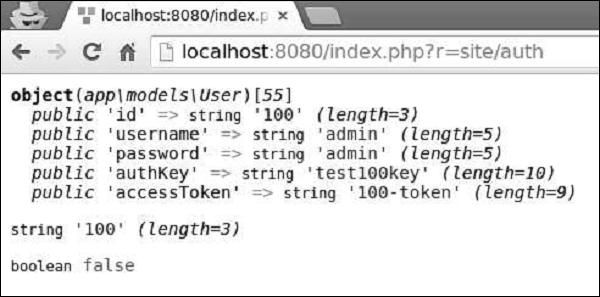
步骤 4 - 要登录和注销用户,您可以使用以下代码。
public function actionAuth() {
   // whether the current user is a guest (not authenticated)
   var_dump(Yii::$app->user->isGuest);
   // find a user identity with the specified username.
   // note that you may want to check the password if needed
   $identity = User::findByUsername("admin");
   // logs in the user
   Yii::$app->user->login($identity);
   // whether the current user is a guest (not authenticated)
   var_dump(Yii::$app->user->isGuest);
   Yii::$app->user->logout();
   // whether the current user is a guest (not authenticated)
   var_dump(Yii::$app->user->isGuest);
}
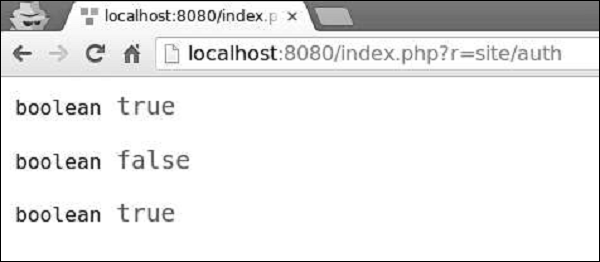
首先,我们检查用户是否已登录。如果返回值为false,则通过Yii::$app → user → login()调用登录用户,并使用Yii::$app → user → logout()方法注销用户。
步骤 5 - 前往 URL https://:8080/index.php?r=site/auth,您将看到以下内容。
yii\web\User类引发以下事件:
EVENT_BEFORE_LOGIN - 在yii\web\User::login()的开头引发
EVENT_AFTER_LOGIN - 成功登录后引发
EVENT_BEFORE_LOGOUT - 在yii\web\User::logout()的开头引发
EVENT_AFTER_LOGOUT - 成功注销后引发