- Yii 教程
- Yii - 首页
- Yii - 概述
- Yii - 安装
- Yii - 创建页面
- Yii - 应用结构
- Yii - 入口脚本
- Yii - 控制器
- Yii - 使用控制器
- Yii - 使用操作
- Yii - 模型
- Yii - 小部件
- Yii - 模块
- Yii - 视图
- Yii - 布局
- Yii - 资源
- Yii - 资源转换
- Yii - 扩展
- Yii - 创建扩展
- Yii - HTTP 请求
- Yii - 响应
- Yii - URL 格式
- Yii - URL 路由
- Yii - URL 规则
- Yii - HTML 表单
- Yii - 验证
- Yii - 即席验证
- Yii - AJAX 验证
- Yii - 会话
- Yii - 使用 Flash 数据
- Yii - Cookie
- Yii - 使用 Cookie
- Yii - 文件上传
- Yii - 格式化
- Yii - 分页
- Yii - 排序
- Yii - 属性
- Yii - 数据提供者
- Yii - 数据小部件
- Yii - ListView 小部件
- Yii - GridView 小部件
- Yii - 事件
- Yii - 创建事件
- Yii - 行为
- Yii - 创建行为
- Yii - 配置
- Yii - 依赖注入
- Yii - 数据库访问
- Yii - 数据访问对象
- Yii - 查询构造器
- Yii - 活动记录
- Yii - 数据库迁移
- Yii - 主题
- Yii - RESTful API
- Yii - RESTful API 实践
- Yii - 字段
- Yii - 测试
- Yii - 缓存
- Yii - 片段缓存
- Yii - 别名
- Yii - 日志
- Yii - 错误处理
- Yii - 身份验证
- Yii - 授权
- Yii - 本地化
- Yii - Gii
- Gii – 创建模型
- Gii – 生成控制器
- Gii – 生成模块
- Yii 有用资源
- Yii - 快速指南
- Yii - 有用资源
- Yii - 讨论
Yii - URL 路由
要更改应用程序的默认路由,应配置defaultRoute 属性。
步骤 1 - 以如下方式修改config/web.php 文件。
<?php
   $params = require(__DIR__ . '/params.php');
   $config = [
      'id' => 'basic',
      'basePath' => dirname(__DIR__),
      'bootstrap' => ['log'],
      'defaultRoute' => 'site/contact',
      'components' => [
         //other code
?>
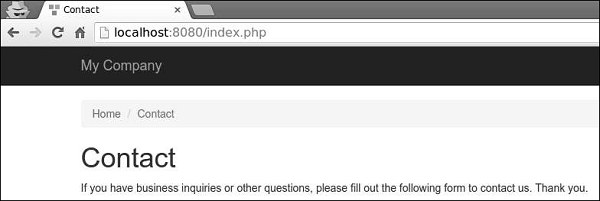
步骤 2 - 转到https://:8080/index.php。您将看到默认的contact 页面。
要暂时将您的应用程序置于维护模式,应配置yii\web\Application::$catchAll 属性。
步骤 3 - 将以下函数添加到SiteController。
public function actionMaintenance() {
   echo "<h1>Maintenance</h1>";
}
步骤 4 - 然后,以如下方式修改config/web.php 文件。
<?php
   $params = require(__DIR__ . '/params.php');
   $config = [
      'id' => 'basic',
      'basePath' => dirname(__DIR__),
      'bootstrap' => ['log'],
      'catchAll' => ['site/maintenance'],
      'components' => [
         //OTHER CODE
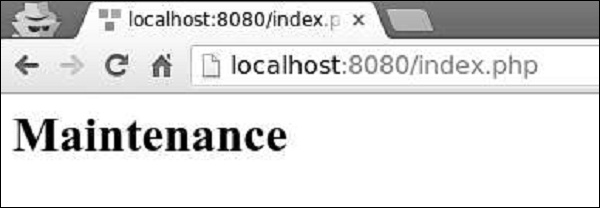
步骤 5 - 现在输入应用程序的任何 URL,您将看到以下内容。
创建 URL
要创建各种类型的 URL,可以使用yii\helpers\Url::to() 辅助方法。以下示例假设使用默认 URL 格式。
步骤 1 - 向SiteController 添加一个actionRoutes() 方法。
public function actionRoutes() {
   return $this->render('routes');
}
此方法只需呈现routes 视图。
步骤 2 - 在 views/site 目录内,创建一个名为routes.php 的文件,其中包含以下代码。
<?php
   use yii\helpers\Url;
?>

<h4>
   <b>Url::to(['post/index']):</b>
   <?php
      // creates a URL to a route: /index.php?r = post/index
      echo Url::to(['post/index']);
   ?>
</h4>

<h4>
   <b>Url::to(['post/view', 'id' => 100]):</b>
   <?php
      // creates a URL to a route with parameters: /index.php?r = post/view&id=100
      echo Url::to(['post/view', 'id' => 100]);
   ?>
</h4>

<h4>
   <b>Url::to(['post/view', 'id' => 100, '#' => 'content']):</b>
   <?php
      // creates an anchored URL: /index.php?r = post/view&id=100#content
      echo Url::to(['post/view', 'id' => 100, '#' => 'content']);
   ?>
</h4>

<h4>
   <b>Url::to(['post/index'], true):</b>
   <?php
      // creates an absolute URL: http://www.example.com/index.php?r=post/index
      echo Url::to(['post/index'], true);
   ?>
</h4>

<h4>
   <b>Url::to(['post/index'], 'https'):</b>
   <?php
      // creates an absolute URL using the https scheme: https://www.example.com/index.php?r=post/index
      echo Url::to(['post/index'], 'https');
   ?>
</h4>
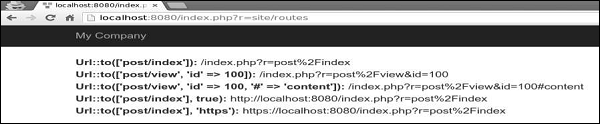
步骤 3 - 输入https://:8080/index.php?r=site/routes,您将看到一些to() 函数的用法。
传递给yii\helpers\Url::to() 方法的路由可以根据以下规则是相对的或绝对的:
如果路由为空,则使用当前请求的路由。
如果路由没有前导斜杠,则将其视为相对于当前模块的路由。
如果路由不包含斜杠,则将其视为当前控制器的操作 ID。
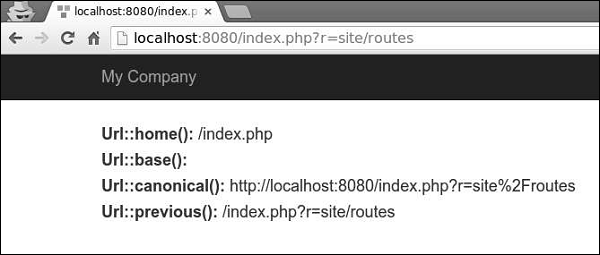
yii\helpers\Url 辅助类还提供了一些有用的方法。
步骤 4 - 按以下代码修改routes 视图。
<?php
   use yii\helpers\Url;
?>

<h4>
   <b>Url::home():</b>
   <?php
      // home page URL: /index.php?r=site/index
      echo Url::home();
   ?>
</h4>

<h4>
   <b>Url::base():</b>
   <?php
      // the base URL, useful if the application is deployed in a sub-folder of the Web root
      echo Url::base();
   ?>
</h4>

<h4>
   <b>Url::canonical():</b>
   <?php
      // the canonical URL of the currently requested URL
      // see https://en.wikipedia.org/wiki/Canonical_link_element
      echo Url::canonical();
   ?>
</h4>

<h4>
   <b>Url::previous():</b>
   <?php
      // remember the currently requested URL and retrieve it back in later requests
      Url::remember();
      echo Url::previous();
   ?>
</h4>
步骤 5 - 如果您在 Web 浏览器中输入地址https://:8080/index.php?r=site/routes,您将看到以下内容。