
- Angular 教程
- Angular - 首页
- Angular - 概述
- Angular - 功能
- Angular - 优势与劣势
- Angular 基础
- Angular - 环境搭建
- Angular - 第一个应用
- Angular - MVC 架构
- Angular 组件
- Angular - 组件
- Angular - 组件生命周期
- Angular - 视图封装
- Angular - 组件交互
- Angular - 组件样式
- Angular - 嵌套组件
- Angular - 内容投影
- Angular - 动态组件
- Angular - 元素
- Angular 模板
- Angular - 模板
- Angular - 文本插值
- Angular - 模板语句
- Angular - 模板中的变量
- Angular - SVG 作为模板
- Angular 数据绑定
- Angular - 数据绑定及其类型
- Angular - 数据绑定
- Angular - 事件绑定
- Angular - 属性绑定
- Angular - 属性绑定
- Angular - 类和样式绑定
- Angular 指令
- Angular - 指令
- Angular - 内置指令
- Angular 管道
- Angular - 管道
- Angular - 使用管道转换数据
- Angular 依赖注入
- Angular - 依赖注入
- Angular HTTP 客户端编程
- Angular - 服务
- Angular - HTTP 客户端
- Angular - 请求
- Angular - 响应
- Angular - GET 请求
- Angular - PUT 请求
- Angular - DELETE 请求
- Angular - JSON-P
- Angular - 使用 HTTP 进行 CRUD 操作
- Angular 路由
- Angular - 路由
- Angular - 导航
- Angular - Angular Material
- Angular 动画
- Angular - 动画
- Angular 表单
- Angular - 表单
- Angular - 表单验证
- Angular Service Workers & PWA
- Angular - Service Workers & PWA
- Angular 测试
- Angular - 测试概述
- Angular NgModule
- Angular - 模块介绍
- Angular 高级
- Angular - 身份验证与授权
- Angular 国际化
- Angular - 可访问性
- Angular - Web Workers
- Angular - 服务器端渲染
- Angular - Ivy 编译器
- Angular - 使用 Bazel 构建
- Angular - 向后兼容性
- Angular - 响应式编程
- Angular - 指令和组件之间的数据共享
- Angular 工具
- Angular - CLI
- Angular 其他
- Angular - 第三方控件
- Angular - 配置
- Angular - 数据显示
- Angular - 装饰器和元数据
- Angular - 基本示例
- Angular - 错误处理
- Angular - 测试和构建项目
- Angular - 生命周期钩子
- Angular - 用户输入
- Angular - 新特性?
- Angular 有用资源
- Angular - 快速指南
- Angular - 有用资源
- Angular - 讨论
Angular 国际化
国际化是任何现代 Web 应用必不可少的特性。国际化使应用程序能够面向全球任何语言。本地化是国际化的一部分,它使应用程序能够以目标本地语言呈现。Angular 提供了对国际化和本地化功能的全面支持。
让我们学习如何用不同的语言创建一个简单的“Hello World”应用程序。
使用以下命令创建一个新的 Angular 应用程序:
cd /go/to/workspace
ng new i18n-sample
使用以下命令运行应用程序:
cd i18n-sample
npm run start
按如下所示更改AppComponent的模板:
<h1>{{ title }}</h1>

<div>Hello</div>
<div>The Current time is {{ currentDate | date : 'medium' }}</div>
使用以下命令添加本地化模块:
ng add @angular/localize
重启应用程序。
LOCALE_ID是 Angular 变量,用于引用当前区域设置。默认情况下,它设置为 en_US。让我们在 AppModule 中的 provider 中使用它来更改区域设置。
import { BrowserModule } from '@angular/platform-browser';
import { LOCALE_ID, NgModule } from '@angular/core';

import { AppComponent } from './app.component';

@NgModule({
   declarations: [
      AppComponent
   ],
   imports: [
      BrowserModule
   ],
   providers: [ { provide: LOCALE_ID, useValue: 'hi' } ],

   bootstrap: [AppComponent]
})
export class AppModule { }
这里:
- LOCALE_ID 从 @angular/core 导入。
- 通过 provider 将 LOCALE_ID 设置为 hi,以便在应用程序的任何地方都可以使用 LOCALE_ID。
从 @angular/common/locales/hi 导入区域设置数据,然后使用 registerLocaleData 方法注册它,如下所示:
import { Component } from '@angular/core';

import { registerLocaleData } from '@angular/common';
import localeHi from '@angular/common/locales/hi';

registerLocaleData(localeHi);

@Component({
   selector: 'app-root',
   templateUrl: './app.component.html',
   styleUrls: ['./app.component.css'],
})
export class AppComponent {
   title = 'Internationzation Sample';
}
创建一个局部变量 CurrentDate 并使用 Date.now() 设置当前时间。
export class AppComponent {
   title = 'Internationzation Sample';

   currentDate: number = Date.now();
}
更改 AppComponent 的模板内容并包含 currentDate,如下所示:
<h1>{{ title }}</h1>

<div>Hello</div>
<div>The Current time is {{ currentDate | date : 'medium' }}</div>
检查结果,您将看到日期使用的是 hi 区域设置。
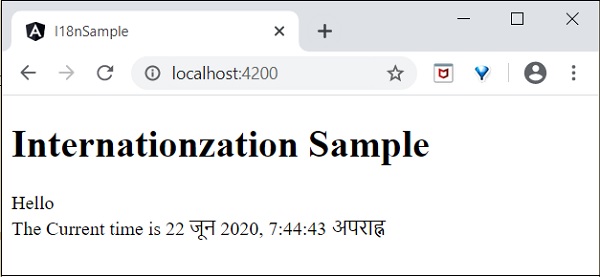
我们已将日期更改为当前区域设置。让我们也更改其他内容。为此,请在相关标签中包含i18n属性,格式为title|description@@id。
<h1>{{ title }}</h1>

<h1 i18n="greeting|Greeting a person@@greeting">Hello</h1>
<div>
   <span i18n="time|Specifiy the current time@@currentTime">
      The Current time is {{ currentDate | date : 'medium' }}
   </span>
</div>
这里:
- hello 是简单的翻译格式,因为它包含要翻译的完整文本。
- Time 稍微复杂一些,因为它也包含动态内容。文本的格式应遵循 ICU 消息格式进行翻译。
我们可以使用以下命令提取要翻译的数据:
ng xi18n --output-path src/locale
命令生成包含以下内容的messages.xlf文件:
<?xml version="1.0" encoding="UTF-8" ?>
<xliff version="1.2" xmlns="urn:oasis:names:tc:xliff:document:1.2">
   <file source-language="en" datatype="plaintext" original="ng2.template">
      <body>
         <trans-unit id="greeting" datatype="html">
            <source>Hello</source>
            <context-group purpose="location">
               <context context-type="sourcefile">src/app/app.component.html</context>
               <context context-type="linenumber">3</context>
            </context-group>
            <note priority="1" from="description">Greeting a person</note>
            <note priority="1" from="meaning">greeting</note>

         </trans-unit>
         <trans-unit id="currentTime" datatype="html">
            <source>
                        The Current time is <x id="INTERPOLATION" equiv-text="{{ currentDate | date : 'medium' }}"/>
            </source>
            <context-group purpose="location">
               <context context-type="sourcefile">src/app/app.component.html</context>
               <context context-type="linenumber">5</context>
            </context-group>
            <note priority="1" from="description">Specifiy the current time</note>
            <note priority="1" from="meaning">time</note>
         </trans-unit>
      </body>
   </file>
</xliff>
复制文件并将其重命名为messages.hi.xlf
使用 Unicode 文本编辑器打开文件。找到source标签并使用target标签复制它,然后将内容更改为hi区域设置。使用谷歌翻译查找匹配的文本。更改后的内容如下:


打开angular.json并在build -> configuration下放置以下配置:
"hi": {
   "aot": true,
   "outputPath": "dist/hi/",
   "i18nFile": "src/locale/messages.hi.xlf",
   "i18nFormat": "xlf",
   "i18nLocale": "hi",
   "i18nMissingTranslation": "error",
   "baseHref": "/hi/"
},
"en": {
   "aot": true,
   "outputPath": "dist/en/",
   "i18nFile": "src/locale/messages.xlf",
   "i18nFormat": "xlf",
   "i18nLocale": "en",
   "i18nMissingTranslation": "error",
   "baseHref": "/en/"
}
这里:
我们对hi和en区域设置使用了单独的设置。
在serve -> configuration下设置以下内容。
"hi": {
   "browserTarget": "i18n-sample:build:hi"
},
"en": {
   "browserTarget": "i18n-sample:build:en"
}
我们添加了必要的配置。停止应用程序并运行以下命令:
npm run start -- --configuration=hi
这里:
我们指定了必须使用 hi 配置。
导航到 https://:4200/hi,您将看到印地语本地化内容。
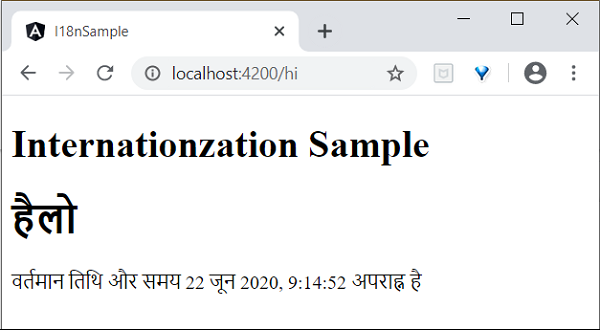
最后,我们创建了一个 Angular 本地化应用程序。