
- Angular 教程
- Angular - 首页
- Angular - 概述
- Angular - 特性
- Angular - 优点与缺点
- Angular 基础
- Angular - 环境搭建
- Angular - 第一个应用
- Angular - MVC 架构
- Angular 组件
- Angular - 组件
- Angular - 组件生命周期
- Angular - 视图封装
- Angular - 组件交互
- Angular - 组件样式
- Angular - 嵌套组件
- Angular - 内容投影
- Angular - 动态组件
- Angular - 元素
- Angular 模板
- Angular - 模板
- Angular - 文本插值
- Angular - 模板语句
- Angular - 模板中的变量
- Angular - SVG 作为模板
- Angular 绑定
- Angular - 绑定及其类型
- Angular - 数据绑定
- Angular - 事件绑定
- Angular - 属性绑定
- Angular - 属性绑定
- Angular - 类和样式绑定
- Angular 指令
- Angular - 指令
- Angular - 内置指令
- Angular 管道
- Angular - 管道
- Angular - 使用管道转换数据
- Angular 依赖注入
- Angular - 依赖注入
- Angular HTTP 客户端编程
- Angular - 服务
- Angular - HTTP 客户端
- Angular - 请求
- Angular - 响应
- Angular - 获取
- Angular - PUT
- Angular - DELETE
- Angular - JSON-P
- Angular - 使用 HTTP 进行 CRUD 操作
- Angular 路由
- Angular - 路由
- Angular - 导航
- Angular - Angular Material
- Angular 动画
- Angular - 动画
- Angular 表单
- Angular - 表单
- Angular - 表单验证
- Angular Service Workers & PWA
- Angular - Service Workers & PWA
- Angular 测试
- Angular - 测试概述
- Angular NgModules
- Angular - 模块简介
- Angular 高级
- Angular - 身份验证和授权
- Angular - 国际化
- Angular - 可访问性
- Angular - Web Workers
- Angular - 服务器端渲染
- Angular - Ivy 编译器
- Angular - 使用 Bazel 构建
- Angular - 向后兼容性
- Angular - 响应式编程
- Angular - 在指令和组件之间共享数据
- Angular 工具
- Angular - CLI
- Angular 杂项
- Angular - 第三方控件
- Angular - 配置
- Angular - 显示数据
- Angular - 装饰器和元数据
- Angular - 基本示例
- Angular - 错误处理
- Angular - 测试和构建项目
- Angular - 生命周期钩子
- Angular - 用户输入
- Angular - 新功能?
- Angular 有用资源
- Angular - 快速指南
- Angular - 有用资源
- Angular - 讨论
Angular - 服务
如前所述,服务在 Angular 应用程序中提供特定的功能。在给定的 Angular 应用程序中,可能存在一个或多个服务可以使用。类似地,Angular 组件可能依赖于一个或多个服务。
此外,Angular 服务可能依赖于其他服务才能正常工作。依赖项解析是开发任何应用程序中复杂且耗时的活动之一。为了降低复杂性,Angular 提供了依赖注入模式作为其核心概念之一。
让我们在本节中学习如何在 Angular 应用程序中使用依赖注入。
创建 Angular 服务
Angular 服务是一个普通的 TypeScript 类,具有一个或多个方法(功能)以及@Injectable装饰器。它使普通的 TypeScript 类能够在 Angular 应用程序中用作服务。
import { Injectable } from '@angular/core'; @Injectable()
export class DebugService {
   constructor() { }
}
这里,@Injectable装饰器将普通的 TypeScript 类转换为 Angular 服务。
注册 Angular 服务
要使用依赖注入,每个服务都需要注册到系统中。Angular 提供了多种注册服务的方法。它们如下所示:
- ModuleInjector @ 根级别
- ModuleInjector @ 平台级别
- 使用 providers 元数据的 ElementInjector
- 使用 viewProviders 元数据的 ElementInjector
- NullInjector
ModuleInjector @ 根
ModuleInjector 强制服务只能在特定模块内部使用。@Injectable中提供的ProvidedIn元数据必须用于指定服务可以使用的模块。
该值应引用已注册的 Angular 模块之一(用@NgModule装饰)。root是一个特殊选项,它指的是应用程序的根模块。示例代码如下:
import { Injectable } from '@angular/core'; @Injectable({
   providedIn: 'root',
})
export class DebugService {
   constructor() { }
}
ModuleInjector @ 平台
Platform Injector 比ModuleInject高一级,仅在高级和罕见的情况下使用。每个 Angular 应用程序都通过执行PreformBrowserDynamic().bootstrap方法(参见main.js)开始,该方法负责引导 Angular 应用程序的根模块。
PreformBrowserDynamic()方法创建一个由PlatformModule配置的注入器。我们可以使用PlatformModule提供的platformBrowser()方法配置平台级服务。
NullInjector
NullInjector比平台级ModuleInjector高一级,并且位于层次结构的顶层。我们无法在NullInjector中注册任何服务。当在层次结构中的任何位置都找不到所需的 service 时,它会解析并简单地抛出错误。
使用 providers 的 ElementInjector
ElementInjector 强制服务只能在某些特定组件内部使用。@Component装饰器中提供的 providers 和ViewProviders元数据用于指定对特定组件可见的服务列表。使用 providers 的示例代码如下:
ExpenseEntryListComponent
// import statement
import { DebugService } from '../debug.service';
// component decorator
@Component({
   selector: 'app-expense-entry-list',
   templateUrl: './expense-entry-list.component.html',
   styleUrls: ['./expense-entry-list.component.css'],
   providers: [DebugService] })
这里,DebugService仅在ExpenseEntryListComponent及其视图内部可用。要在其他组件中使用 DebugService,只需在必要的组件中使用providers装饰器即可。
使用 viewProviders 的 ElementInjector
viewProviders类似于provider,不同之处在于它不允许在使用ng-content指令创建的组件内容内部使用服务。
ExpenseEntryListComponent
// import statement
import { DebugService } from '../debug.service';
// component decorator
@Component({
   selector: 'app-expense-entry-list',
   templateUrl: './expense-entry-list.component.html',
   styleUrls: ['./expense-entry-list.component.css'], viewProviders: [DebugService]
})
父组件可以通过其视图或内容使用子组件。下面给出了一个包含子组件和内容视图的父组件的示例:
父组件视图/模板
<div>
   child template in view
   <child></child>
</div>
<ng-content></ng-content>
子组件视图/模板
<div>
   child template in view
</div>
父组件在模板(另一个组件)中的用法
<parent>
   <!-- child template in content -->
   <child></child>
</parent>
这里,
- child组件在两个地方使用。一个在父级的视图内。另一个在父级内容内。
- 服务将在放置在父级视图内的子组件中可用。
- 服务将不会在放置在父级内容内的子组件中可用。
解析 Angular 服务
让我们看看组件如何使用以下流程图解析服务。
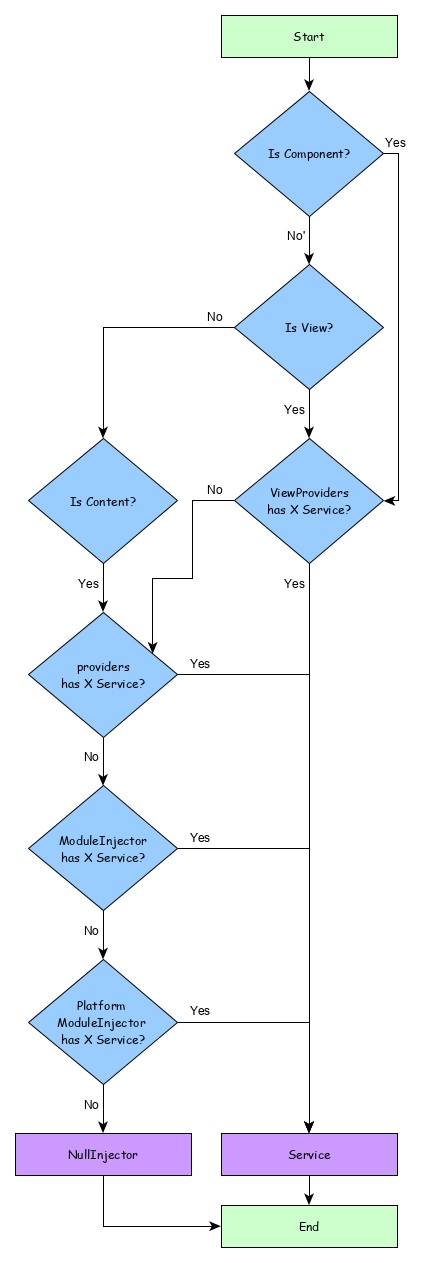
这里,
- 首先,组件尝试查找使用viewProviders元数据注册的服务。
- 如果未找到,组件尝试查找使用providers元数据注册的服务。
- 如果未找到,组件尝试查找使用ModuleInjector注册的服务
- 如果未找到,组件尝试查找使用PlatformInjector注册的服务
- 如果未找到,组件尝试查找使用NullInjector注册的服务,它始终会抛出错误。
注入器的层次结构以及解析服务的流程如下:
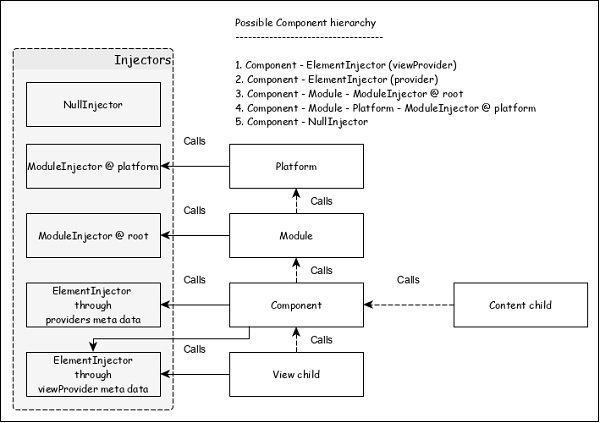
解析修饰符
正如我们在上一节中学到的,服务的解析从组件开始,并在找到服务或到达NUllInjector时停止。这是默认解析,可以使用Resolution Modifier更改它。它们如下:
Self()
Self()在其当前ElementInjector本身中启动和停止对服务的搜索。
import { Self } from '@angular/core';
constructor(@Self() public debugService: DebugService) {}
SkipSelf()
SkipSelf()与Self()正好相反。它跳过当前的 ElementInjector,并从其父ElementInjector开始搜索服务。
import { SkipSelf } from '@angular/core';
constructor(@SkipSelf() public debugService: DebugService) {}
Host()
Host()在其宿主ElementInjector中停止对服务的搜索。即使服务在更高级别可用,它也会在宿主处停止。
import { Host } from '@angular/core';
constructor(@Host() public debugService: DebugService) {}
Optional()
Optional()在搜索服务失败时不会抛出错误。
import { Optional } from '@angular/core';
constructor(@Optional() private debugService?: DebugService) {
   if (this.debugService) {
      this.debugService.info("Debugger initialized");
   }
}
依赖注入提供程序
依赖注入提供程序有两个用途。首先,它有助于为要注册的服务设置令牌。该令牌将用于引用和调用服务。其次,它有助于根据给定的配置创建服务。
如前所述,最简单的提供程序如下:
providers: [ DebugService ]
这里,DebugService既是令牌,也是类,服务对象必须由此类创建。提供程序的实际形式如下:
providers: [ { provides: DebugService, useClass: DebugService }]
这里,provides是令牌,useClass是创建服务对象的类引用。
Angular 提供了一些其他提供程序,它们如下:
别名类提供程序
提供程序的目的是重用现有的服务。
providers: [ DebugService,
   { provides: AnotherDebugService, userClass: DebugService }]
这里,只会创建DebugService服务的一个实例。
值提供程序
值提供程序的目的是提供值本身,而不是要求 DI 创建服务对象的实例。它也可以使用现有的对象。唯一的限制是对象必须与引用的服务具有相同的形状。
export class MyCustomService {
   name = "My Custom Service"
}
[{ provide: MyService, useValue: { name: 'instance of MyCustomService' }]
这里,DI 提供程序只是返回在useValue选项中设置的实例,而不是创建新的服务对象。
非类依赖项提供程序
它使字符串、函数或对象能够在 Angular DI 中使用。
让我们看一个简单的例子。
// Create the injectable token
import { InjectionToken } from '@angular/core';
export const APP_CONFIG = new InjectionToken<AppConfig>('app.config');
// Create value
export const MY_CONFIG: AppConfig = {
   title: 'Dependency Injection'
};
// congfigure providers
providers: [{ provide: APP_CONFIG, useValue: HERO_DI_CONFIG }]
// inject the service
constructor(@Inject(APP_CONFIG) config: AppConfig) {
工厂提供程序
工厂提供程序支持复杂的 service 创建。它将对象的创建委托给外部函数。工厂提供程序还可以选择为工厂对象设置依赖项。
{ provide: MyService, useFactory: myServiceFactory, deps: [DebugService] };
这里,myServiceFactory返回MyService的实例。
Angular 服务用法
现在,我们知道了如何创建和注册 Angular 服务。让我们看看如何在组件内部使用 Angular 服务。使用 Angular 服务就像将构造函数的参数类型设置为服务提供程序的令牌一样简单。
export class ExpenseEntryListComponent implements OnInit {
   title = 'Expense List';
   constructor(private debugService : DebugService) {}
   ngOnInit() {
      this.debugService.info("Angular Application starts");
   }
}
这里,
ExpenseEntryListComponent构造函数设置了一个类型为 DebugService 的参数。
Angular 依赖注入(DI) 将尝试查找应用程序中注册的任何类型为 DebugService 的服务。如果找到,它将为 ExpenseEntryListComponent 组件设置 DebugService 的实例。如果未找到,它将抛出错误。
添加调试服务
让我们添加一个简单的Debug服务,它将帮助我们在应用程序开发期间打印调试信息。
打开命令提示符并转到项目根文件夹。
cd /go/to/expense-manager
启动应用程序。
ng serve
运行以下命令生成一个 Angular 服务,**DebugService**。
ng g service debug
这将创建两个 TypeScript 文件(调试服务及其测试),如下所示:
CREATE src/app/debug.service.spec.ts (328 bytes)
CREATE src/app/debug.service.ts (134 bytes)
让我们分析一下 **DebugService** 服务的内容。
import { Injectable } from '@angular/core'; @Injectable({
   providedIn: 'root'
})
export class DebugService {
   constructor() { }
}
这里,
**@Injectable** 装饰器附加到 DebugService 类,这使得 DebugService 能够在应用程序的 Angular 组件中使用。
**providedIn** 选项及其值 root 使 DebugService 能够在应用程序的所有组件中使用。
让我们添加一个方法 Info,它将消息打印到浏览器控制台。
info(message : String) : void {
   console.log(message);
}
让我们在 **ExpenseEntryListComponent** 中初始化服务并使用它来打印消息。
import { Component, OnInit } from '@angular/core'; import { ExpenseEntry } from '../expense-entry'; import { DebugService } from '../debug.service'; @Component({
   selector: 'app-expense-entry-list',
   templateUrl: './expense-entry-list.component.html', styleUrls: ['./expense-entry-list.component.css']
})
export class ExpenseEntryListComponent implements OnInit {
   title: string;
   expenseEntries: ExpenseEntry[];
   constructor(private debugService: DebugService) { }
   ngOnInit() {
      this.debugService.info("Expense Entry List
      component initialized");
      this.title = "Expense Entry List";
      this.expenseEntries = this.getExpenseEntries();
   }
   // other coding
}
这里,
DebugService 使用构造函数参数进行初始化。设置类型为 DebugService 的参数(debugService)将触发依赖注入以创建一个新的 DebugService 对象并将其设置为 ExpenseEntryListComponent 组件。
在 ngOnInit 方法中调用 DebugService 的 info 方法会在浏览器控制台打印消息。
可以使用开发者工具查看结果,它看起来类似于以下所示:
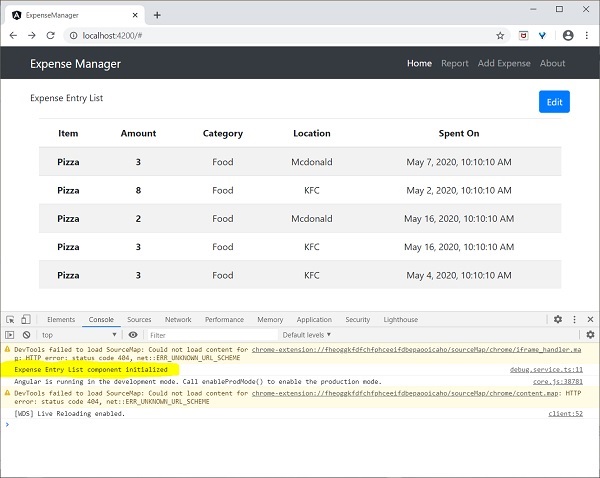
让我们扩展应用程序以了解服务的范围。
让我们使用以下命令创建一个 **DebugComponent**。
ng generate component debug
CREATE src/app/debug/debug.component.html (20 bytes) CREATE src/app/debug/debug.component.spec.ts (621 bytes)
CREATE src/app/debug/debug.component.ts (265 bytes) CREATE src/app/debug/debug.component.css (0 bytes) UPDATE src/app/app.module.ts (392 bytes)
让我们从根模块中删除 DebugService。
// src/app/debug.service.ts
import { Injectable } from '@angular/core'; @Injectable()
export class DebugService {
   constructor() {
   }
   info(message : String) : void {
      console.log(message);
   }
}
在 ExpenseEntryListComponent 组件下注册 DebugService。
// src/app/expense-entry-list/expense-entry-list.component.ts @Component({
   selector: 'app-expense-entry-list',
   templateUrl: './expense-entry-list.component.html',
   styleUrls: ['./expense-entry-list.component.css']
   providers: [DebugService]
})
这里,我们使用了 providers 元数据 **(ElementInjector)** 来注册服务。
打开 **DebugComponent** (src/app/debug/debug.component.ts) 并导入 **DebugService**,并在组件的构造函数中设置一个实例。
import { Component, OnInit } from '@angular/core'; import { DebugService } from '../debug.service';
@Component({
   selector: 'app-debug',
   templateUrl: './debug.component.html',
   styleUrls: ['./debug.component.css']
})
export class DebugComponent implements OnInit {
   constructor(private debugService: DebugService) { }
   ngOnInit() {
      this.debugService.info("Debug component gets service from Parent");
   }
}
这里,我们没有注册 **DebugService**。因此,如果用作父组件,DebugService 将不可用。当在父组件内部使用时,如果父组件可以访问该服务,则该服务可能从父组件获取。
打开 **ExpenseEntryListComponent** 模板 (src/app/expense-entry-list/expense-entry-list.component.html) 并包含一个内容部分,如下所示
// existing content
<app-debug></app-debug>
<ng-content></ng-content>
这里,我们包含了一个内容部分和 DebugComponent 部分。
让我们在 **AppComponent** 模板中将调试组件作为内容包含在 **ExpenseEntryListComponent** 组件内。打开 **AppComponent** 模板并将 **app-expense-entry-list** 更改为如下所示:
// navigation code
<app-expense-entry-list>
<app-debug></app-debug>
</app-expense-entry-list>
这里,我们包含了 **DebugComponent** 作为内容。
让我们检查应用程序,它将在页面末尾显示 **DebugService** 模板,如下所示:
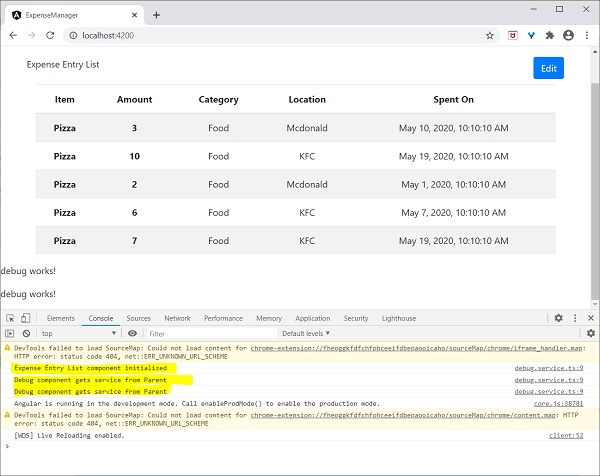
此外,我们还可以在控制台中看到来自调试组件的两个调试信息。这表明调试组件从其父组件获取服务。
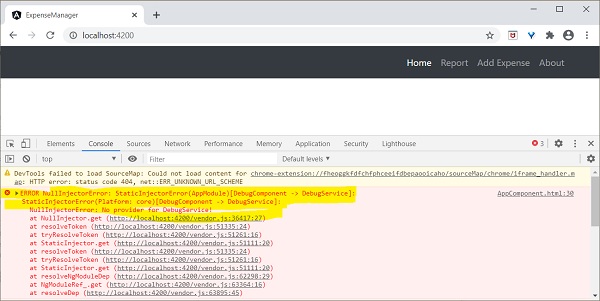
让我们更改服务在 **ExpenseEntryListComponent** 中的注入方式以及它如何影响服务的范围。将 providers 注入器更改为 viewProviders 注入。**viewProviders** 不会将服务注入到内容子元素中,因此它应该会失败。
viewProviders: [DebugService]
检查应用程序,您将看到其中一个调试组件(用作内容子元素)抛出错误,如下所示:
让我们从模板中删除调试组件并恢复应用程序。
打开 **ExpenseEntryListComponent** 模板 (src/app/expense-entry-list/expense-entry-list.component.html) 并删除以下内容
<app-debug></app-debug>
<ng-content></ng-content>
打开 **AppComponent** 模板并将 **app-expense-entry-list** 更改为如下所示:
// navigation code
<app-expense-entry-list>
</app-expense-entry-list>
将 **ExpenseEntryListComponent** 中的 **viewProviders** 设置更改为 **providers**。
providers: [DebugService]
重新运行应用程序并检查结果。