- Google AMP 教程
- Google AMP - 首页
- Google AMP - 概述
- Google AMP - 简介
- Google AMP - 图片
- Google AMP - 表单
- Google AMP - iframe
- Google AMP - 视频
- Google AMP - 按钮
- Google AMP - Timeago
- Google AMP - MathML
- Google AMP - 适应文本
- Google AMP - 日期倒计时
- Google AMP - 日期选择器
- Google AMP - 故事
- Google AMP - 选择器
- Google AMP - 链接
- Google AMP - 字体
- Google AMP - 列表
- Google AMP - 用户通知
- Google AMP - 下一页
- Google AMP - 属性
- 样式和自定义 CSS
- Google AMP - 动态 CSS 类
- Google AMP - 动作和事件
- Google AMP - 动画
- Google AMP - 数据绑定
- Google AMP - 布局
- Google AMP - 广告
- Google AMP - 分析
- Google AMP - 社交小工具
- Google AMP - 媒体
- HTML 页面转换为 AMP 页面
- Google AMP - 基本语法
- Google AMP - 验证
- Google AMP - 缓存
- Google AMP - 自定义 JavaScript
- Google AMP - CORS
- Google AMP 有用资源
- Google AMP - 快速指南
- Google AMP - 有用资源
- Google AMP - 讨论
Google AMP - 分析
AMP 分析是一个用于跟踪页面数据的 AMP 组件。页面上所有用户交互都可以被记录并保存,以分析数据,以便进一步改进或用于业务目的。
要使用 amp-analytics 组件,需要在 head 部分添加以下脚本:
<script async custom-element = "amp-analytics"
   src   = "https://cdn.ampproject.org/v0/amp-analytics-0.1.js">
</script>
要记录 amp-analytics 中使用的事件,可以使用第三方供应商,也可以拥有内部跟踪系统。
使用 Google Analytics 供应商的 amp-analytics 示例:
<amp-analytics type = googleanalytics>
   <script type = application/json>{
      "requests": {
         "pageview": "${eventId}"
      },
      "vars": {
         "account": "UA-44450152-1"
      },
      "triggers": {
         "trackPageview" : {
            "on": "visible",
            "request": "pageview",
            "vars": {
               "eventId": "pageview"
            }
         }
      }
   }
   </script>
</amp-analytics>
使用 comScore 供应商的 amp-analytics 示例
<amp-analytics type = comscore>
   <script type = application/json>
      {"vars": {"c2":"7922264"}}
   </script>
</amp-analytics>
使用 Chartbeat 供应商的 amp-analytics 示例
<amp-analytics type = chartbeat>
   <script type = application/json>{
      "vars": {
         "uid": "230",
         "domain": "dummyurl.com",
         "sections": "us",
         "authors": "Hello World"
      }
   }</script>
</amp-analytics>
供应商的详细列表在此处。
下面给出了一个关于如何使用内部分析供应商的示例:
示例
<!doctype html>
<html amp>
   <head>
      <meta charset = "utf-8">
      <title>amp-analytics</title>
      <script async src = "https://cdn.ampproject.org/v0.js">
      </script>
      <script async custom-element = "amp-analytics"
         src = "https://cdn.ampproject.org/v0/amp-analytics-0.1.js">
      </script>
      <link rel = "canonical" href = "ampanalytics.html">
      <meta name = "viewport" content = "width = device-width,
      minimum-scale = 1,initial-scale = 1">

      <style amp-boilerplate>
         body{
            -webkit-animation:
            -amp-start 8s steps(1,end) 0s 1 normal both;-moz-animation:
            -amp-start 8s steps(1,end) 0s 1 normal both;-ms-animation:
            -amp-start 8s steps(1,end) 0s 1 normal both;animation:
            -amp-start 8s steps(1,end) 0s 1 normal both}
         @-webkit-keyframes
         -amp-start{from{visibility:hidden}to{visibility:visible}}@-moz-keyframes
         -amp-start{from{visibility:hidden}to{visibility:visible}}@-ms-keyframes
         -amp-start{from{visibility:hidden}to{visibility:visible}}@-o-keyframes
         -amp-start{from{visibility:hidden}to{visibility:visible}}@keyframes
         -amp-start{from{visibility:hidden}to{visibility:visible}}
      </style>

      <noscript>
         <style amp-boilerplate>
            body{
               -webkit-animation:none;
               -moz-animation:none;
               -ms-animation:none;
               animation:none}
         </style>
      </noscript>
   </head>
   <body>
      <h1>Google Amp - Analytics</h1>
      <amp-analytics>
         <script type = "application/json">
            {
               "requests": {
                  "event": "https://:8080/googleamp/tracking.php?
                  user=test&account=localhost&event=${eventId}"
               },
               "triggers": {
                  "trackPageview": {
                     "on": "visible",
                     "request": "event",
                        "vars": {
                           "eventId": "pageview"
                        }
                  }
               }
            }
         </script>
      </amp-analytics>
   </body>
</html>
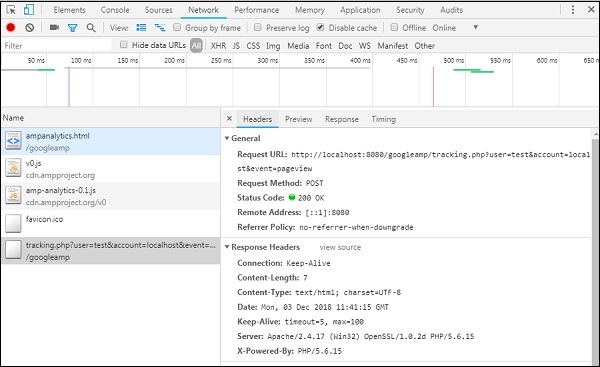
当浏览器访问页面时,将触发页面浏览量的跟踪器。这可以在 Google 网络选项卡中看到,如下所示。
当页面上特定元素可见时,您还可以触发 amp-analytics 事件。此处的示例如下:
示例
<!doctype html>
<html amp>
   <head>
      <meta charset = "utf-8">
      <title>amp-analytics</title>
      <script async src = "https://cdn.ampproject.org/v0.js">
      </script>
      <script async custom-element = "amp-analytics"
         src = "https://cdn.ampproject.org/v0/amp-analytics-0.1.js">
      </script>
      <link rel = "canonical" href = "ampanalytics.html">
      <meta name = "viewport" content = "width = device-width,
      minimum-scale = 1,initial-scale = 1">

      <style amp-boilerplate>
         body{
            -webkit-animation:
            -amp-start 8s steps(1,end) 0s 1 normal both;-moz-animation:
            -amp-start 8s steps(1,end) 0s 1 normal both;-ms-animation:
            -amp-start 8s steps(1,end) 0s 1 normal both;animation:
            -amp-start 8s steps(1,end) 0s 1 normal both
         }
         @-webkit-keyframes
         -amp-start{from{visibility:hidden}to{visibility:visible}}@-moz-keyframes
         -amp-start{from{visibility:hidden}to{visibility:visible}}@-ms-keyframes
         -amp-start{from{visibility:hidden}to{visibility:visible}}@-o-keyframes
         -amp-start{from{visibility:hidden}to{visibility:visible}}@keyframes
         -amp-start{from{visibility:hidden}to{visibility:visible}}
      </style>
      <noscript>
         <style amp-boilerplate>
            body{
               -webkit-animation:none;
               -moz-animation:none;
               -ms-animation:none;
               animation:none}
         </style>
      </noscript>
      <script async custom-element = "amp-video"
         src = "https://cdn.ampproject.org/v0/amp-video-0.1.js">
      </script>
   </head>
   <body>
      <h1>Google Amp - Analytics</h1>
      <amp-video controls
         id = "videoplayer"
         width = "640"
         height = "360"
         layout = "responsive"
         poster = "images/videoposter.png"
         autoplay>
            <source src = "video/bunny.webm" type = "video/webm" />
            <source src = "video/samplevideo.mp4" type = "video/mp4" />
               <div fallback>
                  <p>This browser does not support the video element.</p>
               </div>
      </amp-video>
      <amp-analytics>
         <script type = "application/json">
         {
         "requests": {
            "event": "https://:8080/googleamp/tracking.php?
            user=test&account=localhost&event=${eventId}"
         },
         "triggers": {
            "trackPageview": {
               "on": "visible",
               "request": "event",
                  "visibilitySpec": {
                     "selector": "#videoplayer",
                     "visiblePercentageMin": 20,
                     "totalTimeMin": 2000,
                     "continuousTimeMin": 200
                  },
                  "vars": {
                     "eventId": "video"
                  }
               }
            }
         }
         </script>
      </amp-analytics>
   </body>
</html>
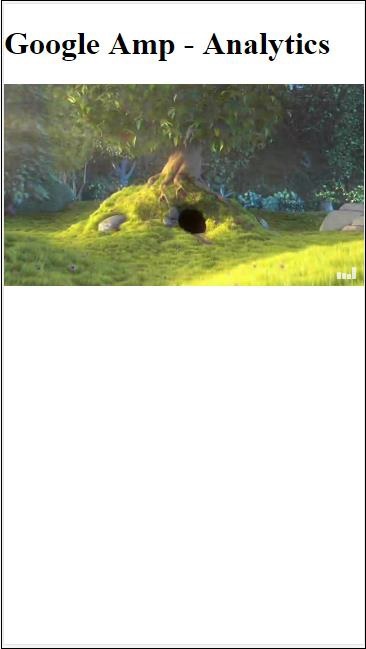
输出
Amp-analytics 组件需要将 JSON 对象传递给 script 标签。JSON 的格式如下:
{
   "requests": {
      request-name: request-value,
      ...
   },
   "vars": {
      var-name: var-value,
      ...
   },
   "extraUrlParams": {
      extraurlparam-name: extraurlparam-value,
      ...
   },
   "triggers": {
      trigger-name: trigger-object,
      ...
   },
   "transport": {
      "beacon": *boolean*,
      "xhrpost": *boolean*,
      "image": *boolean*,
   }
}
上面指定的并非所有对象都必须传递给 amp-analytics。如果您使用的是第三方供应商,则该供应商将有其自身的格式,用户需要按照该格式传递数据。
让我们详细了解每个对象:
请求
请求对象具有一个 url,当满足条件时将使用该 url 来触发。请求对象的示例如下:
"requests": {
   "request-name": "https://:8080/googleamp/tracking.php?
   user=test&account=localhost&event=${eventId}"
},
请求名称将在触发器对象中指定,并且必须为此使用相同的名称。
变量
要在请求对象中使用的所有变量都在 vars 对象中指定。
"requests": {
   "event": "https://:8080/googleamp/tracking.php?
   user=test&account=localhost&event=${eventId}"
},
"vars": {
   "eventId": "video"
}
额外的 URL 参数
任何要作为查询字符串附加到请求 url 的附加参数都可以在此对象中定义。请观察以下示例
"requests": {
   "event": "https://:8080/googleamp/tracking.php?
   user=test&account=localhost&event=${eventId}&x=1&y=2&z=3"
},
"vars": {
   "eventId": "video"
},
"extraUrlParams": {
   "x": "1",
   "y": "2",
   "z": "3"
}
触发器
此对象将指示何时必须触发请求 url。触发器对象中可用的键值对如下所示:
on - 您应该提及要监听的事件。on 可用的值有 render-start、ini-load、click、scroll、timer、visible、hidden、user-error、access-* 和 video-*
request - 这是请求的名称。这必须与请求对象中的请求名称匹配。
vars - 这是定义要在触发器对象内使用或用于覆盖已定义的 vars 键值的对象。
selector - 这显示了设置触发器的元素的详细信息。
scrollSpec - 这将包含滚动触发器的详细信息。
timerSpec - 这将包含给定时间的详细信息。
videoSpec - 这将包含要为视频调用的详细信息。
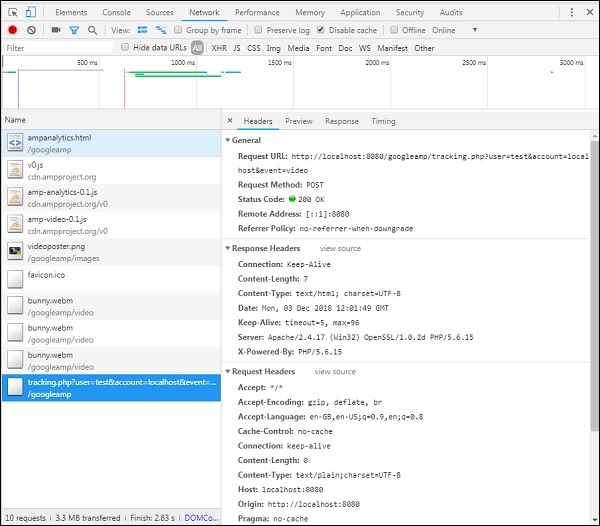
这是一个示例,其中我们添加了 amp-video。当视频元素在页面上可用、在页面上至少可见 20%、视频至少播放 2 秒且连续观看 200 毫秒时,amp-analytics 将触发跟踪器。满足所有这些条件后,跟踪器才会被触发。详细信息如下:
要添加关于元素可见性和其他条件(例如元素必须至少可见 20%、视频应播放 2 秒)的条件,必须在visibilitySpec中指定这些条件,如下所示:
<amp-analytics>
  <script type = "application/json">
   {
      "requests": {
         "event": "https://:8080/googleamp/tracking.php?
         user=test&account=localhost&event=${eventId}"
      },
      "triggers": {
         "trackPageview": {
            "on": "visible",
            "request": "event",
               "visibilitySpec": {
                  "selector": "#videoplayer",
                  "visiblePercentageMin": 20,
                  "totalTimeMin": 2000,
                  "continuousTimeMin": 200
               },
               "vars": {
                  "eventId": "video"
               }
         }
      }
   }
   </script>
</amp-analytics>
videoSpec允许您定义基于其想要触发跟踪器触发的条件。条件列在此处:
waitFor
此属性用于可见性触发器,以便在触发之前等待特定情况。waitFor 可用的选项为none、ini-load和render-start。默认情况下,waitFor 的值为 ini-load。
reportWhen
此属性用于可见性触发器,以便在触发之前等待特定情况。支持的值为 documentExit。您不能在visibilitySpec中同时使用reportWhen和repeat属性。
continuousTimeMin 和 continuousTimeMax
此属性指示可见性跟踪器要触发,它需要元素连续地在continuousTimeMin和continuousTimeMax之间位于视口中。如果未指定 continousTimeMin,则默认设置为 0。该值以毫秒为单位。
totalTimeMin 和 totalTimeMin
此属性指示可见性跟踪器要触发,它需要元素总共在totalTimeMin和totalTimeMin之间位于视口中。如果未指定 totalTimeMin,则默认为 0。该值以毫秒为单位。
visiblePercentageMin 和 visiblePercentageMax
此属性指示可见性跟踪器要触发,它需要元素在分配给 visiblePercetageMin 和 visiblePercentageMax 的百分比之间在视口中可见。visiblePercentageMin的默认值为 0,visibilePercentageMax的默认值为 100。如果两者都为 0,则元素不可见时可见性触发器将触发;如果两者都为 100,则元素完全可见时将触发。
重复
如果设置为 true,则每次满足 visibilitySpec 条件时,触发器都会触发。默认情况下,repeat 的值为 false。它不能与 reportWhen 属性一起使用。
此处显示点击触发器的示例:
<!doctype html>
<html amp>
   <head>
      <meta charset = "utf-8">
      <title>amp-analytics</title>
      <script async src = "https://cdn.ampproject.org/v0.js">
      </script>
      <script async custom-element = "amp-analytics"
      src="https://cdn.ampproject.org/v0/amp-analytics-0.1.js">
      </script>
      <link rel = "canonical" href = "ampanalytics.html">
      <meta name = "viewport" content = "width = device-width,
      minimum-scale = 1,initial-scale = 1">

      <style amp-boilerplate>
         body{
            -webkit-animation:
            -amp-start 8s steps(1,end) 0s 1 normal both;-moz-animation:
            -amp-start 8s steps(1,end) 0s 1 normal both;-ms-animation:
            -amp-start 8s steps(1,end) 0s 1 normal both;animation:
            -amp-start 8s steps(1,end) 0s 1 normal both
         }
         @-webkit-keyframes
         -amp-start{from{visibility:hidden}to{visibility:visible}}@-moz-keyframes
         -amp-start{from{visibility:hidden}to{visibility:visible}}@-ms-keyframes
         -amp-start{from{visibility:hidden}to{visibility:visible}}@-o-keyframes
         -amp-start{from{visibility:hidden}to{visibility:visible}}@keyframes
         -amp-start{from{visibility:hidden}to{visibility:visible}}
      </style>
      <noscript>
         <style amp-boilerplate>
            body{
               -webkit-animation:none;
               -moz-animation:none;
               -ms-animation:none;
               animation:none}
         </style>
      </noscript>
      <script async custom-element = "amp-video"
         src = "https://cdn.ampproject.org/v0/amp-video-0.1.js">
      </script>
      <style amp-custom>
         a {
            color: blue;
         }
      </style>
   </head>
   <body>
      <h1>Google Amp - Analytics</h1>
      <a>Click Here</a>
      <amp-analytics>
         <script type = "application/json">
            {
               "requests": {
                  "event": "https://:8080/googleamp/tracking.php?
                  user=test&account=localhost&event=${eventId}"
               },
               "triggers": {
                  "trackAnchorClicks": {
                  "on": "click",
                  "selector": "a",
                  "request": "event",
                     "vars": {
                        "eventId": "clickonlink"
                     }
                  }
               }
            }
         </script>
      </amp-analytics>
   </body>
</html>
输出
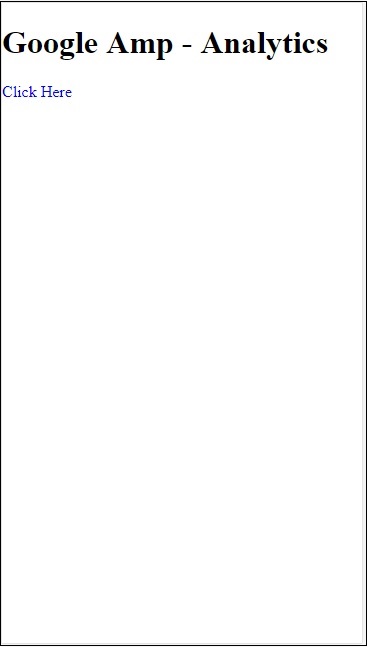
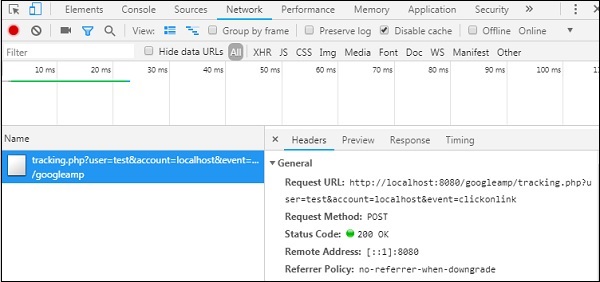
单击链接时,将触发事件,如下所示: