
- Google AMP 教程
- Google AMP - 首页
- Google AMP - 概述
- Google AMP - 简介
- Google AMP - 图片
- Google AMP - 表单
- Google AMP - 内嵌框架 (iFrames)
- Google AMP - 视频
- Google AMP - 按钮
- Google AMP - 时间标记 (Timeago)
- Google AMP - MathML
- Google AMP - 自动调整文本大小 (Fit Text)
- Google AMP - 日期倒计时
- Google AMP - 日期选择器
- Google AMP - 故事 (Story)
- Google AMP - 选择器
- Google AMP - 链接
- Google AMP - 字体
- Google AMP - 列表
- Google AMP - 用户通知
- Google AMP - 下一页
- Google AMP - 属性
- 样式和自定义 CSS
- Google AMP - 动态 CSS 类
- Google AMP - 动作和事件
- Google AMP - 动画
- Google AMP - 数据绑定
- Google AMP - 布局
- Google AMP - 广告
- Google AMP - 分析
- Google AMP - 社交插件
- Google AMP - 媒体
- HTML 页面转换为 AMP 页面
- Google AMP - 基本语法
- Google AMP - 验证
- Google AMP - 缓存
- Google AMP - 自定义 JavaScript
- Google AMP - CORS
- Google AMP 有用资源
- Google AMP - 快速指南
- Google AMP - 有用资源
- Google AMP - 讨论
Google AMP - 用户通知
Google `amp-user-notification` 用于向用户显示可关闭的对话框消息。我们可以用它来通知用户页面上的 Cookie。
要使用 `amp-user-notification`,需要在页面上添加以下脚本:
<script async custom-element = "amp-user-notification"
   src = "https://cdn.ampproject.org/v0/amp-user-notification-0.1.js">
</script>
`amp-user-notification` 标签格式:
<amp-user-notification id = "my-notification" layout = "nodisplay">
   <div>Example of amp-user-notification.
      <button on = "tap:my-notification.dismiss">I accept
      </button>
   </div>
</amp-user-notification>
让我们通过一个工作示例来了解 `amp-user-notification`:
示例
<!doctype html>
<html amp lang = "en">
   <head>
      <meta charset = "utf-8">
      <script async src = "https://cdn.ampproject.org/v0.js"></script>
      <title>Google AMP - Amp Selector</title>
      <link rel = "canonical" href = " http://example.ampproject.org/article-metadata.html">
      <meta name = "viewport" content = "width = device-width,minimum-scale = 1,initial-scale = 1">

      <style amp-boilerplate>
         body{
            -webkit-animation:
            -amp-start 8s steps(1,end) 0s 1 normal both;-moz-animation:
            -amp-start 8s steps(1,end) 0s 1 normal both;-ms-animation:
            -amp-start 8s steps(1,end) 0s 1 normal both;animation:
            -amp-start 8s steps(1,end) 0s 1 normal both
         }
         @-webkit-keyframes
         -amp-start{from{visibility:hidden}to{visibility:visible}}@-moz-keyframes
         -amp-start{from{visibility:hidden}to{visibility:visible}}@-ms-keyframes
         -amp-start{from{visibility:hidden}to{visibility:visible}}@-o-keyframes
         -amp-start{from{visibility:hidden}to{visibility:visible}}@keyframes
         -amp-start{from{visibility:hidden}to{visibility:visible}}
      </style>

      <noscript>
         <style amp-boilerplate>
            body{
               -webkit-animation:none;
               -moz-animation:none;
               -ms-animation:none
               animation:none
            }
         </style>
      </noscript>

      <script async custom-element = "amp-user-notification"
         src = "https://cdn.ampproject.org/v0/amp-user-notification-0.1.js">
      </script>

      <style amp-custom>
         div {
            font-size: 15px;
            background-color : #ccc;
            padding: 10px 10px;
            border-radius: 2px;
         }
         button{
            background-color: #ACAD5C;
            color: white;
            cursor: pointer;
            float: right;
         }
      </style>
   </head>
   <body>
      <h3>Google AMP - Amp User Notification</h3>
      <amp-user-notification
         id = "my-notification"
         layout = "nodisplay">
         <div>Example of amp-user-notification.
            <button on = "tap:my-notification.dismiss">I accept
            </button>
         </div>
      </amp-user-notification>
   </body>
</html>
输出
上面给出的工作示例代码的输出如下所示:
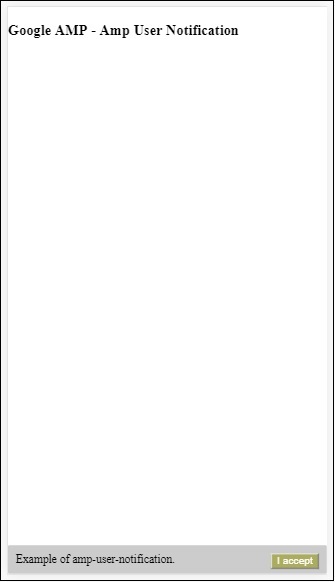
用户单击按钮后,通知将被关闭。关闭后,即使重新加载页面,也不会再次显示该通知。
用户通知的数据存储在浏览器 localStorage 中。如果清除 localStorage 并刷新页面,则可以再次看到通知。您可以使用浏览器控制台中的 `localStorage.clear()` 来尝试。
使用 `dismiss` 动作,可以通过在按钮上使用该动作来关闭通知,如下所示:
<button on = "tap:my-notification.dismiss">
   I accept
</button>
当用户点击按钮时,通知将被关闭。
广告