
- Google AMP 教程
- Google AMP - 首页
- Google AMP - 概述
- Google AMP - 简介
- Google AMP - 图片
- Google AMP - 表单
- Google AMP - Iframes
- Google AMP - 视频
- Google AMP - 按钮
- Google AMP - Timeago
- Google AMP - Mathml
- Google AMP - 自适应文本
- Google AMP - 日期倒计时
- Google AMP - 日期选择器
- Google AMP - 故事
- Google AMP - 选择器
- Google AMP - 链接
- Google AMP - 字体
- Google AMP - 列表
- Google AMP - 用户通知
- Google AMP - 下一页
- Google AMP - 属性
- 样式和自定义 CSS
- Google AMP - 动态 CSS 类
- Google AMP - 操作和事件
- Google AMP - 动画
- Google AMP - 数据绑定
- Google AMP - 布局
- Google AMP - 广告
- Google AMP - 分析
- Google AMP - 社交小部件
- Google AMP - 媒体
- HTML 页面到 AMP 页面
- Google AMP - 基本语法
- Google AMP - 验证
- Google AMP - 缓存
- Google AMP - 自定义 JavaScript
- Google AMP - CORS
- Google AMP 有用资源
- Google AMP - 快速指南
- Google AMP - 有用资源
- Google AMP - 讨论
Google AMP - 样式和自定义 CSS
AMP 在屏幕上渲染页面时会经过仔细的考虑。加载的页面将包含图像、视频、iframe 等,这些都需要进行 HTTP 请求。因此,HTTP 请求会被延迟,以便先显示页面内容,并为图像、视频、iframe 的加载预留必要空间。
AMP 具有占位符、回退、srcset 和布局属性等功能,可以使页面具有响应性,并确保页面内容不会被打乱。在本章中,我们将详细讨论所有这些内容。
AMP 样式标签
AMP 具有一个样式标签,上面带有 **amp-custom** 属性,如下所示:
<style amp-custom>
   button{
      background-color: #ACAD5C;
      color: white;
      padding: 12px 20px;
      border: none;
      border-radius: 4px;
      cursor: pointer;
      float: left;
   }
   amp-img {
      border: 1px solid black;
      border-radius: 4px;
      padding: 5px;
   }
   p {
      padding: 1rem;
      font-size:25px;
   }
   largeText {
      font-size:30px;
      background-color:red;
   }
</style>
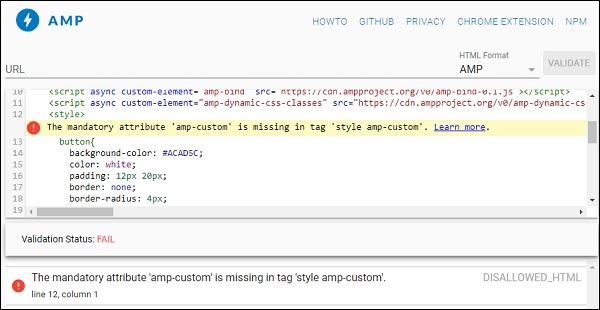
它主要用于编写页面所需的自定义 CSS。请不要忘记添加 **amp-custom** 属性;否则,它将无法通过 AMP 验证,如下所示:
AMP 还支持 HTML 元素的内联 CSS,如下所示:
<div style = "color:green;margin-left:30px;">
Welcome to TutorialsPoint</p>
外部样式表标签
AMP 不支持外部样式表,并在进行 AMP 验证时会失败。
示例
<!doctype html>
<html amp lang = "en">
   <head>
      <meta charset = "utf-8">
      <script async src = "https://cdn.ampproject.org/v0.js"></script>
      <title>Google AMP - Dynamic Css Classes</title>
         <link rel = "canonical" href = "
         http://example.ampproject.org/article-metadata.html">
      <meta name = "viewport" content = "width = device-width,minimum-scale = 1,initial-scale = 1">

      <style amp-boilerplate>
         body {
            -webkit-animation:
            -amp-start 8s steps(1,end) 0s 1 normal both;-moz-animation:
            -amp-start 8s steps(1,end) 0s 1 normal both;-ms-animation:
            -amp-start 8s steps(1,end) 0s 1 normal both;animation:
            -amp-start 8s steps(1,end) 0s 1 normal both
         }
         @-webkit-keyframes
         -amp-start{from{visibility:hidden}to{visibility:visible}}@-moz-keyframes
         -amp-start{from{visibility:hidden}to{visibility:visible}}@-ms-keyframes
         -amp-start{from{visibility:hidden}to{visibility:visible}}@-o-keyframes
         -amp-start{from{visibility:hidden}to{visibility:visible}}@keyframes
         -amp-start{from{visibility:hidden}to{visibility:visible}}
      </style>

      <noscript>
         <style amp-boilerplate>
            body {
               -webkit-animation:none;
               -moz-animation:none;
               -ms-animation:none;
               animation:none
            }
         </style>
      </noscript>
         <script async custom-element = "amp-bind" src = "
      https://cdn.ampproject.org/v0/amp-bind-0.1.js">
      </script>

      <script async custom-element = "amp-dynamic-css-classes"
         src = "https://cdn.ampproject.org/v0/amp-dynamic-css-classes-0.1.js">
      </script>

      <link rel = "stylesheet"
         href = "https://cdnjs.cloudflare.com/ajax/libs/materialize/0.9 8.0/css/materialize.min.css">
      <style amp-custom>
         p {
            padding: 1rem;
            font-size:25px;
         }
      </style>
   </head>
   <body>
      <h3>Google AMP - Dynamic Css Classes</h3>
      <div style = "color:green;margin-left:30px;">
      Welcome to TutorialsPoint</p>
   </body>
</html>
使用 AMP 验证器 验证时,我们会收到以下错误。
为了使页面中的元素能够响应式地显示,AMP 元素需要指定元素在页面上占据的宽度和高度。添加 layout = “responsive” 将使元素在页面上保持纵横比的同时具有响应性。
布局属性的详细信息将在 **Google AMP – 布局** 章节中详细讨论。
广告