
- Python Pillow 教程
- Python Pillow - 首页
- Python Pillow - 概述
- Python Pillow - 环境设置
- 基本图像操作
- Python Pillow - 图像处理
- Python Pillow - 调整图像大小
- Python Pillow - 翻转和旋转图像
- Python Pillow - 裁剪图像
- Python Pillow - 为图像添加边框
- Python Pillow - 识别图像文件
- Python Pillow - 合并图像
- Python Pillow - 图像剪切和粘贴
- Python Pillow - 图像滚动
- Python Pillow - 在图像上写文本
- Python Pillow - ImageDraw 模块
- Python Pillow - 合并两张图像
- Python Pillow - 创建缩略图
- Python Pillow - 创建水印
- Python Pillow - 图像序列
- Python Pillow 颜色转换
- Python Pillow - 图像上的颜色
- Python Pillow - 使用颜色创建图像
- Python Pillow - 将颜色字符串转换为 RGB 颜色值
- Python Pillow - 将颜色字符串转换为灰度值
- Python Pillow - 通过更改像素值来更改颜色
- 图像处理
- Python Pillow - 降噪
- Python Pillow - 更改图像模式
- Python Pillow - 图像合成
- Python Pillow - 使用 Alpha 通道
- Python Pillow - 应用透视变换
- 图像滤镜
- Python Pillow - 为图像添加滤镜
- Python Pillow - 卷积滤镜
- Python Pillow - 模糊图像
- Python Pillow - 边缘检测
- Python Pillow - 浮雕图像
- Python Pillow - 增强边缘
- Python Pillow - 锐化蒙版滤镜
- 图像增强和校正
- Python Pillow - 增强对比度
- Python Pillow - 增强锐度
- Python Pillow - 增强色彩
- Python Pillow - 校正色彩平衡
- Python Pillow - 去噪
- 图像分析
- Python Pillow - 提取图像元数据
- Python Pillow - 识别颜色
- 高级主题
- Python Pillow - 创建动画 GIF
- Python Pillow - 批量处理图像
- Python Pillow - 转换图像文件格式
- Python Pillow - 为图像添加填充
- Python Pillow - 颜色反转
- Python Pillow 与 NumPy 的结合使用
- Python Pillow 与 Tkinter 的 BitmapImage 和 PhotoImage 对象结合使用
- Image 模块
- Python Pillow - 图像混合
- Python Pillow 有用资源
- Python Pillow - 快速指南
- Python Pillow - 函数参考
- Python Pillow - 有用资源
- Python Pillow - 讨论
Python Pillow - 合并图像
Pillow (PIL) 库用于合并或组合图像的单个波段以创建新的多波段图像。它在处理多光谱或多通道图像(例如 RGB 或 CMYK 图像)时特别有用,并且我们希望通过合并特定波段来创建新图像。
在 Pillow 中,我们有 `merge()` 方法,它属于 `Image` 模块,用于合并给定的输入图像。
此方法对于组合卫星或医学图像的多个通道、创建自定义彩色图像或处理需要组合成单个图像的单独通道的图像等任务非常有用。
以下是 `Image.merge()` 方法的语法和用法:
Image.merge(mode, bands)
其中:
**mode** - 此参数指定新多波段图像的模式。它应该与我们想要合并的各个波段的模式匹配。常见的模式包括用于彩色图像的“RGB”、用于具有 alpha 通道的图像的“RGBA”以及用于青色、品红色、黄色和黑色颜色空间的“CMYK”。
**bands** - 此参数是一个元组,包含我们要合并的各个图像波段。每个波段都应该是单通道图像或灰度图像。
示例
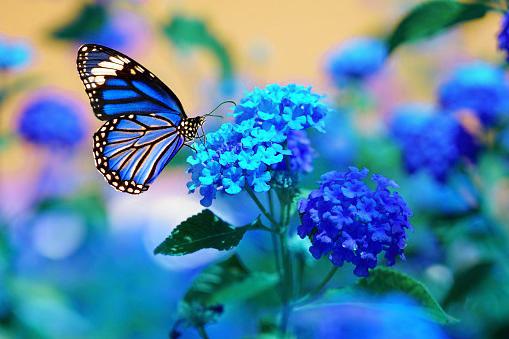
以下是如何使用 `Image.merge()` 方法合并图像的红色、绿色和蓝色波段以创建新的 RGB 图像的示例。
from PIL import Image
image = Image.open("Images/butterfly.jpg")
r, g, b = image.split()
image = Image.merge("RGB", (b, g, r))
image.show()
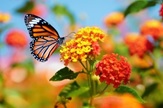
待使用的图像
输出
示例
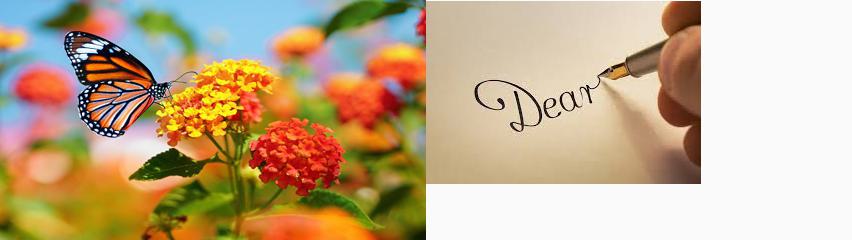
在此示例中,我们使用 Pillow 库的 `Image` 模块的 `merge()` 方法合并两个输入图像。
from PIL import Image
image1 = Image.open("Images/butterfly.jpg")
image2 = Image.open("Images/hand writing.jpg")

#resize, first image
image1 = image1.resize((426, 240))
image1_size = image1.size
image2_size = image2.size
new_image = Image.new("RGB",(2*image1_size[0], image1_size[1]), (250,250,250))
new_image.paste(image1,(0,0))
new_image.paste(image2,(image1_size[0],1))
new_image.save("output Image/merged.jpg")
new_image.show()
要合并的两张图像

输出
广告