
- Python Pillow 教程
- Python Pillow - 首页
- Python Pillow - 概述
- Python Pillow - 环境设置
- 基本图像操作
- Python Pillow - 图像处理
- Python Pillow - 调整图像大小
- Python Pillow - 翻转和旋转图像
- Python Pillow - 裁剪图像
- Python Pillow - 为图像添加边框
- Python Pillow - 识别图像文件
- Python Pillow - 合并图像
- Python Pillow - 剪切和粘贴图像
- Python Pillow - 滚动图像
- Python Pillow - 在图像上添加文字
- Python Pillow - ImageDraw 模块
- Python Pillow - 合并两张图像
- Python Pillow - 创建缩略图
- Python Pillow - 创建水印
- Python Pillow - 图像序列
- Python Pillow 颜色转换
- Python Pillow - 图像颜色
- Python Pillow - 创建彩色图像
- Python Pillow - 将颜色字符串转换为 RGB 颜色值
- Python Pillow - 将颜色字符串转换为灰度值
- Python Pillow - 通过更改像素值来更改颜色
- 图像处理
- Python Pillow - 降噪
- Python Pillow - 更改图像模式
- Python Pillow - 图像合成
- Python Pillow - 使用 Alpha 通道
- Python Pillow - 应用透视变换
- 图像滤镜
- Python Pillow - 为图像添加滤镜
- Python Pillow - 卷积滤镜
- Python Pillow - 模糊图像
- Python Pillow - 边缘检测
- Python Pillow - 浮雕图像
- Python Pillow - 增强边缘
- Python Pillow - 锐化蒙版滤镜
- 图像增强和校正
- Python Pillow - 增强对比度
- Python Pillow - 增强锐度
- Python Pillow - 增强色彩
- Python Pillow - 校正色彩平衡
- Python Pillow - 去噪
- 图像分析
- Python Pillow - 提取图像元数据
- Python Pillow - 识别颜色
- 高级主题
- Python Pillow - 创建动画 GIF
- Python Pillow - 批量处理图像
- Python Pillow - 转换图像文件格式
- Python Pillow - 为图像添加填充
- Python Pillow - 颜色反转
- Python Pillow - 使用 NumPy 进行机器学习
- Python Pillow 与 Tkinter BitmapImage 和 PhotoImage 对象
- Image 模块
- Python Pillow - 图像混合
- Python Pillow 有用资源
- Python Pillow - 快速指南
- Python Pillow - 函数参考
- Python Pillow - 有用资源
- Python Pillow - 讨论
Python Pillow - 图像序列
图像序列简介
Pillow(Python 图像库)中的图像序列指的是按特定顺序显示的一组单个图像,以创建动画。图像序列的常用文件格式包括 GIF、APNG(动画便携式网络图形)、FLI/FLC、TIFF 文件(包含多个帧)等等。
Python Pillow 库提供了ImageSequence模块来处理图像序列和动画图片。ImageSequence 模块的主要功能是能够迭代图像序列的帧。我们可以使用ImageSequence.Iterator类来实现这一点,它充当图像序列的包装器,简化了访问单个帧的过程。
读取图像序列
读取图像序列是处理动画或多帧图像时的基本操作。您可以使用 Python Pillow (PIL) 库中的Image.open()方法打开和读取图像序列。
示例
这是一个演示如何使用 Python Pillow Image.open() 方法读取图像序列的示例。
from PIL import Image, ImageSequence

# Open the image sequence file
image = Image.open("Images/Book_animation.gif")

# Display the opened image
image.show()
输出
执行上述代码时,我们将得到以下输出:

打开图像序列文件时,PIL 会自动加载第一帧。要访问序列中的其他帧,我们需要使用ImageSequence.Iterator类迭代它们,该类提供了一种方便的方法来循环遍历图像序列中的所有帧。
访问图像序列中的帧
Python Pillow 中的ImageSequence.Iterator()类允许我们迭代图像序列的帧。它接受一个图像对象作为参数,并实现一个迭代器对象,用户可以使用该对象迭代图像序列。我们可以使用运算符访问序列中的单个帧,也可以使用 for 循环迭代所有帧。
使用ImageSequence.Iterator()类的语法如下:
image_object = PIL.ImageSequence.Iterator(image)
其中image_object是用于循环遍历图像序列帧的迭代器,image是我们的输入图像对象(PIL.Image 的实例)。
要在 Pillow 中使用 ImageSequence.Iterator,请按照以下步骤操作:
导入必要的模块,例如 Image 和 ImageSequence。
使用Image.open()方法加载序列中的第一张图像。
使用PIL.ImageSequence.Iterator()类迭代帧。
在循环中,根据需要处理或操作每一帧,这可能包括任何以下操作,例如调整大小、添加文本、应用滤镜或 Pillow 中可用的其他图像处理技术。
使用save()方法将处理后的帧另存为单独的图像。
示例
以下示例演示了如何使用ImageSequence.Iterator()类迭代图像序列的帧。
from PIL import Image, ImageSequence

# Open an image sequence file
image = Image.open("Images/Book_animation.gif")

index = 0

# Iterate through the frames
for frame in ImageSequence.Iterator(image):
    # Process or manipulate the current frame here
    frame.convert('RGB').save("output_image/frame % d.jpg" % index)
    index += 1

print("All frames of the ImageSequence are saved separately.")
输出
All frames of the ImageSequence are saved separately.
执行上述代码后,图像序列的所有帧将分别保存在您的工作目录中。
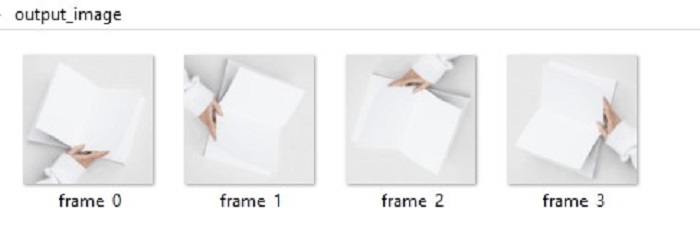
我们还可以访问图像序列中各个帧的各种属性。例如,我们可以检索每个帧的持续时间,这决定了它在动画中显示的时间长度。
创建图像序列
虽然 Image Sequence 模块的主要用途是从现有序列中提取帧,但我们也可以创建自己的图像序列。在此处了解更多关于创建动画 GIF 的信息。
示例
这是一个演示如何从图像列表创建 GIF 图像序列的基本示例。
from PIL import Image

# Create a list of image objects
images = [Image.open(f"Images/split{i}.jpg") for i in range(1,4)]

# Save the image sequence as a GIF
images[0].save(
    "output_image/creating_animation.gif",
    save_all=True,
    append_images=images[1:],
    duration=200,
    loop=0
)

print("Image sequence created and saved as creating_animation.gif")
输出
Image sequence created and saved as creating_animation.gif
修改和保存图像序列
图像序列可以像普通图像一样进行处理和保存。要修改图像序列,您可以使用 Pillow 的 ImageSequence 模块中的all_frames()方法。此方法将指定函数应用于图像序列中的所有帧,并返回一个包含所有分离帧的列表。使用此方法,我们可以迭代图像序列中的每一帧并应用必要的变换。
以下是 ImageSequence.all_frames() 方法的语法:
PIL.ImageSequence.all_frames(im,func)
其中,
im - 一个图像序列。
func - 要应用于所有图像帧的函数。
对图像序列进行更改后,我们可以根据需要将其保存为新的图像序列或不同的格式。
示例
此示例演示了如何为图像序列的每一帧添加文本并保存修改后的序列。
from PIL import Image, ImageSequence, ImageDraw

# Open the image sequence
im = Image.open('Images/book_animation.gif')

# Define a function to add text to each frame
def add_text(im_frame):
    draw = ImageDraw.Draw(im_frame)
    draw.text((150, 100), "Tutorialspoint", fill='green')
    return im_frame

# Apply the add_text function to all frames in the image sequence
ims = ImageSequence.all_frames(im, add_text)

# Save the modified frames as a new GIF
ims[0].convert('RGB').save('output_image/modified_image_sequences.gif', save_all=True, append_images=ims[1:])
print('Text added to each frame of the given ImageSequence.')
输出
Text added to each frame of the given ImageSequence.
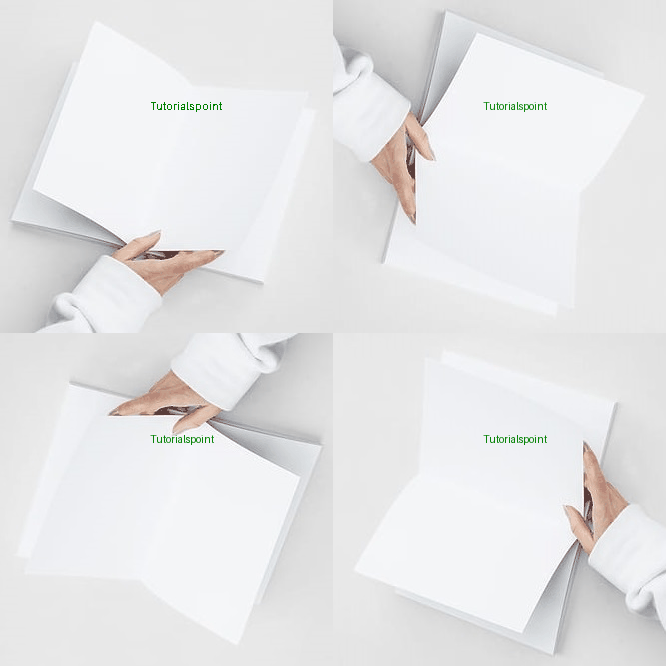
结论
Pillow 的 Image Sequence 模块是处理图像序列和创建动画的强大工具。我们可以轻松地迭代帧、提取属性并应用各种图像操作来创建动态视觉效果。无论我们是处理 GIF、创建自定义动画还是处理图像序列,Pillow 都提供了必要的函数和类来简化此过程。