- Python Pillow 教程
- Python Pillow - 首页
- Python Pillow - 概述
- Python Pillow - 环境设置
- 基本图像操作
- Python Pillow - 图像处理
- Python Pillow - 调整图像大小
- Python Pillow - 翻转和旋转图像
- Python Pillow - 裁剪图像
- Python Pillow - 为图像添加边框
- Python Pillow - 识别图像文件
- Python Pillow - 合并图像
- Python Pillow - 剪切和粘贴图像
- Python Pillow - 滚动图像
- Python Pillow - 在图像上写入文本
- Python Pillow - ImageDraw 模块
- Python Pillow - 合并两张图像
- Python Pillow - 创建缩略图
- Python Pillow - 创建水印
- Python Pillow - 图像序列
- Python Pillow 颜色转换
- Python Pillow - 图像颜色
- Python Pillow - 使用颜色创建图像
- Python Pillow - 将颜色字符串转换为 RGB 颜色值
- Python Pillow - 将颜色字符串转换为灰度值
- Python Pillow - 通过更改像素值来更改颜色
- 图像处理
- Python Pillow - 降噪
- Python Pillow - 更改图像模式
- Python Pillow - 图像合成
- Python Pillow - 使用 Alpha 通道
- Python Pillow - 应用透视变换
- 图像滤镜
- Python Pillow - 为图像添加滤镜
- Python Pillow - 卷积滤镜
- Python Pillow - 模糊图像
- Python Pillow - 边缘检测
- Python Pillow - 浮雕图像
- Python Pillow - 增强边缘
- Python Pillow - 锐化蒙版滤镜
- 图像增强和校正
- Python Pillow - 增强对比度
- Python Pillow - 增强锐度
- Python Pillow - 增强颜色
- Python Pillow - 校正色彩平衡
- Python Pillow - 去噪
- 图像分析
- Python Pillow - 提取图像元数据
- Python Pillow - 识别颜色
- 高级主题
- Python Pillow - 创建动画 GIF
- Python Pillow - 批量处理图像
- Python Pillow - 转换图像文件格式
- Python Pillow - 为图像添加填充
- Python Pillow - 颜色反转
- Python Pillow 与 NumPy
- Python Pillow 与 Tkinter BitmapImage 和 PhotoImage 对象
- Image 模块
- Python Pillow - 图像混合
- Python Pillow 有用资源
- Python Pillow - 快速指南
- Python Pillow - 函数参考
- Python Pillow - 有用资源
- Python Pillow - 讨论
Python Pillow - 批量处理图像
使用 Python Pillow 进行批量图像处理允许您高效地对多张图像同时应用相同的编辑或操作。这种方法对于调整大小、裁剪、重命名、添加水印或格式化图像等任务非常有价值,因为它可以提高工作效率并优化输出。
当处理大量图像时,这尤其有用,因为它可以显著影响计算机的速度和效率。它允许您对每张图像应用相同的操作,从而节省时间和精力。
批量处理图像的步骤
使用 Python Pillow 批量处理图像的步骤如下:
创建图像文件列表:生成要处理的图像的文件路径列表。
遍历图像列表:使用循环遍历图像文件列表。您可以使用“for”或“while”循环一次处理一张图像。
执行图像处理操作:在循环中,对每张图像应用所需的图像处理操作。这可能包括调整大小、裁剪、应用滤镜、添加文本或水印,或任何其他必要的操作。
保存处理后的图像:对每张图像执行处理操作后,将处理后的图像保存到所需的位置。
使用批量处理调整图像大小
使用 Python Pillow 批量处理调整图像大小是图像处理中的常见任务之一。它涉及将多张图像的尺寸调整为特定大小或纵横比。
示例
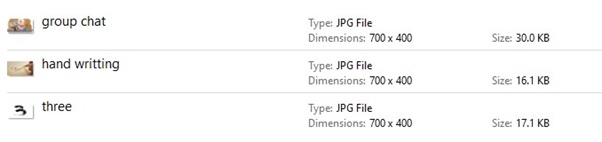
以下示例演示了使用 Python Pillow 批量处理一次调整多张图像的大小。在此示例中,指定文件夹中的一组 JPG 图像被调整为特定大小(例如,700x400)。
from PIL import Image
import glob
import os

# Get a list of image files in the 'Images for Batch Operation' directory
input_directory = "Images for Batch Operation"
output_directory = "Output directory for Batch Operation"

image_files = [f for f in glob.glob(os.path.join(input_directory, "*.jpg"))]

for file in image_files:
   image = Image.open(file)

   # Resize the image to a specific size (e.g., 700x400)
   image = image.resize((700, 400))

   # Save the resized image to the 'Output directory for Batch Operation' directory
   output_path = os.path.join(output_directory, os.path.basename(file))
   image.save(output_path)
输出
下图显示了输入目录中可用的图像文件列表。
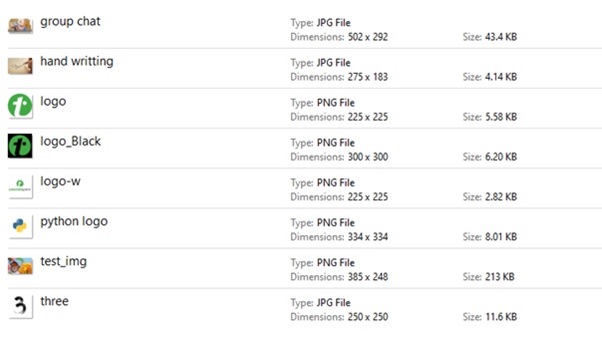
如果我们导航到保存输出图像的目录(即“批量操作的输出目录”),我们将能够观察到如下所示的调整大小的图像。
使用批量处理重命名图像
重命名图像是批量处理中另一个经常执行的任务。它涉及根据指定的模式更改多张图像的文件名。
示例
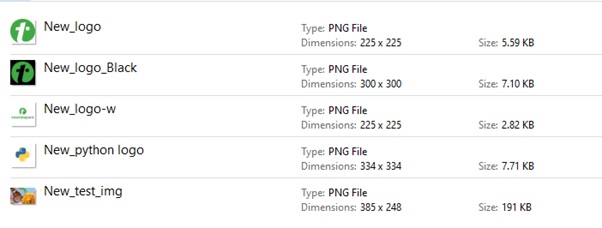
以下示例在指定 input_directory 中的一批 PNG 图像名称前添加前缀“New_”。它重命名这些图像,并使用新名称将它们保存在 output_directory 中。
from PIL import Image
import glob
import os

# Get a list of image files in the 'Images for Batch Operation' directory
input_directory = "Images for Batch Operation"
output_directory = "Output directory for Batch Operation"

image_files = [f for f in glob.glob(os.path.join(input_directory, "*.png"))]

for file in image_files:
   image = Image.open(file)

   # Save the image with the new name to the 'Output directory for Batch Operation' directory
   output_path = os.path.join(output_directory, 'New_'+os.path.basename(file))
   image.save(output_path)
输出
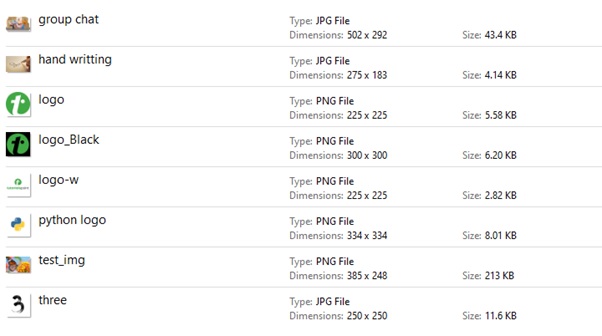
下图显示了输入目录中可用的图像文件列表。
如果我们导航到保存输出图像的目录(即“批量操作的输出目录”),我们将能够观察到如下所示的重命名图像。