- Python基础
- Python - 首页
- Python - 概述
- Python - 历史
- Python - 特性
- Python vs C++
- Python - Hello World程序
- Python - 应用领域
- Python - 解释器
- Python - 环境搭建
- Python - 虚拟环境
- Python - 基本语法
- Python - 变量
- Python - 数据类型
- Python - 类型转换
- Python - Unicode系统
- Python - 字面量
- Python - 运算符
- Python - 算术运算符
- Python - 比较运算符
- Python - 赋值运算符
- Python - 逻辑运算符
- Python - 位运算符
- Python - 成员运算符
- Python - 身份运算符
- Python - 运算符优先级
- Python - 注释
- Python - 用户输入
- Python - 数字
- Python - 布尔值
- Python控制语句
- Python - 控制流
- Python - 决策制定
- Python - if语句
- Python - if else语句
- Python - 嵌套if语句
- Python - match-case语句
- Python - 循环
- Python - for循环
- Python - for-else循环
- Python - while循环
- Python - break语句
- Python - continue语句
- Python - pass语句
- Python - 嵌套循环
- Python函数与模块
- Python - 函数
- Python - 默认参数
- Python - 关键字参数
- Python - 仅关键字参数
- Python - 位置参数
- Python - 仅位置参数
- Python - 可变参数
- Python - 变量作用域
- Python - 函数注解
- Python - 模块
- Python - 内置函数
- Python字符串
- Python - 字符串
- Python - 字符串切片
- Python - 修改字符串
- Python - 字符串连接
- Python - 字符串格式化
- Python - 转义字符
- Python - 字符串方法
- Python - 字符串练习
- Python列表
- Python - 列表
- Python - 访问列表元素
- Python - 修改列表元素
- Python - 添加列表元素
- Python - 删除列表元素
- Python - 遍历列表
- Python - 列表推导式
- Python - 排序列表
- Python - 复制列表
- Python - 合并列表
- Python - 列表方法
- Python - 列表练习
- Python元组
- Python - 元组
- Python - 访问元组元素
- Python - 更新元组
- Python - 解包元组
- Python - 遍历元组
- Python - 合并元组
- Python - 元组方法
- Python - 元组练习
- Python集合
- Python - 集合
- Python - 访问集合元素
- Python - 添加集合元素
- Python - 删除集合元素
- Python - 遍历集合
- Python - 合并集合
- Python - 复制集合
- Python - 集合运算符
- Python - 集合方法
- Python - 集合练习
- Python字典
- Python - 字典
- Python - 访问字典元素
- Python - 修改字典元素
- Python - 添加字典元素
- Python - 删除字典元素
- Python - 字典视图对象
- Python - 遍历字典
- Python - 复制字典
- Python - 嵌套字典
- Python - 字典方法
- Python - 字典练习
- Python数组
- Python - 数组
- Python - 访问数组元素
- Python - 添加数组元素
- Python - 删除数组元素
- Python - 遍历数组
- Python - 复制数组
- Python - 反转数组
- Python - 排序数组
- Python - 合并数组
- Python - 数组方法
- Python - 数组练习
- Python文件处理
- Python - 文件处理
- Python - 写入文件
- Python - 读取文件
- Python - 重命名和删除文件
- Python - 目录
- Python - 文件方法
- Python - OS文件/目录方法
- Python - OS路径方法
- 面向对象编程
- Python - OOPs概念
- Python - 类与对象
- Python - 类属性
- Python - 类方法
- Python - 静态方法
- Python - 构造函数
- Python - 访问修饰符
- Python - 继承
- Python - 多态
- Python - 方法重写
- Python - 方法重载
- Python - 动态绑定
- Python - 动态类型
- Python - 抽象
- Python - 封装
- Python - 接口
- Python - 包
- Python - 内部类
- Python - 匿名类和对象
- Python - 单例类
- Python - 包装器类
- Python - 枚举
- Python - 反射
- Python错误与异常
- Python - 语法错误
- Python - 异常
- Python - try-except块
- Python - try-finally块
- Python - 抛出异常
- Python - 异常链
- Python - 嵌套try块
- Python - 用户自定义异常
- Python - 日志记录
- Python - 断言
- Python - 内置异常
- Python多线程
- Python - 多线程
- Python - 线程生命周期
- Python - 创建线程
- Python - 启动线程
- Python - 加入线程
- Python - 线程命名
- Python - 线程调度
- Python - 线程池
- Python - 主线程
- Python - 线程优先级
- Python - 守护线程
- Python - 线程同步
- Python同步
- Python - 线程间通信
- Python - 线程死锁
- Python - 中断线程
- Python网络编程
- Python - 网络编程
- Python - Socket编程
- Python - URL处理
- Python - 泛型
- Python库
- NumPy教程
- Pandas教程
- SciPy教程
- Matplotlib教程
- Django教程
- OpenCV教程
- Python杂项
- Python - 日期与时间
- Python - 数学
- Python - 迭代器
- Python - 生成器
- Python - 闭包
- Python - 装饰器
- Python - 递归
- Python - 正则表达式
- Python - PIP
- Python - 数据库访问
- Python - 弱引用
- Python - 序列化
- Python - 模板
- Python - 输出格式化
- Python - 性能测量
- Python - 数据压缩
- Python - CGI编程
- Python - XML处理
- Python - GUI编程
- Python - 命令行参数
- Python - 文档字符串
- Python - JSON
- Python - 发送邮件
- Python - 扩展
- Python - 工具/实用程序
- Python - GUIs
- Python高级概念
- Python - 抽象基类
- Python - 自定义异常
- Python - 高阶函数
- Python - 对象内部结构
- Python - 内存管理
- Python - 元类
- Python - 使用元类进行元编程
- Python - 模拟和存根
- Python - 猴子补丁
- Python - 信号处理
- Python - 类型提示
- Python - 自动化教程
- Python - Humanize包
- Python - 上下文管理器
- Python - 协程
- Python - 描述符
- Python - 诊断和修复内存泄漏
- Python - 不可变数据结构
- Python有用资源
- Python - 问答
- Python - 在线测验
- Python - 快速指南
- Python - 参考
- Python - 速查表
- Python - 项目
- Python - 有用资源
- Python - 讨论
- Python编译器
- NumPy编译器
- Matplotlib编译器
- SciPy编译器
使用Pygame制作的太空侵略者游戏
太空侵略者游戏是一款使用著名的Python框架Pygame开发的基本二维游戏。游戏中玩家操控一艘宇宙飞船,向其他宇宙飞船射击,同时躲避其他宇宙飞船射来的子弹。随着玩家得分增加,游戏难度也会提升,敌人的速度和射击频率会加快。
如何玩太空侵略者游戏?
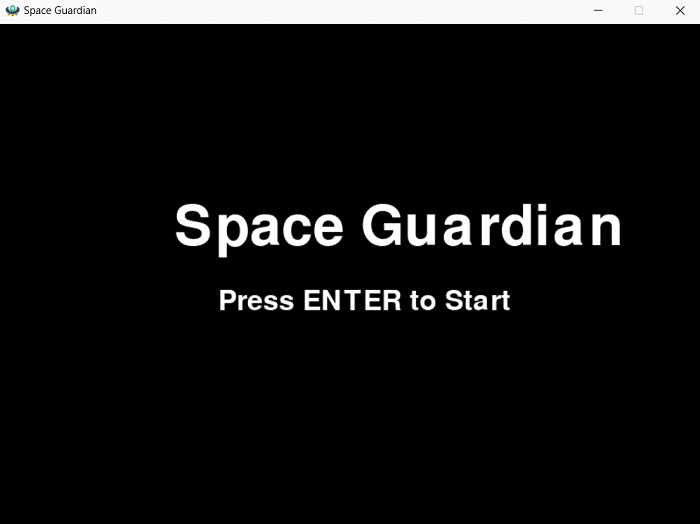
1. 开始游戏
首先,按键盘上的ENTER键开始游戏。
2. 移动
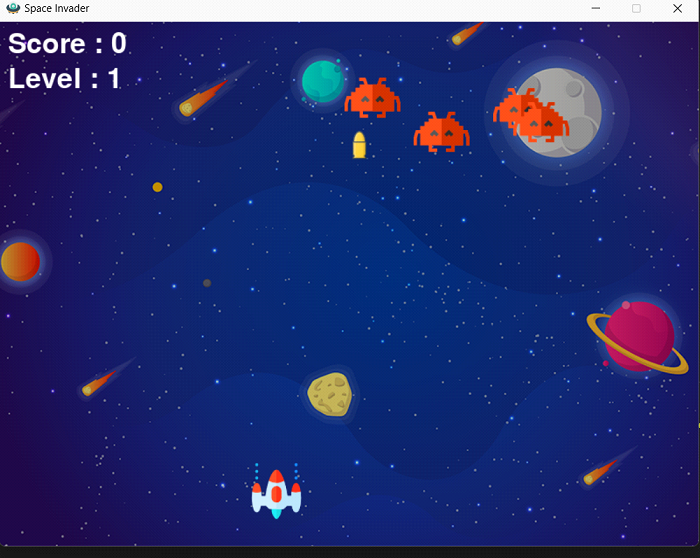
使用A和D键控制飞船左右移动。使用W键向上移动,S键向下移动。
3. 射击
按空格键向敌人射击。
4. 目标
尽可能击落更多的敌方宇宙飞船,同时躲避它们的子弹。
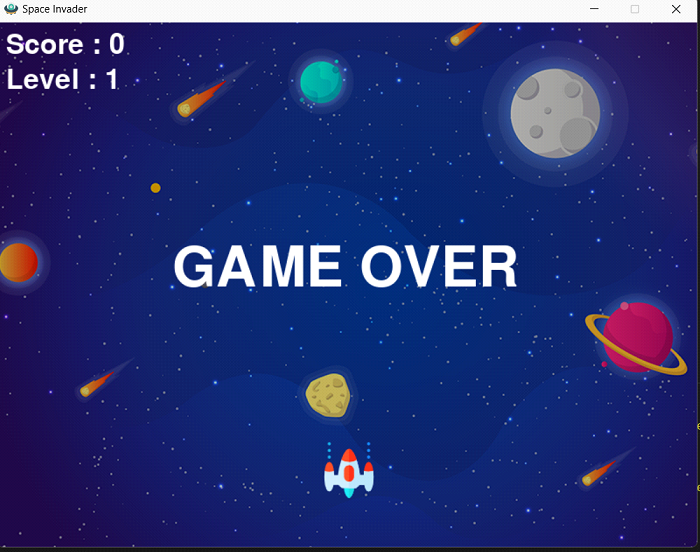
5. 游戏结束
如果敌人的子弹击中你的飞船,或者敌人到达屏幕底部,游戏结束。
注意
请确保下载敌方宇宙飞船和背景的图片,否则游戏无法正常运行。
最终游戏
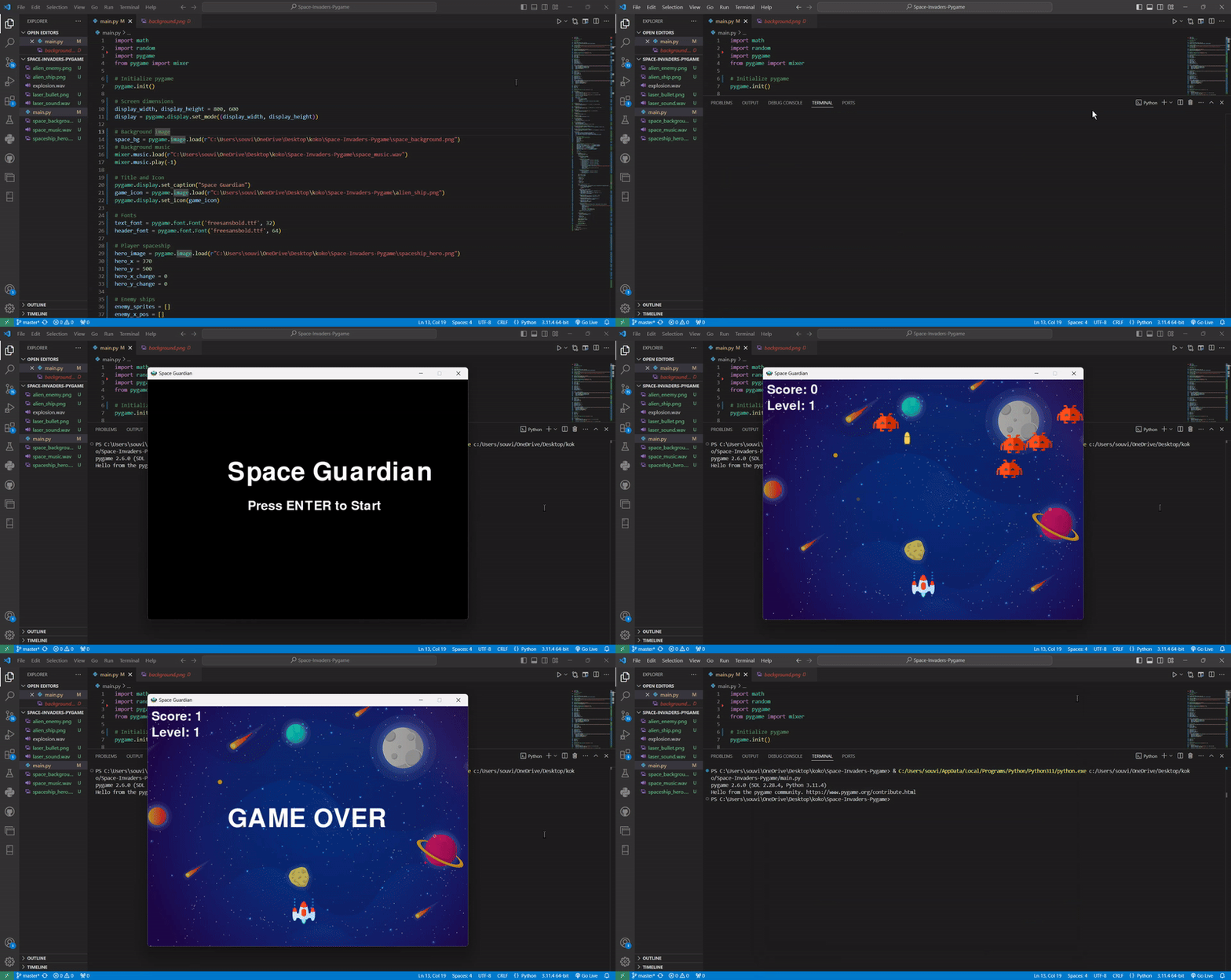
使用Pygame实现太空侵略者游戏
1. 所需库
要实现此游戏,您需要安装以下库:
- math - 用于计算距离以检测子弹和敌人之间的碰撞。
- random - 用于生成随机的敌人位置和子弹射击时间。
- Pygame − 用于计算距离,检测子弹与敌机之间的碰撞。
2. 游戏初始化
启动 Pygame 并设置显示
此部分初始化 Pygame 库并设置游戏窗口的宽度和高度。还会加载游戏的背景音乐和图像。
玩家设置
加载玩家的宇宙飞船,并设置初始位置和移动变量。
敌机设置
初始化敌机,包括它们各自的位置、速度和移动变化。
开始菜单
显示开始菜单,包含标题和提示玩家开始游戏的提示。
3. 主游戏循环
处理事件、更新玩家和敌机移动的主循环。它还处理碰撞检测、子弹移动和更新游戏显示。
使用 Pygame 实现太空侵略者游戏的代码
以下是实现该游戏的完整代码:
import math
import random
import pygame
from pygame import mixer

# Initialize pygame
pygame.init()

# Screen dimensions
display_width, display_height = 800, 600
display = pygame.display.set_mode((display_width, display_height))

# Background image
space_bg = pygame.image.load(r"C:\Users\souvi\OneDrive\Desktop\koko\Space-Invaders-Pygame\space_background.png")
# Background music
mixer.music.load(r"C:\Users\souvi\OneDrive\Desktop\koko\Space-Invaders-Pygame\space_music.wav")
mixer.music.play(-1)

# Title and Icon
pygame.display.set_caption("Space Guardian")
game_icon = pygame.image.load(r"C:\Users\souvi\OneDrive\Desktop\koko\Space-Invaders-Pygame\alien_ship.png")
pygame.display.set_icon(game_icon)

# Fonts
text_font = pygame.font.Font('freesansbold.ttf', 32)
header_font = pygame.font.Font('freesansbold.ttf', 64)

# Player spaceship
hero_image = pygame.image.load(r"C:\Users\souvi\OneDrive\Desktop\koko\Space-Invaders-Pygame\spaceship_hero.png")
hero_x = 370
hero_y = 500
hero_x_change = 0
hero_y_change = 0

# Enemy ships
enemy_sprites = []
enemy_x_pos = []
enemy_y_pos = []
enemy_x_change = []
enemy_y_change = []
number_of_enemies = 5
base_enemy_velocity = 0.4

i = 0
while i < number_of_enemies:
   enemy_sprites.append(pygame.image.load(r"C:\Users\souvi\OneDrive\Desktop\koko\Space-Invaders-Pygame\alien_enemy.png"))
   enemy_x_pos.append(random.randint(0, 736))
   enemy_y_pos.append(random.randint(50, 150))
   enemy_x_change.append(base_enemy_velocity)
   enemy_y_change.append(20)
   i += 1

# Player bullets
bullet_sprite = pygame.image.load(r"C:\Users\souvi\OneDrive\Desktop\koko\Space-Invaders-Pygame\laser_bullet.png")
bullet_x = 0
bullet_y = 500
bullet_x_change = 0
bullet_y_change = 10
bullet_state = "ready"

# Enemy bullets
enemy_bullet_sprite = []
enemy_bullet_x = []
enemy_bullet_y = []
enemy_bullet_y_change = []
enemy_bullet_state = []
j = 0
while j < number_of_enemies:
   enemy_bullet_sprite.append(pygame.image.load(r"C:\Users\souvi\OneDrive\Desktop\koko\Space-Invaders-Pygame\laser_bullet.png"))
   enemy_bullet_x.append(0)
   enemy_bullet_y.append(enemy_y_pos[j])
   enemy_bullet_y_change.append(2)
   enemy_bullet_state.append("ready")
   j += 1

# Score and level
score = 0
game_level = 1
text_x = 10
text_y = 10

# Game Over font
game_over_font = pygame.font.Font('freesansbold.ttf', 64)

# Start Menu
def start_menu():
   display.fill((0, 0, 0))
   title_text = header_font.render("Space Guardian", True, (255, 255, 255))
   display.blit(title_text, (200, 200))

   instructions = text_font.render("Press ENTER to Start", True, (255, 255, 255))
   display.blit(instructions, (250, 300))

   pygame.display.update()
   start = False
   while not start:
      for event in pygame.event.get():
         if event.type == pygame.QUIT:
            pygame.quit()
            quit()
         if event.type == pygame.KEYDOWN and event.key == pygame.K_RETURN:
            start = True

# Display score
def display_score(x, y):
   score_text = text_font.render("Score: " + str(score), True, (255, 255, 255))
   display.blit(score_text, (x, y))

# Display level
def display_level(x, y):
   level_text = text_font.render("Level: " + str(game_level), True, (255, 255, 255))
   display.blit(level_text, (x, y + 40))

# Game Over text
def game_over():
   over_text = game_over_font.render("GAME OVER", True, (255, 255, 255))
   display.blit(over_text, (200, 250))

# Player sprite
def player(x, y):
   display.blit(hero_image, (x, y))

# Enemy sprite
def enemy(x, y, index):
   display.blit(enemy_sprites[index], (x, y))

# Fire player bullet
def fire_hero_bullet(x, y):
   global bullet_state
   bullet_state = "fire"
   display.blit(bullet_sprite, (x + 16, y + 10))

# Fire enemy bullet
def fire_enemy_bullet(x, y, index):
   global enemy_bullet_state
   enemy_bullet_state[index] = "fire"
   display.blit(enemy_bullet_sprite[index], (x + 16, y + 10))

# Collision detection (player bullet with enemy)
def collision_detected(enemy_x, enemy_y, bullet_x, bullet_y):
   distance = math.sqrt(math.pow(enemy_x - bullet_x, 2) + (math.pow(enemy_y - bullet_y, 2)))
   return distance < 27

# Collision detection (enemy bullet with player)
def player_hit(player_x, player_y, bullet_x, bullet_y):
   distance = math.sqrt(math.pow(player_x - bullet_x, 2) + (math.pow(player_y - bullet_y, 2)))
   return distance < 30

def game_loop():
   global bullet_x, bullet_y, bullet_state, score, game_level
   global hero_x, hero_y, hero_x_change, hero_y_change
   global enemy_x_pos, enemy_y_pos, enemy_x_change, enemy_y_change
   global enemy_bullet_x, enemy_bullet_y, enemy_bullet_state, enemy_bullet_y_change

   try:
      # Initialize variables
      hero_x = 368  # Example starting position
      hero_y = 480  # Example starting position
      hero_x_change = 0
      hero_y_change = 0
      bullet_x = 0
      bullet_y = 500
      bullet_state = "ready"
      score = 0
      game_level = 1

      # Example initialization for enemies and their bullets
      number_of_enemies = 5
      enemy_x_pos = [random.randint(0, 736) for _ in range(number_of_enemies)]
      enemy_y_pos = [random.randint(50, 150) for _ in range(number_of_enemies)]
      enemy_x_change = [base_enemy_velocity for _ in range(number_of_enemies)]
      enemy_y_change = [40 for _ in range(number_of_enemies)]
      enemy_bullet_x = [0 for _ in range(number_of_enemies)]
      enemy_bullet_y = [0 for _ in range(number_of_enemies)]
      enemy_bullet_state = ["ready" for _ in range(number_of_enemies)]
      enemy_bullet_y_change = [10 for _ in range(number_of_enemies)]

      running = True

      start_menu()  # Call start menu

      while running:
         display.fill((0, 0, 0))
         display.blit(space_bg, (0, 0))

         # Event handling
         for event in pygame.event.get():
            if event.type == pygame.QUIT:
               running = False

         # Key press detection
         if event.type == pygame.KEYDOWN:
            if event.key == pygame.K_a or event.key == pygame.K_LEFT:
               hero_x_change = -5
            if event.key == pygame.K_d or event.key == pygame.K_RIGHT:
               hero_x_change = 5
            if event.key == pygame.K_w or event.key == pygame.K_UP:
               hero_y_change = -5
            if event.key == pygame.K_s or event.key == pygame.K_DOWN:
               hero_y_change = 5
            if event.key == pygame.K_SPACE and bullet_state == "ready":
               bullet_sound = mixer.Sound(r"C:\Users\souvi\OneDrive\Desktop\koko\Space-Invaders-Pygame\laser_sound.wav")
               bullet_sound.play()
               bullet_x = hero_x
               bullet_y = hero_y  # Initialize bullet_y when firing
               bullet_state = "fire"

         # Key release detection
         if event.type == pygame.KEYUP:
            if event.key == pygame.K_a or event.key == pygame.K_d:
               hero_x_change = 0
            if event.key == pygame.K_w or event.key == pygame.K_s:
               hero_y_change = 0

         # Move player
         hero_x += hero_x_change
         hero_y += hero_y_change

         # Boundary for player
         if hero_x <= 0:
            hero_x = 0
         elif hero_x >= 736:
            hero_x = 736

         if hero_y <= 0:
            hero_y = 0
         elif hero_y >= 536:
            hero_y = 536

         # Enemy movement and collision logic
         e = 0
         while e < number_of_enemies:
            if enemy_y_pos[e] > 440 or player_hit(hero_x, hero_y, enemy_bullet_x[e], enemy_bullet_y[e]):
               for j in range(number_of_enemies):
                  enemy_y_pos[j] = 2000
               game_over()
               break

            enemy_x_pos[e] += enemy_x_change[e]
               if enemy_x_pos[e] <= 0:
                  enemy_x_change[e] = base_enemy_velocity + (game_level - 1) / 4
                  enemy_y_pos[e] += enemy_y_change[e]
               elif enemy_x_pos[e] >= 736:
                  enemy_x_change[e] = -(base_enemy_velocity + (game_level - 1) / 4)
                  enemy_y_pos[e] += enemy_y_change[e]

         # Enemy bullet firing
         if enemy_bullet_state[e] == "ready" and random.random() < 0.008:
            enemy_bullet_x[e] = enemy_x_pos[e]
            fire_enemy_bullet(enemy_bullet_x[e], enemy_bullet_y[e], e)

         if enemy_bullet_state[e] == "fire":
            fire_enemy_bullet(enemy_bullet_x[e], enemy_bullet_y[e], e)
            enemy_bullet_y[e] += enemy_bullet_y_change[e]

         if enemy_bullet_y[e] >= 600:
            enemy_bullet_y[e] = enemy_y_pos[e]
            enemy_bullet_state[e] = "ready"

         # Check for collisions
         if bullet_state == "fire":
            collision = collision_detected(enemy_x_pos[e], enemy_y_pos[e], bullet_x, bullet_y)
            if collision:
               explosion_sound = mixer.Sound(r"C:\Users\souvi\OneDrive\Desktop\koko\Space-Invaders-Pygame\explosion.wav")
               explosion_sound.play()
               bullet_y = 500
               bullet_state = "ready"
               score += 1
               enemy_x_pos[e] = random.randint(0, 736)
               enemy_y_pos[e] = random.randint(50, 150)

            enemy(enemy_x_pos[e], enemy_y_pos[e], e)
               e += 1

         # Bullet movement
         if bullet_state == "fire":
            fire_hero_bullet(bullet_x, bullet_y)
            bullet_y -= bullet_y_change

            if bullet_y <= 0:
               bullet_y = 500
               bullet_state = "ready"

         # Update score and level
         display_score(text_x, text_y)
         display_level(text_x, text_y)

         # Display player
         player(hero_x, hero_y)

         # Update the screen
         pygame.display.update()

      except Exception as e:
         print(f"An error occurred: {e}")

   finally:
      pygame.quit()

# Call game_loop() in a try-except block
if __name__ == "__main__":
   game_loop()
代码分解
导入所需的库:这些是游戏功能所需的必要库,包括数学库、随机数生成库、Pygame 库和 pygame.mixer 库(用于游戏音乐)。
- 初始化 pygame − Pygame 中的 init() 函数调用并初始化运行游戏所需的许多模块。
- 设置屏幕尺寸 − 定义变量 display_width 为游戏屏幕宽度,display_height 为游戏屏幕高度。
- 创建游戏窗口 − 使用 display.set_mode() 开发屏幕上显示的图形。
- 加载背景图像 − 使用 image.load() 中的 image 模块将背景图像加载到游戏中。
- 加载并播放背景音乐 − 预先录制好的音乐预设并在混音器上使用特定的 music.load() 和 mixer.music.play() 播放。
- 设置标题和图标 − Pygame 用于设置游戏的标题和窗口图标,使用 display.set_caption() 和 pygame.display.set_icon()。
- 加载字体 − 分数字体、游戏结束消息字体和标题屏幕字体都是使用 font.Font() 加载的资源。
- 加载玩家图像 − 加载玩家的宇宙飞船图像,并设置宇宙飞船的初始 x 和 y 坐标。
- 加载敌机 − 创建多个目标飞船,并将其随机放置在战场上。玩家需要加载子弹图像。还需要加载玩家可以看到的宇宙飞船的子弹图像。
- 加载敌机子弹 为每艘敌机创建敌机发射的子弹图像。
- 设置分数和关卡占位符 − 玩家的分数以及当前的游戏关卡是需要定义的变量。
- 游戏结束字体 − 也创建了显示“游戏结束”消息的字体。
- 定义开始菜单 − 第一个菜单创建游戏标题并显示游戏玩法。
- 定义分数显示 − 为在屏幕上显示玩家分数,定义了一个特殊的函数。
- 定义关卡显示 − 使用一个函数在玩家可见的屏幕上显示游戏关卡。
- 定义游戏结束函数 − 开发另一个函数来显示游戏结束和玩家输掉游戏的消息。
- 定义玩家函数 − 使用函数呈现玩家的宇宙飞船。
- 定义敌机函数 − 资源通过屏幕上的坐标来描绘敌机。
- 发射玩家子弹函数 − 开发一个函数来处理玩家宇宙飞船发射子弹。
- 发射敌机子弹函数 − 同样,为敌机定义了一个类似的函数,用于发射子弹。
- 使用碰撞检测来检测玩家子弹 − 一个函数通过计算距离来确定玩家的子弹是否会击中敌人。
- 敌机子弹的碰撞解决 − 另一个函数检查敌机子弹是否击中了玩家的宇宙飞船。
- 定义游戏循环 − 所有游戏逻辑都放在一个循环中;这意味着游戏会持续运行,直到玩家决定停止游戏。
- 处理玩家移动 − 监督重要事件以管理玩家拥有的宇宙飞船的导航运动。
- 玩家边界 − 准确地说,玩家的移动仅限于屏幕定义的区域,无论是水平还是垂直,可以是自由移动或横向卷轴。
- 处理敌机移动 − 目标是中性的,会在水平和垂直方向移动,并在撞击屏幕边缘后下降。
- 敌机子弹移动 − 敌机子弹会随机发射,并向下移动朝向玩家。
- 更新显示 − 可以随时在持续进行的过程中使用 **pygame** 更新屏幕。**display.update()** 用于游戏循环中发生的所有更改。
python_reference.htm
广告