
- Cypress 教程
- Cypress - 首页
- Cypress - 简介
- Cypress - 架构和环境设置
- Cypress - 测试运行器
- Cypress - 创建第一个测试
- Cypress - 支持的浏览器
- Cypress - 基本命令
- Cypress - 变量
- Cypress - 别名
- Cypress - 定位器
- Cypress - 断言
- Cypress - 文本验证
- Cypress - 异步行为
- Cypress - 使用 XHR
- Cypress - jQuery
- Cypress - 复选框
- Cypress - 标签页
- Cypress - 下拉列表
- Cypress - 警报
- Cypress - 子窗口
- Cypress - 隐藏元素
- Cypress - 框架
- Cypress - 网页表格
- Cypress - 鼠标操作
- Cypress - Cookie
- Cypress - GET 和 POST 请求
- Cypress - 文件上传
- Cypress - 数据驱动测试
- Cypress - 提示弹出窗口
- Cypress - 仪表盘
- Cypress - 截图和视频
- Cypress - 调试
- Cypress - 自定义命令
- Cypress - Fixture
- Cypress - 环境变量
- Cypress - 钩子
- Cypress - JSON 文件配置
- Cypress - 报告
- Cypress - 插件
- Cypress - GitHub
- Cypress 有用资源
- Cypress - 快速指南
- Cypress - 有用资源
- Cypress - 讨论
Cypress - 钩子
Cypress 钩子用于在每个测试之前/之后执行某些操作。一些常见的钩子如下:
before - 在 describe 块中任何测试执行之前执行一次。
after - 在 describe 块中所有测试执行之后执行一次。
beforeEach - 在 describe 块中每个 it 块执行之前执行。
afterEach - 在 describe 块中每个 it 块执行之后执行。
实现
Cypress 钩子命令的实现如下:
describe('Tutorialspoint', function() {
   before(function() {
      // executes once prior all tests in it block
      cy.log("Before hook")
   })
   after(function() {
      // executes once post all tests in it block
      cy.log("After hook")
   })
   beforeEach(function() {
      // executes prior each test within it block
      cy.log("BeforeEach hook")
   })
   afterEach(function() {
      // executes post each test within it block
      cy.log("AfterEac hook")
   })
   it('First Test', function() {
      cy.log("First Test")
   })
   it('Second Test', function() {
      cy.log("Second Test")
   })
})
执行结果
输出如下:
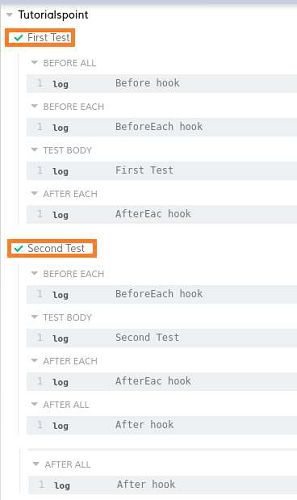
输出日志显示第一个执行的步骤是 BEFORE ALL。
最后一个执行的步骤是 AFTER ALL。两者都只运行了一次。
BEFORE EACH 下执行的步骤运行了两次(每个 TEST BODY 之前)。
同样,AFTER EACH 下执行的步骤运行了两次(每个 TEST BODY 之后)。
两个 it 块按其实现顺序执行。
标签
除了钩子,Cypress 还有标签 -.only 和 .skip。
.only 标签用于执行其标记的 it 块,.skip 标签用于排除其标记的 it 块。
使用 .only 的实现
.only 标签在 Cypress 中的实现如下:
describe('Tutorialspoint', function()
   //it block with tag .only
   it.only('First Test', function() {
      cy.log("First Test")
   })
   //it block with tag .only
   It.only('Second Test', function() {
      cy.log("Second Test")
   })
   it('Third Test', function() {
      cy.log("Third Test")
   })
})
执行结果
输出如下:
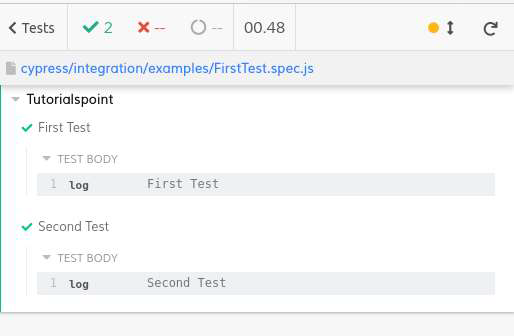
输出日志显示只有带有 .only 标签的 it 块(第一个和第二个测试)被执行。
使用 .skip 的实现
.skip 标签在 Cypress 中的实现如下:
describe('Tutorialspoint', function()
   it('First Test', function() {
      cy.log("First Test")
   })
   it('Second Test', function() {
      cy.log("Second Test")
   })
   //it block with tag .skip
   it.skip('Third Test', function() {
      cy.log("Third Test")
   })
})
执行结果
输出如下:
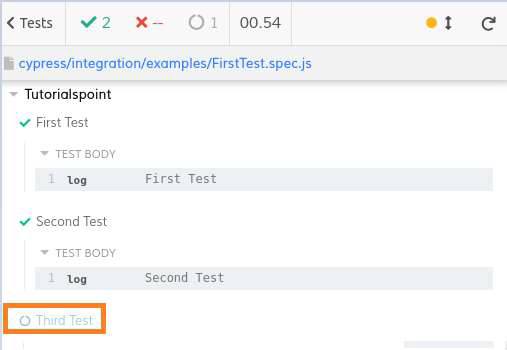
输出日志显示带有 .skip 标签的 it 块(第三个测试)被跳过执行。
广告