- Python 基础
- Python - 首页
- Python - 概述
- Python - 历史
- Python - 特性
- Python vs C++
- Python - Hello World 程序
- Python - 应用领域
- Python - 解释器
- Python - 环境搭建
- Python - 虚拟环境
- Python - 基本语法
- Python - 变量
- Python - 数据类型
- Python - 类型转换
- Python - Unicode 系统
- Python - 字面量
- Python - 运算符
- Python - 算术运算符
- Python - 比较运算符
- Python - 赋值运算符
- Python - 逻辑运算符
- Python - 位运算符
- Python - 成员运算符
- Python - 身份运算符
- Python - 运算符优先级
- Python - 注释
- Python - 用户输入
- Python - 数字
- Python - 布尔值
- Python 控制语句
- Python - 控制流
- Python - 决策
- Python - If 语句
- Python - If else
- Python - 嵌套 If
- Python - Match-Case 语句
- Python - 循环
- Python - for 循环
- Python - for-else 循环
- Python - While 循环
- Python - break 语句
- Python - continue 语句
- Python - pass 语句
- Python - 嵌套循环
- Python 函数与模块
- Python - 函数
- Python - 默认参数
- Python - 关键字参数
- Python - 仅关键字参数
- Python - 位置参数
- Python - 仅位置参数
- Python - 可变参数
- Python - 变量作用域
- Python - 函数注解
- Python - 模块
- Python - 内置函数
- Python 字符串
- Python - 字符串
- Python - 字符串切片
- Python - 修改字符串
- Python - 字符串连接
- Python - 字符串格式化
- Python - 转义字符
- Python - 字符串方法
- Python - 字符串练习
- Python 列表
- Python - 列表
- Python - 访问列表元素
- Python - 修改列表元素
- Python - 添加列表元素
- Python - 删除列表元素
- Python - 循环遍历列表
- Python - 列表推导式
- Python - 排序列表
- Python - 复制列表
- Python - 合并列表
- Python - 列表方法
- Python - 列表练习
- Python 元组
- Python - 元组
- Python - 访问元组元素
- Python - 更新元组
- Python - 解包元组
- Python - 循环遍历元组
- Python - 合并元组
- Python - 元组方法
- Python - 元组练习
- Python 集合
- Python - 集合
- Python - 访问集合元素
- Python - 添加集合元素
- Python - 删除集合元素
- Python - 循环遍历集合
- Python - 合并集合
- Python - 复制集合
- Python - 集合运算符
- Python - 集合方法
- Python - 集合练习
- Python 字典
- Python - 字典
- Python - 访问字典元素
- Python - 修改字典元素
- Python - 添加字典元素
- Python - 删除字典元素
- Python - 字典视图对象
- Python - 循环遍历字典
- Python - 复制字典
- Python - 嵌套字典
- Python - 字典方法
- Python - 字典练习
- Python 数组
- Python - 数组
- Python - 访问数组元素
- Python - 添加数组元素
- Python - 删除数组元素
- Python - 循环遍历数组
- Python - 复制数组
- Python - 反转数组
- Python - 排序数组
- Python - 合并数组
- Python - 数组方法
- Python - 数组练习
- Python 文件处理
- Python - 文件处理
- Python - 写入文件
- Python - 读取文件
- Python - 重命名和删除文件
- Python - 目录
- Python - 文件方法
- Python - OS 文件/目录方法
- Python - OS 路径方法
- 面向对象编程
- Python - OOPs 概念
- Python - 类与对象
- Python - 类属性
- Python - 类方法
- Python - 静态方法
- Python - 构造函数
- Python - 访问修饰符
- Python - 继承
- Python - 多态
- Python - 方法重写
- Python - 方法重载
- Python - 动态绑定
- Python - 动态类型
- Python - 抽象
- Python - 封装
- Python - 接口
- Python - 包
- Python - 内部类
- Python - 匿名类和对象
- Python - 单例类
- Python - 包装类
- Python - 枚举
- Python - 反射
- Python 错误与异常
- Python - 语法错误
- Python - 异常
- Python - try-except 块
- Python - try-finally 块
- Python - 抛出异常
- Python - 异常链
- Python - 嵌套 try 块
- Python - 用户自定义异常
- Python - 日志记录
- Python - 断言
- Python - 内置异常
- Python 多线程
- Python - 多线程
- Python - 线程生命周期
- Python - 创建线程
- Python - 启动线程
- Python - 线程连接
- Python - 线程命名
- Python - 线程调度
- Python - 线程池
- Python - 主线程
- Python - 线程优先级
- Python - 守护线程
- Python - 线程同步
- Python 同步
- Python - 线程间通信
- Python - 线程死锁
- Python - 中断线程
- Python 网络编程
- Python - 网络编程
- Python - 套接字编程
- Python - URL 处理
- Python - 泛型
- Python 库
- NumPy 教程
- Pandas 教程
- SciPy 教程
- Matplotlib 教程
- Django 教程
- OpenCV 教程
- Python 杂项
- Python - 日期与时间
- Python - 数学
- Python - 迭代器
- Python - 生成器
- Python - 闭包
- Python - 装饰器
- Python - 递归
- Python - 正则表达式
- Python - PIP
- Python - 数据库访问
- Python - 弱引用
- Python - 序列化
- Python - 模板
- Python - 输出格式化
- Python - 性能测量
- Python - 数据压缩
- Python - CGI 编程
- Python - XML 处理
- Python - GUI 编程
- Python - 命令行参数
- Python - 文档字符串
- Python - JSON
- Python - 发送邮件
- Python - 扩展
- Python - 工具/实用程序
- Python - GUIs
- Python 高级概念
- Python - 抽象基类
- Python - 自定义异常
- Python - 高阶函数
- Python - 对象内部
- Python - 内存管理
- Python - 元类
- Python - 使用元类进行元编程
- Python - 模拟和存根
- Python - 猴子补丁
- Python - 信号处理
- Python - 类型提示
- Python - 自动化教程
- Python - Humanize 包
- Python - 上下文管理器
- Python - 协程
- Python - 描述符
- Python - 诊断和修复内存泄漏
- Python - 不可变数据结构
- Python 有用资源
- Python - 问答
- Python - 在线测验
- Python - 快速指南
- Python - 参考
- Python - 速查表
- Python - 项目
- Python - 有用资源
- Python - 讨论
- Python 编译器
- NumPy 编译器
- Matplotlib 编译器
- SciPy 编译器
Python - 基于文本的冒险游戏(使用 pygame)
开发一个简单的文本冒险游戏是教授 Python 基础知识的好方法,尤其是在使用 pygame 库设计时。
本教程将包含有关如何构建游戏的详细分步说明,其中包括在一个房间中搜索钥匙并打开图书馆门的步骤。在本教程中,您将学习有关 pygame 的安装、代码每个步骤的解释以及如何运行游戏及其输出的方法。
安装
首先,检查您的计算机上是否安装了 Python。这就是 **pygame** 发挥作用的地方,它是 Python 的一个开源游戏和多媒体开发库。
要安装 **pygame**,您需要在计算机上打开 cmd 或终端,然后输入以下指令:
pip install pygame
基于文本的冒险游戏的代码
以下是我们基于文本的冒险游戏的完整代码。游戏包含几个房间:大厅、花园、餐厅和图书馆。玩家可以访问两个房间以尝试找到隐藏的钥匙。如果他们找到钥匙,他们就可以进入图书馆房间。如果玩家在允许的尝试次数内未能找到钥匙,游戏将结束。
import pygame
import sys
import random

# Initialize pygame
pygame.init()

# Set up the display
width, height = 800, 600
screen = pygame.display.set_mode((width, height))
pygame.display.set_caption('Text Adventure Game')

# Define colors
BLACK = (0, 0, 0)
WHITE = (255, 255, 255)

# Set up fonts
font = pygame.font.Font(None, 36)

# Load images for different rooms
room_images = {
   'Start': pygame.Surface((width, height)),
   'Hall': pygame.transform.scale(pygame.image.load('hall.png'), (width, height)),
   'Garden': pygame.transform.scale(pygame.image.load('garden.png'), (width, height)),
   'Dining Room': pygame.transform.scale(pygame.image.load('dining_room.png'), (width, height)),
   'Library': pygame.transform.scale(pygame.image.load('library.png'), (width, height)),
   'Game': pygame.Surface((width, height))  # Blank surface for the Game screen
}

# Fill the blank surface with black
room_images['Game'].fill(BLACK)

# Define room choices and chances
room_choices = ['Hall', 'Garden', 'Dining Room']
key_room = random.choice(room_choices)  # Randomly select which room contains the key
chances_left = 2

# Define starting state
current_screen = 'Start'
current_room = None
found_key = False

# Define a function to draw the screen
def draw_screen(screen_name):
   screen.blit(room_images[screen_name], (0, 0))

   if screen_name == 'Start':
      start_text = font.render('WELCOME TO THE GAME', True, WHITE)
      instructions_text = font.render('LOOK: You have only two chances to access the Library room.', True, WHITE)
      start_button_text = font.render('Start', True, BLACK)
      exit_button_text = font.render('Exit', True, BLACK)
      screen.blit(start_text, (20, 20))
      screen.blit(instructions_text, (20, 60))
      pygame.draw.rect(screen, WHITE, pygame.Rect(300, 200, 200, 50))
      screen.blit(start_button_text, (375, 215))
      pygame.draw.rect(screen, WHITE, pygame.Rect(300, 300, 200, 50))
      screen.blit(exit_button_text, (375, 315))

   elif screen_name == 'Game':
      if current_room:
         screen.blit(room_images[current_room], (0, 0))

      game_text = font.render(f'You have {chances_left} chances left to find the key.', True, WHITE)
      screen.blit(game_text, (20, 20))

      if found_key:
         key_found_text = font.render('You successfully found the key! Now you can go to the Library room.', True, WHITE)
         screen.blit(key_found_text, (20, 60))

      # Draw the navigation buttons
      for room, rect in button_rects.items():
         if room in room_choices or room == 'Library':
            pygame.draw.rect(screen, WHITE, rect)
            text_surface = font.render(button_texts[room], True, BLACK)
            screen.blit(text_surface, (rect.x + 10, rect.y + 10))

   elif screen_name == 'Library':
      screen.blit(room_images['Library'], (0, 0))
      library_text = font.render('Welcome to the Library!', True, WHITE)
      screen.blit(library_text, (20, 20))

# Define buttons for navigation and initial screen
button_rects = {
   'Start': pygame.Rect(300, 200, 200, 50),
   'Exit': pygame.Rect(300, 300, 200, 50),
   'Hall': pygame.Rect(50, 500, 150, 50),
   'Garden': pygame.Rect(225, 500, 150, 50),
   'Dining Room': pygame.Rect(400, 500, 150, 50),
   'Library': pygame.Rect(575, 500, 150, 50),
}

# Define button text
button_texts = {
   'Start': 'Start',
   'Exit': 'Exit',
   'Hall': 'Go to Hall',
   'Garden': 'Go to Garden',
   'Dining Room': 'Go to Dining Room',
   'Library': 'Go to Library',
}

# Main loop
running = True
while running:
   # Clear the screen
   screen.fill(BLACK)

   # Draw the current screen
   draw_screen(current_screen)

   # Event handling
   for event in pygame.event.get():
      if event.type == pygame.QUIT:
         running = False
      elif event.type == pygame.KEYDOWN:
         if event.key == pygame.K_ESCAPE:
            running = False
      elif event.type == pygame.MOUSEBUTTONDOWN:
         if event.button == 1:  # Left mouse button
            if current_screen == 'Start':
               if button_rects['Start'].collidepoint(event.pos):
                  current_screen = 'Game'
               elif button_rects['Exit'].collidepoint(event.pos):
                  running = False
            elif current_screen == 'Game':
               for room, rect in button_rects.items():
                  if rect.collidepoint(event.pos):
                     if room in room_choices:
                        current_room = room
                        if room == key_room:
                           found_key = True
                     else:
                        chances_left -= 1
                        if chances_left <= 0 and not found_key:
                           current_screen = 'Start'  # Game over if no chances left
            elif room == 'Library':
               if found_key:
                  current_screen = 'Library'
               else:
                  current_screen = 'Game'  # Can't access Library without the key

   # Update the display
   pygame.display.flip()

# Quit pygame
pygame.quit()
sys.exit()
使用的图片
以下是我们在上述代码中用于设计基于文本的冒险游戏的图片:
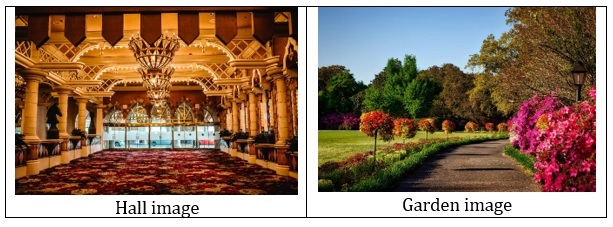
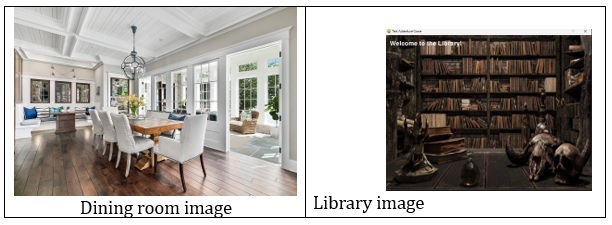
这些是我们使用的图片。您也可以从 Google 下载随机图片并使用它们。
运行游戏的步骤
- **设置** - 首先确保您已安装 Python 以及 Pygame。
- **准备图片** - 将所需的房间图片(hall.png、garden.png、dining_room.png 和 library.png)放在与 Python 脚本相同的目录中。
- **运行脚本** - 通过在您的终端或命令提示符中运行 python your_script_name.py 来执行脚本。
输出截图
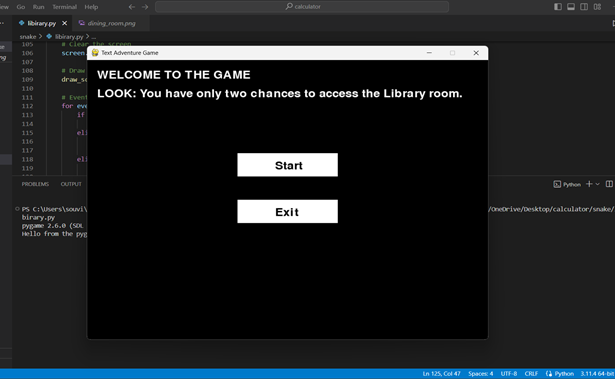
1. 初始屏幕
游戏开始时会显示一个屏幕,提供“开始”或“退出”选项。
2. 游戏玩法
点击“开始”后,您将进入游戏画面,在这里您可以选择房间以搜索钥匙。
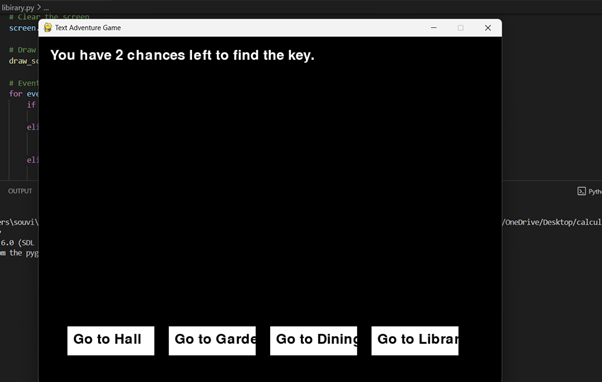
您可以随意前往大厅、花园、餐厅等任何房间。我们点击大厅房间:
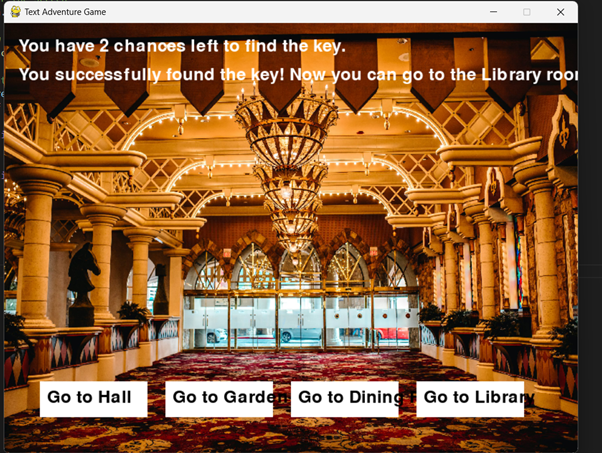
3. 找到钥匙
如果您找到钥匙,顶部会出现一条消息,指示您现在可以进入图书馆。
4. 访问图书馆
找到钥匙后,点击“图书馆”房间以访问它并完成游戏。

python_projects_from_basic_to_advanced.htm
广告