
- Android 基础
- Android - 首页
- Android - 概述
- Android - 环境设置
- Android - 架构
- Android - 应用程序组件
- Android - Hello World 示例
- Android - 资源
- Android - 活动
- Android - 服务
- Android - 广播接收器
- Android - 内容提供程序
- Android - 片段
- Android - 意图/过滤器
- Android - 用户界面
- Android - UI 布局
- Android - UI 控件
- Android - 事件处理
- Android - 样式和主题
- Android - 自定义组件
- Android 高级概念
- Android - 拖放
- Android - 通知
- 基于位置的服务
- Android - 发送电子邮件
- Android - 发送短信
- Android - 电话呼叫
- 发布 Android 应用程序
- Android 实用示例
- Android - 警报对话框
- Android - 动画
- Android - 音频捕获
- Android - AudioManager
- Android - 自动完成
- Android - 最佳实践
- Android - 蓝牙
- Android - 相机
- Android - 剪贴板
- Android - 自定义字体
- Android - 数据备份
- Android - 开发人员工具
- Android - 模拟器
- Android - Facebook 集成
- Android - 手势
- Android - Google 地图
- Android - 图像效果
- Android - ImageSwitcher
- Android - 内部存储
- Android - JetPlayer
- Android - JSON 解析器
- Android - Linkedin 集成
- Android - 加载微调器
- Android - 本地化
- Android - 登录屏幕
- Android - MediaPlayer
- Android - 多点触控
- Android - 导航
- Android - 网络连接
- Android - NFC 指南
- Android - PHP/MySQL
- Android - 进度圆圈
- Android - 进度条
- Android - 推送通知
- Android - RenderScript
- Android - RSS 阅读器
- Android - 屏幕录制
- Android - SDK 管理器
- Android - 传感器
- Android - 会话管理
- Android - 共享首选项
- Android - SIP 协议
- Android - 拼写检查器
- Android - SQLite 数据库
- Android - 支持库
- Android - 测试
- Android - 文字转语音
- Android - TextureView
- Android - Twitter 集成
- Android - UI 设计
- Android - UI 模式
- Android - UI 测试
- Android - WebView 布局
- Android - Wi-Fi
- Android - 小部件
- Android - XML 解析器
- Android 实用资源
- Android - 常见问题解答
- Android - 实用资源
- Android - 讨论
Android - 意图和过滤器
Android 的意图是对要执行的操作的抽象描述。它可以与startActivity一起使用以启动活动,与broadcastIntent一起使用以将其发送到任何感兴趣的 BroadcastReceiver 组件,以及与startService(Intent)或bindService(Intent, ServiceConnection, int)一起使用以与后台服务进行通信。
意图本身,一个 Intent 对象,是一个被动的数据结构,包含要执行的操作的抽象描述。
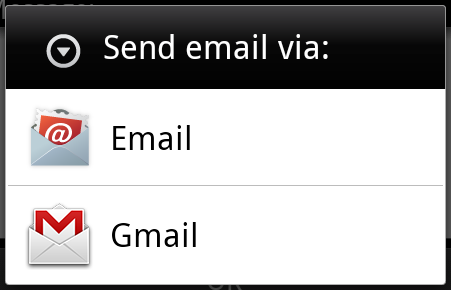
例如,假设您有一个活动需要启动电子邮件客户端并使用您的 Android 设备发送电子邮件。为此,您的活动将与适当的选择器一起发送 ACTION_SEND 到 Android 意图解析器。指定的 选择器为用户提供了合适的界面来选择如何发送您的电子邮件数据。
Intent email = new Intent(Intent.ACTION_SEND, Uri.parse("mailto:"));
email.putExtra(Intent.EXTRA_EMAIL, recipients);
email.putExtra(Intent.EXTRA_SUBJECT, subject.getText().toString());
email.putExtra(Intent.EXTRA_TEXT, body.getText().toString());
startActivity(Intent.createChooser(email, "Choose an email client from..."));
以上语法调用 startActivity 方法来启动电子邮件活动,结果应如下所示:
例如,假设您有一个活动需要在您的 Android 设备上的 Web 浏览器中打开 URL。为此,您的活动将 ACTION_WEB_SEARCH 意图发送到 Android 意图解析器以在 Web 浏览器中打开给定的 URL。意图解析器会解析活动列表并选择最匹配您的意图的活动,在本例中为 Web 浏览器活动。然后,意图解析器将您的网页传递给 Web 浏览器并启动 Web 浏览器活动。
String q = "tutorialspoint";
Intent intent = new Intent(Intent.ACTION_WEB_SEARCH );
intent.putExtra(SearchManager.QUERY, q);
startActivity(intent);
以上示例将在 Android 搜索引擎上搜索tutorialspoint,并在您的活动中显示 tutorialspoint 的结果。
有单独的机制将意图传递到每种类型的组件:活动、服务和广播接收器。
| 序号 | 方法和描述 |
|---|---|
| 1 |
Context.startActivity() 将 Intent 对象传递给此方法以启动新的活动或让现有活动执行新的操作。 |
| 2 |
Context.startService() 将 Intent 对象传递给此方法以启动服务或向正在进行的服务传递新指令。 |
| 3 |
Context.sendBroadcast() 将 Intent 对象传递给此方法以将消息传递给所有感兴趣的广播接收器。 |
Intent 对象
Intent 对象是一个信息包,接收意图的组件以及 Android 系统使用它来进行信息传递。
根据 Intent 对象正在通信或将要执行的操作,它可以包含以下组件:
操作
这是 Intent 对象的必须部分,是一个字符串,命名要执行的操作——或者,对于广播意图,命名已发生并正在报告的操作。操作在很大程度上决定了 Intent 对象的其余结构。Intent 类定义了许多对应于不同意图的操作常量。这是一个Android 意图标准操作列表。
Intent 对象中的操作可以通过 setAction() 方法设置,并通过 getAction() 方法读取。
数据
向意图过滤器添加数据规范。规范可以只是一个数据类型(mimeType 属性),只是一个 URI,或者数据类型和 URI 都是。
这些指定 URL 格式的属性是可选的,但也是相互依赖的:
- 如果未为意图过滤器指定方案,则会忽略所有其他 URI 属性。
- 如果未为过滤器指定主机,则会忽略端口属性和所有路径属性。
setData() 方法仅将数据指定为 URI,setType() 方法仅将数据指定为 MIME 类型,setDataAndType() 方法将其指定为 URI 和 MIME 类型。URI 通过 getData() 读取,类型通过 getType() 读取。
一些操作/数据对的示例:
| 序号。 | 操作/数据对和描述 |
|---|---|
| 1 | ACTION_VIEW content://contacts/people/1 显示有关标识符为“1”的人的信息。 |
| 2 |
ACTION_DIAL content://contacts/people/1 显示电话拨号器,并填写人员信息。 |
| 3 |
ACTION_VIEW tel:123 显示电话拨号器,并填写给定的号码。 |
| 4 |
ACTION_DIAL tel:123 显示电话拨号器,并填写给定的号码。 |
| 5 |
ACTION_EDIT content://contacts/people/1 编辑有关标识符为“1”的人的信息。 |
| 6 |
ACTION_VIEW content://contacts/people/ 显示人员列表,用户可以浏览。 |
| 7 |
ACTION_SET_WALLPAPER 显示选择墙纸的设置 |
| 8 |
ACTION_SYNC 将同步数据,常量值为android.intent.action.SYNC |
| 9 |
ACTION_SYSTEM_TUTORIAL 它将启动平台定义的教程(默认教程或启动教程) |
| 10 |
ACTION_TIMEZONE_CHANGED 当时区更改时会通知 |
| 11 |
ACTION_UNINSTALL_PACKAGE 用于运行默认卸载程序 |
类别
类别是 Intent 对象的可选部分,它是一个字符串,包含有关应处理意图的组件类型的其他信息。addCategory() 方法将类别放入 Intent 对象中,removeCategory() 删除先前添加的类别,getCategories() 获取对象中当前的所有类别集。这是一个Android 意图标准类别列表。
您可以在下面的部分中查看有关意图过滤器的详细信息,以了解我们如何使用类别来选择与意图相对应的适当活动。
额外信息
这将以键值对的形式提供其他信息,这些信息应传递给处理意图的组件。可以使用 putExtras() 和 getExtras() 方法分别设置和读取额外信息。这是一个Android 意图标准额外数据列表。
标志
这些标志是 Intent 对象的可选部分,指示 Android 系统如何启动活动,以及如何在启动后处理它等。
| 序号 | 标志和描述 |
|---|---|
| 1 |
FLAG_ACTIVITY_CLEAR_TASK 如果在传递给 Context.startActivity() 的 Intent 中设置,此标志将导致在启动活动之前清除与该活动关联的任何现有任务。也就是说,该活动成为其他空任务的新根,任何旧活动都将结束。这只能与 FLAG_ACTIVITY_NEW_TASK 结合使用。 |
| 2 |
FLAG_ACTIVITY_CLEAR_TOP 如果设置,并且要启动的活动已经在当前任务中运行,那么它将不会启动该活动的新的实例,而是关闭其上方的所有其他活动,并将此 Intent 作为新的 Intent 传递给(现在位于顶部)旧活动。 |
| 3 |
FLAG_ACTIVITY_NEW_TASK 此标志通常由想要呈现“启动器”样式行为的活动使用:它们为用户提供一系列可以执行的不同操作,这些操作在其他情况下完全独立于启动它们的活动运行。 |
组件名称
此可选字段是一个 Android ComponentName 对象,表示 Activity、Service 或 BroadcastReceiver 类。如果设置了它,则 Intent 对象将传递到指定类的实例,否则 Android 会使用 Intent 对象中的其他信息来定位合适的目标。
组件名称由 setComponent()、setClass() 或 setClassName() 设置,并由 getComponent() 读取。
意图类型
Android 支持以下两种类型的意图

显式意图
显式意图连接应用程序的内部世界,假设您想将一个活动连接到另一个活动,您可以通过显式意图来实现这一点,下图是通过点击按钮将第一个活动连接到第二个活动。
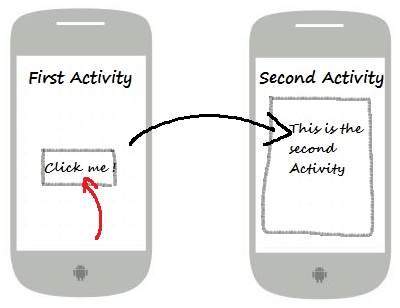
这些意图通过其名称指定目标组件,它们通常用于应用程序内部消息——例如活动启动下级服务或启动姐妹活动。例如:
// Explicit Intent by specifying its class name
Intent i = new Intent(FirstActivity.this, SecondActivity.class);

// Starts TargetActivity
startActivity(i);
隐式意图
这些意图不命名目标,并且组件名称字段留空。隐式意图通常用于激活其他应用程序中的组件。例如:
Intent read1=new Intent();
read1.setAction(android.content.Intent.ACTION_VIEW);
read1.setData(ContactsContract.Contacts.CONTENT_URI);
startActivity(read1);
以上代码将给出如下结果

接收意图的目标组件可以使用getExtras()方法获取源组件发送的额外数据。例如:
// Get bundle object at appropriate place in your code
Bundle extras = getIntent().getExtras();

// Extract data using passed keys
String value1 = extras.getString("Key1");
String value2 = extras.getString("Key2");
示例
以下示例显示了 Android 意图启动各种 Android 内置应用程序的功能。
| 步骤 | 描述 |
|---|---|
| 1 | 您将使用 Android Studio IDE 创建一个 Android 应用程序,并将其命名为My Application,位于包com.example.saira_000.myapplication下。 |
| 2 | 修改src/main/java/MainActivity.java文件,并添加代码以定义两个对应于两个按钮的监听器,即“启动浏览器”和“启动电话”。 |
| 3 | 修改布局 XML 文件res/layout/activity_main.xml,在线性布局中添加三个按钮。 |
| 4 | 运行应用程序以启动 Android 模拟器,并验证对应用程序所做更改的结果。 |
以下是修改后的主活动文件src/com.example.My Application/MainActivity.java的内容。
package com.example.saira_000.myapplication;

import android.content.Intent;
import android.net.Uri;
import android.support.v7.app.AppCompatActivity;
import android.os.Bundle;
import android.view.View;
import android.widget.Button;

public class MainActivity extends AppCompatActivity {
   Button b1,b2;

   @Override
   protected void onCreate(Bundle savedInstanceState) {
      super.onCreate(savedInstanceState);
      setContentView(R.layout.activity_main);

      b1=(Button)findViewById(R.id.button);
      b1.setOnClickListener(new View.OnClickListener() {

         @Override
         public void onClick(View v) {
            Intent i = new Intent(android.content.Intent.ACTION_VIEW,
               Uri.parse("http://www.example.com"));
            startActivity(i);
         }
      });

      b2=(Button)findViewById(R.id.button2);
      b2.setOnClickListener(new View.OnClickListener() {
         @Override
         public void onClick(View v) {
            Intent i = new Intent(android.content.Intent.ACTION_VIEW,
               Uri.parse("tel:9510300000"));
            startActivity(i);
         }
      });
   }
}
以下是res/layout/activity_main.xml文件的内容:
<?xml version="1.0" encoding="utf-8"?>
<RelativeLayout xmlns:android="http://schemas.android.com/apk/res/android"
   xmlns:tools="http://schemas.android.com/tools"
   android:layout_width="match_parent"
   android:layout_height="match_parent"
   android:paddingLeft="@dimen/activity_horizontal_margin"
   android:paddingRight="@dimen/activity_horizontal_margin"
   android:paddingTop="@dimen/activity_vertical_margin"
   android:paddingBottom="@dimen/activity_vertical_margin"
   tools:context=".MainActivity">

   <TextView
      android:id="@+id/textView1"
      android:layout_width="wrap_content"
      android:layout_height="wrap_content"
      android:text="Intent Example"
      android:layout_alignParentTop="true"
      android:layout_centerHorizontal="true"
      android:textSize="30dp" />

   <TextView
      android:id="@+id/textView2"
      android:layout_width="wrap_content"
      android:layout_height="wrap_content"
      android:text="Tutorials point"
      android:textColor="#ff87ff09"
      android:textSize="30dp"
      android:layout_below="@+id/textView1"
      android:layout_centerHorizontal="true" />

   <ImageButton
      android:layout_width="wrap_content"
      android:layout_height="wrap_content"
      android:id="@+id/imageButton"
      android:src="@drawable/abc"
      android:layout_below="@+id/textView2"
      android:layout_centerHorizontal="true" />

   <EditText
      android:layout_width="wrap_content"
      android:layout_height="wrap_content"
      android:id="@+id/editText"
      android:layout_below="@+id/imageButton"
      android:layout_alignRight="@+id/imageButton"
      android:layout_alignEnd="@+id/imageButton" />

   <Button
      android:layout_width="wrap_content"
      android:layout_height="wrap_content"
      android:text="Start Browser"
      android:id="@+id/button"
      android:layout_alignTop="@+id/editText"
      android:layout_alignRight="@+id/textView1"
      android:layout_alignEnd="@+id/textView1"
      android:layout_alignLeft="@+id/imageButton"
      android:layout_alignStart="@+id/imageButton" />

   <Button
      android:layout_width="wrap_content"
      android:layout_height="wrap_content"
      android:text="Start Phone"
      android:id="@+id/button2"
      android:layout_below="@+id/button"
      android:layout_alignLeft="@+id/button"
      android:layout_alignStart="@+id/button"
      android:layout_alignRight="@+id/textView2"
      android:layout_alignEnd="@+id/textView2" />
</RelativeLayout>
以下是res/values/strings.xml文件的内容,用于定义两个新的常量:
<?xml version="1.0" encoding="utf-8"?>
<resources>
   <string name="app_name">My Applicaiton</string>
</resources>
以下是AndroidManifest.xml的默认内容:
<?xml version="1.0" encoding="utf-8"?>
<manifest xmlns:android="http://schemas.android.com/apk/res/android"
   package="com.example.saira_000.myapplication">

   <application
      android:allowBackup="true"
      android:icon="@mipmap/ic_launcher"
      android:label="@string/app_name"
      android:supportsRtl="true"
      android:theme="@style/AppTheme">
      <activity android:name=".MainActivity">
         <intent-filter>
            <action android:name="android.intent.action.MAIN" />
            <category android:name="android.intent.category.LAUNCHER" />
         </intent-filter>
      </activity>
   </application>
</manifest>
让我们尝试运行您的My Application应用程序。我假设您在进行环境设置时已创建了AVD。要从 Android Studio 运行应用程序,请打开项目中的一个活动文件,然后单击工具栏中的运行 图标。Android Studio 会将应用程序安装到您的 AVD 并启动它,如果您的设置和应用程序一切正常,它将显示以下模拟器窗口:
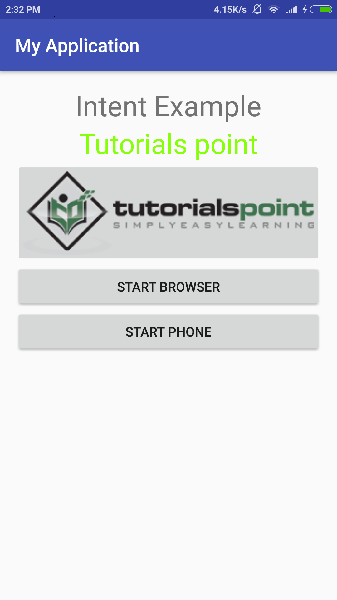
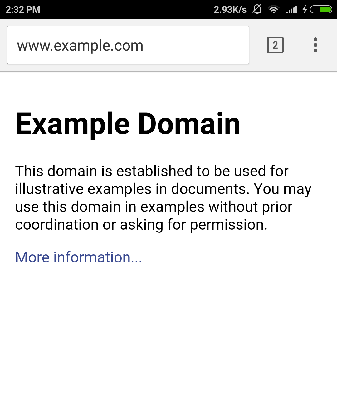
现在,点击启动浏览器按钮,这将启动已配置的浏览器并显示http://www.example.com,如下所示:
类似地,您可以使用“启动电话”按钮启动电话界面,这将允许您拨打已提供的电话号码。
Intent 过滤器
您已经了解了如何使用 Intent 调用另一个活动。Android 操作系统使用过滤器来确定可以处理 Intent 的活动、服务和广播接收器的集合,借助于与 Intent 关联的一组指定的动作、类别和数据方案。您将在清单文件中使用<intent-filter>元素列出与任何活动、服务或广播接收器关联的动作、类别和数据类型。
以下是一个AndroidManifest.xml文件的一部分示例,用于指定一个活动com.example.My Application.CustomActivity,该活动可以通过上面提到的两个动作之一、一个类别和一个数据来调用:
<activity android:name=".CustomActivity"
   android:label="@string/app_name">

   <intent-filter>
      <action android:name="android.intent.action.VIEW" />
      <action android:name="com.example.My Application.LAUNCH" />
      <category android:name="android.intent.category.DEFAULT" />
      <data android:scheme="http" />
   </intent-filter>

</activity>
一旦此活动与上述过滤器一起定义,其他活动将能够使用android.intent.action.VIEW或使用com.example.My Application.LAUNCH动作来调用此活动,前提是它们的类别为android.intent.category.DEFAULT。
<data>元素指定要调用的活动期望的数据类型,对于上面的示例,我们的自定义活动期望数据以“http://”开头。
可能存在一种情况,即一个 Intent 可以通过多个活动或服务的过滤器,用户可能会被询问要激活哪个组件。如果找不到目标,则会引发异常。
在调用活动之前,Android 会执行以下测试检查:
一个过滤器<intent-filter>可以列出多个动作,如上所示,但此列表不能为空;过滤器必须至少包含一个<action>元素,否则它将阻止所有 Intent。如果提到了多个动作,则 Android 会尝试在调用活动之前匹配其中一个动作。
一个过滤器<intent-filter>可以列出零个、一个或多个类别。如果没有提及类别,则 Android 始终通过此测试,但如果提到了多个类别,则对于 Intent 要通过类别测试,Intent 对象中的每个类别都必须与过滤器中的一个类别匹配。
每个<data>元素可以指定一个 URI 和一个数据类型(MIME 媒体类型)。对于 URI 的每个部分,都有单独的属性,如scheme、host、port和path。包含 URI 和数据类型的 Intent 对象仅当其类型与过滤器中列出的类型匹配时,才通过测试的数据类型部分。
示例
以下示例是对上述示例的修改。在这里,我们将看到如果一个 Intent 调用在中定义的两个活动,Android 如何解决冲突,接下来是如何使用过滤器调用自定义活动,第三个是如果 Android 未找到为 Intent 定义的适当活动,则会出现异常情况。
| 步骤 | 描述 |
|---|---|
| 1 | 您将使用 Android Studio 创建一个 Android 应用程序,并将其命名为My Application,位于包com.example.tutorialspoint7.myapplication下。 |
| 2 | 修改src/Main/Java/MainActivity.java文件,并添加代码以定义三个对应于布局文件中定义的三个按钮的监听器。 |
| 3 | 添加一个新的src/Main/Java/CustomActivity.java文件,以包含一个将由不同的 Intent 调用的自定义活动。 |
| 4 | 修改布局 XML 文件res/layout/activity_main.xml,在线性布局中添加三个按钮。 |
| 5 | 添加一个布局 XML 文件res/layout/custom_view.xml,以添加一个简单的<TextView>来显示通过 Intent 传递的数据。 |
| 6 | 修改AndroidManifest.xml以添加<intent-filter>,以定义 Intent 调用自定义活动的规则。 |
| 7 | 运行应用程序以启动 Android 模拟器,并验证对应用程序所做更改的结果。 |
以下是修改后的主活动文件src/MainActivity.java的内容。
package com.example.tutorialspoint7.myapplication;

import android.content.Intent;
import android.net.Uri;
import android.support.v7.app.AppCompatActivity;
import android.os.Bundle;
import android.view.View;
import android.widget.Button;

public class MainActivity extends AppCompatActivity {
   Button b1,b2,b3;
   @Override
   protected void onCreate(Bundle savedInstanceState) {
      super.onCreate(savedInstanceState);
      setContentView(R.layout.activity_main);
      b1=(Button)findViewById(R.id.button);
      b1.setOnClickListener(new View.OnClickListener() {

         @Override
         public void onClick(View v) {
            Intent i = new Intent(android.content.Intent.ACTION_VIEW,
               Uri.parse("http://www.example.com"));
            startActivity(i);
         }
      });

      b2 = (Button)findViewById(R.id.button2);
      b2.setOnClickListener(new View.OnClickListener() {
         @Override
         public void onClick(View v) {
            Intent i = new Intent("com.example.
               tutorialspoint7.myapplication.
                  LAUNCH",Uri.parse("http://www.example.com"));
            startActivity(i);
         }
      });

      b3 = (Button)findViewById(R.id.button3);
      b3.setOnClickListener(new View.OnClickListener() {
         @Override
         public void onClick(View v) {
            Intent i = new Intent("com.example.
               My Application.LAUNCH",
                  Uri.parse("https://www.example.com"));
            startActivity(i);
         }
      });
   }
}
以下是修改后的主活动文件src/com.example.My Application/CustomActivity.java的内容。
package com.example.tutorialspoint7.myapplication;

import android.app.Activity;
import android.net.Uri;
import android.os.Bundle;
import android.widget.TextView;

/**
 * Created by TutorialsPoint7 on 8/23/2016.
 */
public class CustomActivity extends Activity {
   @Override
   public void onCreate(Bundle savedInstanceState) {
      super.onCreate(savedInstanceState);
      setContentView(R.layout.custom_view);
      TextView label = (TextView) findViewById(R.id.show_data);
      Uri url = getIntent().getData();
      label.setText(url.toString());
   }
}
以下是res/layout/activity_main.xml文件的内容:
<?xml version="1.0" encoding="utf-8"?>
<RelativeLayout
   xmlns:android="http://schemas.android.com/apk/res/android"
   xmlns:tools="http://schemas.android.com/tools"
   android:layout_width="match_parent"
   android:layout_height="match_parent"
   android:paddingBottom="@dimen/activity_vertical_margin"
   android:paddingLeft="@dimen/activity_horizontal_margin"
   android:paddingRight="@dimen/activity_horizontal_margin"
   android:paddingTop="@dimen/activity_vertical_margin"
   tools:context="com.example.tutorialspoint7.myapplication.MainActivity">

   <TextView
      android:id="@+id/textView1"
      android:layout_width="wrap_content"
      android:layout_height="wrap_content"
      android:text="Intent Example"
      android:layout_alignParentTop="true"
      android:layout_centerHorizontal="true"
      android:textSize="30dp" />

   <TextView
      android:id="@+id/textView2"
      android:layout_width="wrap_content"
      android:layout_height="wrap_content"
      android:text="Tutorials point"
      android:textColor="#ff87ff09"
      android:textSize="30dp"
      android:layout_below="@+id/textView1"
      android:layout_centerHorizontal="true" />

   <ImageButton
      android:layout_width="wrap_content"
      android:layout_height="wrap_content"
      android:id="@+id/imageButton"
      android:src="@drawable/abc"
      android:layout_below="@+id/textView2"
      android:layout_centerHorizontal="true" />

   <EditText
      android:layout_width="wrap_content"
      android:layout_height="wrap_content"
      android:id="@+id/editText"
      android:layout_below="@+id/imageButton"
      android:layout_alignRight="@+id/imageButton"
      android:layout_alignEnd="@+id/imageButton" />

   <Button
      android:layout_width="wrap_content"
      android:layout_height="wrap_content"
      android:text="Start Browser"
      android:id="@+id/button"
      android:layout_alignTop="@+id/editText"
      android:layout_alignLeft="@+id/imageButton"
      android:layout_alignStart="@+id/imageButton"
      android:layout_alignEnd="@+id/imageButton" />

   <Button
      android:layout_width="wrap_content"
      android:layout_height="wrap_content"
      android:text="Start browsing with launch action"
      android:id="@+id/button2"
      android:layout_below="@+id/button"
      android:layout_alignLeft="@+id/button"
      android:layout_alignStart="@+id/button"
      android:layout_alignEnd="@+id/button" />
   <Button
      android:layout_width="wrap_content"
      android:layout_height="wrap_content"
      android:text="Exceptional condition"
      android:id="@+id/button3"
      android:layout_below="@+id/button2"
      android:layout_alignLeft="@+id/button2"
      android:layout_alignStart="@+id/button2"
      android:layout_toStartOf="@+id/editText"
      android:layout_alignParentEnd="true" />
</RelativeLayout>
以下是res/layout/custom_view.xml文件的内容:
<?xml version="1.0" encoding="utf-8"?>
<LinearLayout xmlns:android="http://schemas.android.com/apk/res/android"
   android:orientation="vertical" android:layout_width="match_parent"
   android:layout_height="match_parent">
   <TextView android:id="@+id/show_data"
      android:layout_width="fill_parent"
      android:layout_height="400dp"/>
</LinearLayout>
以下是res/values/strings.xml文件的内容,用于定义两个新的常量:
<?xml version="1.0" encoding="utf-8"?>
<resources>
   <string name="app_name">My Application</string>
</resources>
以下是AndroidManifest.xml的默认内容:
<?xml version="1.0" encoding="utf-8"?>
<manifest xmlns:android="http://schemas.android.com/apk/res/android"
   package="com.example.tutorialspoint7.myapplication">

   <application
      android:allowBackup = "true"
      android:icon = "@mipmap/ic_launcher"
      android:label = "@string/app_name"
      android:supportsRtl = "true"
      android:theme = "@style/AppTheme">
      <activity android:name = ".MainActivity">
         <intent-filter>
            <action android:name = "android.intent.action.MAIN" />
            <category android:name = "android.intent.category.LAUNCHER" />
         </intent-filter>
      </activity>

      <activity android:name="com.example.tutorialspoint7.myapplication.CustomActivity">

         <intent-filter>
            <action android:name = "android.intent.action.VIEW" />
            <action android:name = "com.example.tutorialspoint7.myapplication.LAUNCH" />
            <category android:name = "android.intent.category.DEFAULT" />
            <data android:scheme = "http" />
         </intent-filter>

      </activity>
   </application>

</manifest>
让我们尝试运行您的My Application应用程序。我假设您在进行环境设置时已创建了AVD。要从 Android Studio 运行应用程序,请打开项目中的一个活动文件,然后单击工具栏中的运行图标。Android Studio 会将应用程序安装到您的 AVD 并启动它,如果您的设置和应用程序一切正常,它将显示以下模拟器窗口:
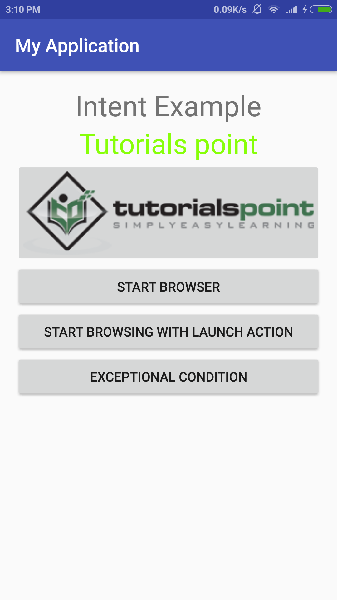
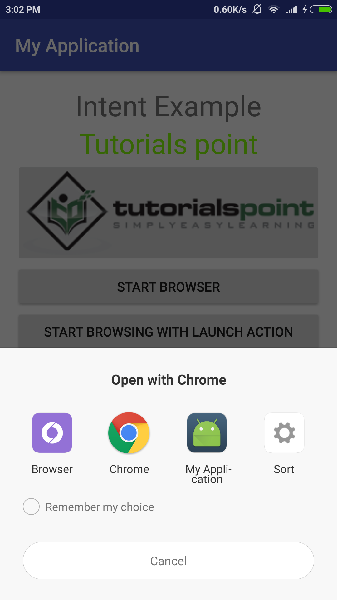
现在让我们从第一个按钮“使用 VIEW 动作启动浏览器”开始。在这里,我们使用过滤器“android.intent.action.VIEW”定义了我们的自定义活动,并且 Android 已为 VIEW 动作定义了一个默认活动,该活动将启动 Web 浏览器,因此 Android 显示以下两个选项以选择您要启动的活动。
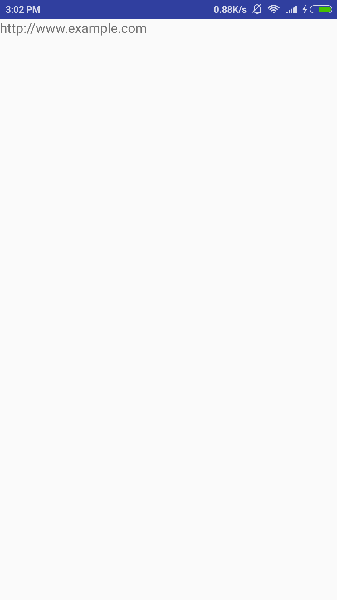
现在,如果您选择浏览器,则 Android 将启动 Web 浏览器并打开 example.com 网站,但如果您选择 IndentDemo 选项,则 Android 将启动 CustomActivity,它什么也不做,只是捕获传递的数据并在文本视图中显示,如下所示:
现在使用后退按钮返回,然后点击“使用 LAUNCH 动作启动浏览器”按钮,在这里 Android 应用过滤器选择定义的活动,它只是启动您的自定义活动。
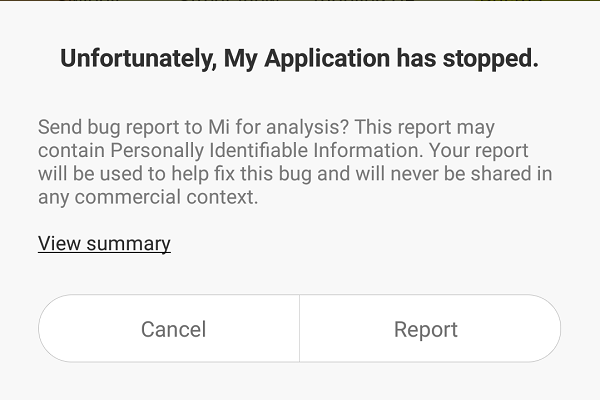
再次使用后退按钮返回,然后点击“异常情况”按钮,在这里 Android 尝试为给定的 Intent 找出有效的过滤器,但它没有找到定义的有效活动,因为这次我们使用https而不是http作为数据,尽管我们给出了正确的动作,因此 Android 引发了异常并显示以下屏幕: