- Android 基础
- Android - 首页
- Android - 概览
- Android - 环境设置
- Android - 架构
- Android - 应用程序组件
- Android - Hello World 示例
- Android - 资源
- Android - 活动
- Android - 服务
- Android - 广播接收器
- Android - 内容提供器
- Android - 碎片
- Android - 意图/过滤器
- Android - 用户界面
- Android - UI 布局
- Android - UI 控件
- Android - 事件处理
- Android - 样式和主题
- Android - 自定义组件
- Android 高级概念
- Android - 拖放
- Android - 通知
- 基于位置的服务
- Android - 发送电子邮件
- Android - 发送短信
- Android - 电话呼叫
- 发布 Android 应用程序
- Android 有用示例
- Android - 警报对话框
- Android - 动画
- Android - 音频捕获
- Android - AudioManager
- Android - 自动完成
- Android - 最佳实践
- Android - 蓝牙
- Android - 摄像头
- Android - 剪贴板
- Android - 自定义字体
- Android - 数据备份
- Android - 开发者工具
- Android - 模拟器
- Android - Facebook 集成
- Android - 手势
- Android - Google 地图
- Android - 图像效果
- Android - ImageSwitcher
- Android - 内部存储
- Android - JetPlayer
- Android - JSON 解析器
- Android - Linkedin 集成
- Android - 加载微调器
- Android - 本地化
- Android - 登录屏幕
- Android - MediaPlayer
- Android - 多点触控
- Android - 导航
- Android - 网络连接
- Android - NFC 指南
- Android - PHP/MySQL
- Android - 进度圆圈
- Android - 进度条
- Android - 推送通知
- Android - RenderScript
- Android - RSS 阅读器
- Android - 屏幕录制
- Android - SDK 管理器
- Android - 传感器
- Android - 会话管理
- Android - 共享首选项
- Android - SIP 协议
- Android - 拼写检查器
- Android - SQLite 数据库
- Android - 支持库
- Android - 测试
- Android - 文本转语音
- Android - TextureView
- Android - Twitter 集成
- Android - UI 设计
- Android - UI 模式
- Android - UI 测试
- Android - WebView 布局
- Android - Wi-Fi
- Android - 小部件
- Android - XML 解析器
- Android 有用资源
- Android - 问答
- Android - 有用资源
- Android - 讨论
Android - RSS 阅读器
RSS 代表 Really Simple Syndication。RSS 是一种轻松与用户共享网站更新和内容的方式,以便用户无需每天访问您的网站以获取任何更新。
RSS 示例
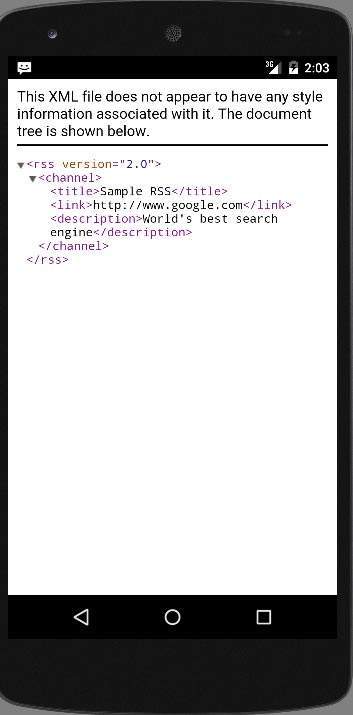
RSS 是网站创建的文档,扩展名为 .xml。您可以轻松解析此文档并在应用程序中将其显示给用户。RSS 文档如下所示。
<rss version="2.0">
   <channel>
      <title>Sample RSS</title>
      <link>http://www.google.com</link>
      <description>World's best search engine</description>
   </channel>
</rss>
RSS 元素
如上所示的 RSS 文档包含以下元素。
| 序号 | 组件和描述 |
|---|---|
| 1 |
channel 此元素用于描述 RSS 提要 |
| 2 |
title 定义频道的标题 |
| 3 |
link 定义到频道的超链接 |
| 4 |
description 描述频道 |
解析 RSS
解析 RSS 文档很像解析 XML。因此,现在让我们看看如何解析 XML 文档。
为此,我们将创建 XMLPullParser 对象,但为了创建它,我们将首先创建 XmlPullParserFactory 对象,然后调用其 newPullParser() 方法来创建 XMLPullParser。其语法如下所示:
private XmlPullParserFactory xmlFactoryObject = XmlPullParserFactory.newInstance();
private XmlPullParser myparser = xmlFactoryObject.newPullParser();
下一步涉及为包含 XML 的 XmlPullParser 指定文件。它可以是文件,也可以是流。在我们的例子中,它是一个流。其语法如下所示:
myparser.setInput(stream, null);
最后一步是解析 XML。XML 文件由事件、名称、文本、属性值等组成。因此,XMLPullParser 具有用于解析 XML 文件每个组件的单独函数。其语法如下所示:
int event = myParser.getEventType();
while (event != XmlPullParser.END_DOCUMENT)  {
   String name=myParser.getName();

   switch (event){
      case XmlPullParser.START_TAG:
      break;

      case XmlPullParser.END_TAG:
      if(name.equals("temperature")){
         temperature = myParser.getAttributeValue(null,"value");
      }
      break;
   }
   event = myParser.next();
}
方法getEventType返回发生的事件类型。例如:文档开始、标签开始等。方法getName返回标签的名称,由于我们只对温度感兴趣,因此我们只需在条件语句中检查是否获得了温度标签,然后调用方法getAttributeValue返回温度标签的值。
除了这些方法之外,此类还提供了其他方法来更好地解析 XML 文件。这些方法列在下面:
| 序号 | 方法和描述 |
|---|---|
| 1 |
getAttributeCount() 此方法仅返回当前开始标签的属性数量。 |
| 2 |
getAttributeName(int index) 此方法返回由索引值指定的属性的名称。 |
| 3 |
getColumnNumber() 此方法返回当前列号,从 0 开始。 |
| 4 |
getDepth() 此方法返回元素的当前深度。 |
| 5 |
getLineNumber() 返回当前行号,从 1 开始。 |
| 6 |
getNamespace() 此方法返回当前元素的命名空间 URI。 |
| 7 |
getPrefix() 此方法返回当前元素的前缀。 |
| 8 |
getName() 此方法返回标签的名称。 |
| 9 |
getText() 此方法返回该特定元素的文本。 |
| 10 |
isWhitespace() 此方法检查当前 TEXT 事件是否仅包含空格字符。 |
示例
这是一个演示 XMLPullParser 类用法的示例。它创建一个基本的解析应用程序,允许您解析此处提供的 RSS 文档/android/sampleXML.xml,然后显示结果。
要试验此示例,您可以在实际设备或模拟器上运行它。
| 步骤 | 描述 |
|---|---|
| 1 | 您将使用 Android studio 在包 com.example.sairamkrishna.myapplication 下创建一个 Android 应用程序。 |
| 2 | 修改 src/MainActivity.java 文件以添加必要的代码。 |
| 3 | 修改 res/layout/activity_main 以添加相应的 XML 组件。 |
| 4 | 在 src/HandleXML.java 下创建一个新的 java 文件以获取和解析 XML 数据。 |
| 5 | 在 src/second.java 下创建一个新的 java 文件以显示 XML 的结果 |
| 5 | 修改 AndroidManifest.xml 以添加必要的互联网权限。 |
| 6 | 运行应用程序并选择一个正在运行的 Android 设备,并将应用程序安装在其上并验证结果。 |
以下是修改后的主要活动文件src/MainActivity.java的内容。
package com.example.sairamkrishna.myapplication;

import android.app.Activity;
import android.content.Intent;
import android.os.Bundle;
import android.view.View;

import android.widget.Button;
import android.widget.EditText;


public class MainActivity extends Activity {
   EditText title,link,description;
   Button b1,b2;
   private String finalUrl="https://tutorialspoint.com/android/sampleXML.xml";
   private HandleXML obj;

   @Override
   protected void onCreate(Bundle savedInstanceState) {
      super.onCreate(savedInstanceState);
      setContentView(R.layout.activity_main);

      title = (EditText) findViewById(R.id.editText);
      link = (EditText) findViewById(R.id.editText2);
      description = (EditText) findViewById(R.id.editText3);

      b1=(Button)findViewById(R.id.button);
      b2=(Button)findViewById(R.id.button2);
      b1.setOnClickListener(new View.OnClickListener() {
         @Override
         public void onClick(View v) {
            obj = new HandleXML(finalUrl);
            obj.fetchXML();

            while(obj.parsingComplete);
            title.setText(obj.getTitle());
            link.setText(obj.getLink());
            description.setText(obj.getDescription());
         }
      });

      b2.setOnClickListener(new View.OnClickListener() {
         @Override
         public void onClick(View v) {
            Intent in=new Intent(MainActivity.this,second.class);
            startActivity(in);
         }
      });
   }

}
以下是 java 文件src/HandleXML.java的内容。
package com.example.rssreader;

import java.io.InputStream;
import java.net.HttpURLConnection;
import java.net.URL;

import org.xmlpull.v1.XmlPullParser;
import org.xmlpull.v1.XmlPullParserFactory;

import android.util.Log;

public class HandleXML {
   private String title = "title";
   private String link = "link";
   private String description = "description";
   private String urlString = null;
   private XmlPullParserFactory xmlFactoryObject;
   public volatile boolean parsingComplete = true;

   public HandleXML(String url){
      this.urlString = url;
   }

   public String getTitle(){
      return title;
   }

   public String getLink(){
      return link;
   }

   public String getDescription(){
      return description;
   }

   public void parseXMLAndStoreIt(XmlPullParser myParser) {
      int event;
      String text=null;

      try {
         event = myParser.getEventType();

         while (event != XmlPullParser.END_DOCUMENT) {
         String name=myParser.getName();

         switch (event){
            case XmlPullParser.START_TAG:
            break;

            case XmlPullParser.TEXT:
            text = myParser.getText();
            break;

            case XmlPullParser.END_TAG:

            if(name.equals("title")){
               title = text;
            }

            else if(name.equals("link")){
               link = text;
            }

            else if(name.equals("description")){
               description = text;
            }

            else{
            }

            break;
            }

            event = myParser.next();
            }

            parsingComplete = false;
            }

            catch (Exception e) {
               e.printStackTrace();
            }
         }

         public void fetchXML(){
            Thread thread = new Thread(new Runnable(){
               @Override
               public void run() {

               try {
               URL url = new URL(urlString);
               HttpURLConnection conn = (HttpURLConnection) url.openConnection();

               conn.setReadTimeout(10000 /* milliseconds */);
               conn.setConnectTimeout(15000 /* milliseconds */);
               conn.setRequestMethod("GET");
               conn.setDoInput(true);

               // Starts the query
               conn.connect();
               InputStream stream = conn.getInputStream();

               xmlFactoryObject = XmlPullParserFactory.newInstance();
               XmlPullParser myparser = xmlFactoryObject.newPullParser();

               myparser.setFeature(XmlPullParser.FEATURE_PROCESS_NAMESPACES, false);
               myparser.setInput(stream, null);

               parseXMLAndStoreIt(myparser);
               stream.close();
            }

            catch (Exception e) {
            }
         }
      });
      thread.start();
   }
}
创建一个文件并将其命名为 second.java 文件,位于目录java/second.java下
package com.example.sairamkrishna.myapplication;

import android.app.Activity;
import android.os.Bundle;
import android.webkit.WebView;

public class second extends Activity {
   @Override
   protected void onCreate(Bundle savedInstanceState) {
      super.onCreate(savedInstanceState);
      setContentView(R.layout.second_activity);
      WebView w1=(WebView)findViewById(R.id.webView);
      w1.loadUrl("https://tutorialspoint.com/android/sampleXML.xml");
   }
}
在res/layout/second_activity.xml下创建一个 xml 文件
<?xml version="1.0" encoding="utf-8"?>
<LinearLayout xmlns:android="http://schemas.android.com/apk/res/android"
   android:orientation="vertical" android:layout_width="match_parent"
   android:layout_height="match_parent">

   <WebView
      android:layout_width="match_parent"
      android:layout_height="match_parent"
      android:id="@+id/webView"
      android:layout_gravity="center_horizontal" />
</LinearLayout>
将res/layout/activity_main.xml的内容修改为以下内容:
<?xml version="1.0" encoding="utf-8"?>
<RelativeLayout xmlns:android="http://schemas.android.com/apk/res/android"
   xmlns:tools="http://schemas.android.com/tools" android:layout_width="match_parent"
   android:layout_height="match_parent" android:paddingLeft="@dimen/activity_horizontal_margin"
   android:paddingRight="@dimen/activity_horizontal_margin"
   android:paddingTop="@dimen/activity_vertical_margin"
   android:paddingBottom="@dimen/activity_vertical_margin"
   tools:context=".MainActivity"
   android:transitionGroup="true">

   <TextView android:text="RSS example" android:layout_width="wrap_content"
      android:layout_height="wrap_content"
      android:id="@+id/textview"
      android:textSize="35dp"
      android:layout_alignParentTop="true"
      android:layout_centerHorizontal="true" />

   <TextView
      android:layout_width="wrap_content"
      android:layout_height="wrap_content"
      android:text="Tutorials point"
      android:id="@+id/textView"
      android:layout_below="@+id/textview"
      android:layout_centerHorizontal="true"
      android:textColor="#ff7aff24"
      android:textSize="35dp" />

   <ImageView
      android:layout_width="wrap_content"
      android:layout_height="wrap_content"
      android:id="@+id/imageView"
      android:src="@drawable/abc"
      android:layout_below="@+id/textView"
      android:layout_centerHorizontal="true"
      android:theme="@style/Base.TextAppearance.AppCompat" />

   <EditText
      android:layout_width="wrap_content"
      android:layout_height="wrap_content"
      android:id="@+id/editText"
      android:layout_below="@+id/imageView"
      android:hint="Tittle"
      android:textColorHint="#ff69ff0e"
      android:layout_alignParentRight="true"
      android:layout_alignParentEnd="true"
      android:layout_alignParentLeft="true"
      android:layout_alignParentStart="true" />

   <EditText
      android:layout_width="wrap_content"
      android:layout_height="wrap_content"
      android:id="@+id/editText2"
      android:layout_below="@+id/editText"
      android:layout_alignLeft="@+id/editText"
      android:layout_alignStart="@+id/editText"
      android:textColorHint="#ff21ff11"
      android:hint="Link"
      android:layout_alignRight="@+id/editText"
      android:layout_alignEnd="@+id/editText" />

   <EditText
      android:layout_width="wrap_content"
      android:layout_height="wrap_content"
      android:id="@+id/editText3"
      android:layout_below="@+id/editText2"
      android:layout_alignLeft="@+id/editText2"
      android:layout_alignStart="@+id/editText2"
      android:hint="Description"
      android:textColorHint="#ff33ff20"
      android:layout_alignRight="@+id/editText2"
      android:layout_alignEnd="@+id/editText2" />

   <Button
      android:layout_width="wrap_content"
      android:layout_height="wrap_content"
      android:text="Fetch"
      android:id="@+id/button"
      android:layout_below="@+id/editText3"
      android:layout_alignParentLeft="true"
      android:layout_alignParentStart="true"
      android:layout_toLeftOf="@+id/imageView"
      android:layout_toStartOf="@+id/imageView" />

   <Button
      android:layout_width="wrap_content"
      android:layout_height="wrap_content"
      android:text="Result"
      android:id="@+id/button2"
      android:layout_alignTop="@+id/button"
      android:layout_alignRight="@+id/editText3"
      android:layout_alignEnd="@+id/editText3" />

</RelativeLayout>
将res/values/string.xml修改为以下内容
<resources>
   <string name="app_name">My Application</string>
</resources>
这是默认的AndroidManifest.xml。
<?xml version="1.0" encoding="utf-8"?>
<manifest xmlns:android="http://schemas.android.com/apk/res/android"
   package="com.example.sairamkrishna.myapplication" >
   <uses-permission android:name="android.permission.INTERNET"/>

   <application
      android:allowBackup="true"
      android:icon="@mipmap/ic_launcher"
      android:label="@string/app_name"
      android:theme="@style/AppTheme" >

      <activity
         android:name=".MainActivity"
         android:label="@string/app_name" >

         <intent-filter>
            <action android:name="android.intent.action.MAIN" />
            <category android:name="android.intent.category.LAUNCHER" />
         </intent-filter>

      </activity>

      <activity android:name=".second"></activity>
   </application>
</manifest>
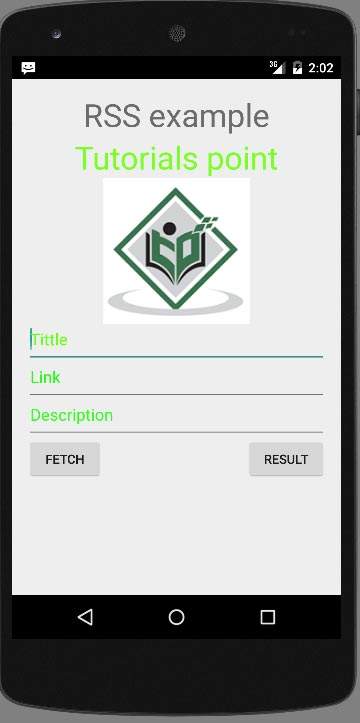
让我们尝试运行您的应用程序。我假设您在进行环境设置时创建了您的AVD。要从 Android studio 运行应用程序,请打开项目的活动文件之一,然后单击工具栏中的运行 图标。Android studio 将应用程序安装到您的 AVD 并启动它,如果您的设置和应用程序一切正常,它将显示以下模拟器窗口:
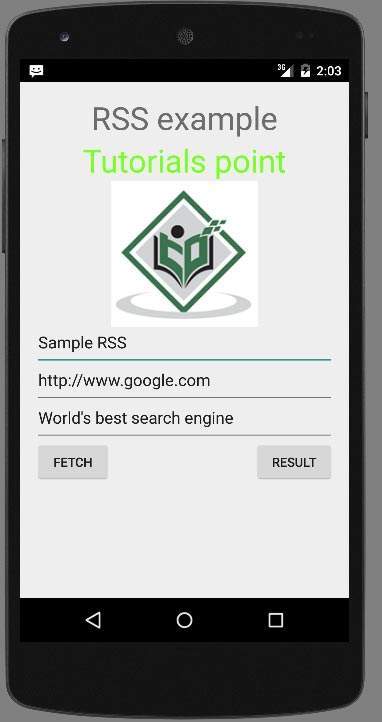
只需按下“获取提要”按钮即可获取 RSS 提要。按下后,将出现以下屏幕,显示 RSS 数据。
只需按下结果按钮即可查看 XML,该 XML 位于https://tutorialspoint.com/android/sampleXML.xml