
- Matlab 教程
- MATLAB - 首页
- MATLAB - 概述
- MATLAB - 特性
- MATLAB - 环境设置
- MATLAB - 编辑器
- MATLAB - 在线
- MATLAB - 工作区
- MATLAB - 语法
- MATLAB - 变量
- MATLAB - 命令
- MATLAB - 数据类型
- MATLAB - 运算符
- MATLAB - 日期和时间
- MATLAB - 数字
- MATLAB - 随机数
- MATLAB - 字符串和字符
- MATLAB - 文本格式化
- MATLAB - 时间表
- MATLAB - M 文件
- MATLAB - 冒号表示法
- MATLAB - 数据导入
- MATLAB - 数据输出
- MATLAB - 数据归一化
- MATLAB - 预定义变量
- MATLAB - 决策
- MATLAB - 决策语句
- MATLAB - If End 语句
- MATLAB - If Else 语句
- MATLAB - If…Elseif Else 语句
- MATLAB - 嵌套 If 语句
- MATLAB - Switch 语句
- MATLAB - 嵌套 Switch
- MATLAB - 循环
- MATLAB - 循环
- MATLAB - For 循环
- MATLAB - While 循环
- MATLAB - 嵌套循环
- MATLAB - Break 语句
- MATLAB - Continue 语句
- MATLAB - End 语句
- MATLAB - 数组
- MATLAB - 数组
- MATLAB - 向量
- MATLAB - 转置运算符
- MATLAB - 数组索引
- MATLAB - 多维数组
- MATLAB - 兼容数组
- MATLAB - 分类数组
- MATLAB - 元胞数组
- MATLAB - 矩阵
- MATLAB - 稀疏矩阵
- MATLAB - 表格
- MATLAB - 结构体
- MATLAB - 数组乘法
- MATLAB - 数组除法
- MATLAB - 数组函数
- MATLAB - 函数
- MATLAB - 函数
- MATLAB - 函数参数
- MATLAB - 匿名函数
- MATLAB - 嵌套函数
- MATLAB - 返回语句
- MATLAB - 空函数
- MATLAB - 局部函数
- MATLAB - 全局变量
- MATLAB - 函数句柄
- MATLAB - 滤波函数
- MATLAB - 阶乘
- MATLAB - 私有函数
- MATLAB - 子函数
- MATLAB - 递归函数
- MATLAB - 函数优先级顺序
- MATLAB - Map 函数
- MATLAB - 均值函数
- MATLAB - End 函数
- MATLAB - 错误处理
- MATLAB - 错误处理
- MATLAB - Try...Catch 语句
- MATLAB - 调试
- MATLAB - 绘图
- MATLAB - 绘图
- MATLAB - 绘制数组
- MATLAB - 绘制向量
- MATLAB - 条形图
- MATLAB - 直方图
- MATLAB - 图形
- MATLAB - 二维线图
- MATLAB - 三维图
- MATLAB - 格式化绘图
- MATLAB - 对数坐标轴绘图
- MATLAB - 绘制误差条
- MATLAB - 绘制三维等值线图
- MATLAB - 极坐标图
- MATLAB - 散点图
- MATLAB - 绘制表达式或函数
- MATLAB - 绘制矩形
- MATLAB - 绘制频谱图
- MATLAB - 绘制网格曲面
- MATLAB - 绘制正弦波
- MATLAB - 插值
- MATLAB - 插值
- MATLAB - 线性插值
- MATLAB - 二维数组插值
- MATLAB - 三维数组插值
- MATLAB - 多项式
- MATLAB - 多项式
- MATLAB - 多项式加法
- MATLAB - 多项式乘法
- MATLAB - 多项式除法
- MATLAB - 多项式的导数
- MATLAB - 变换
- MATLAB - 变换
- MATLAB - 拉普拉斯变换
- MATLAB - 拉普拉斯滤波器
- MATLAB - 高斯-拉普拉斯滤波器
- MATLAB - 逆傅里叶变换
- MATLAB - 傅里叶变换
- MATLAB - 快速傅里叶变换
- MATLAB - 二维逆余弦变换
- MATLAB - 向坐标轴添加图例
- MATLAB - 面向对象
- MATLAB - 面向对象编程
- MATLAB - 类和对象
- MATLAB - 函数重载
- MATLAB - 运算符重载
- MATLAB - 用户定义类
- MATLAB - 复制对象
- MATLAB - 代数
- MATLAB - 线性代数
- MATLAB - 高斯消元法
- MATLAB - 高斯-约旦消元法
- MATLAB - 简化行阶梯形式
- MATLAB - 特征值和特征向量
- MATLAB - 积分
- MATLAB - 积分
- MATLAB - 二重积分
- MATLAB - 梯形法则
- MATLAB - 辛普森法则
- MATLAB - 其他
- MATLAB - 微积分
- MATLAB - 微分
- MATLAB - 矩阵的逆
- MATLAB - GNU Octave
- MATLAB - Simulink
- MATLAB - 有用资源
- MATLAB - 快速指南
- MATLAB - 有用资源
- MATLAB - 讨论
MATLAB - 二维逆余弦变换
逆余弦变换,通常表示为 ICT 或 IDCT,是一种数学运算,它反转余弦变换的过程。它在信号和图像处理中特别有用,用于从其频域表示中重建信号或图像。
在二维信号或图像的上下文中,二维逆余弦变换(二维 ICT 或二维 IDCT)将余弦系数矩阵(表示信号或图像的频率内容)转换回空间域,从而产生原始信号或图像。
MATLAB 中的二维逆余弦变换用于将余弦值矩阵转换为空间域图像。它是二维余弦变换的逆运算,通常用于图像处理和压缩。idct2 函数用于在 MATLAB 中执行二维逆余弦变换。
二维逆离散余弦变换
在 MATLAB 中,idct2 函数用于执行二维逆余弦变换。它以余弦系数矩阵作为输入,并返回信号或图像的空间域表示。结果是可显示或进一步处理的重建图像。
逆余弦变换在各种应用中至关重要,包括图像压缩(例如,在 JPEG 压缩中)、图像重建和信号处理任务,在这些任务中,需要在频域操作后将信号或图像转换回其原始形式。
语法
B = idct2(A)
B = idct2(A,m,n)
B = idct2(A,[m n])
语法说明
B = idct2(A) - 计算矩阵 A 的二维逆离散余弦变换 (IDCT),并将结果返回到矩阵 B 中。此操作有效地从其频域表示 A 中重建空间域图像。
B = idct2(A, m,n) - 计算矩阵 A 的二维逆离散余弦变换 (IDCT),并将输出矩阵 B 的大小指定为 m×n。此操作有效地从其频域表示 A 中重建空间域图像,并将其调整为指定尺寸 m×n。
B = idct2(A, [m,n]) - 计算矩阵 A 的二维逆离散余弦变换 (IDCT),并将输出矩阵 B 调整为具有 m 行和 n 列。此操作从其频域表示 A 中重建空间域图像,并将其调整为指定的尺寸 [m n]。
让我们看看二维逆离散余弦变换的一些示例
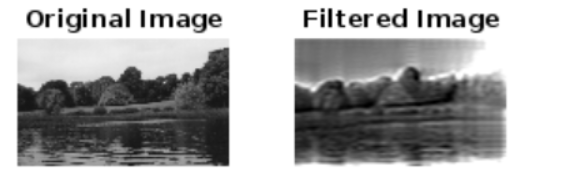
示例 1:使用 idct2() 函数从图像中去除高频
我们的代码如下:
img = imread('autumn.tif');

% Convert to grayscale if necessary
if size(img, 3) == 3
    img = rgb2gray(img);
end

% Compute 2-D DCT
dct_img = dct2(double(img));

% Set a threshold to remove high frequencies (e.g., keep only the first 50 coefficients)
threshold = 50;
dct_img_thresh = dct_img;
dct_img_thresh(threshold+1:end, :) = 0;
dct_img_thresh(:, threshold+1:end) = 0;

% Compute the inverse 2-D DCT to get the filtered image
filtered_img = uint8(idct2(dct_img_thresh));

% Display the original and filtered images
figure;
subplot(1, 2, 1);
imshow(img);
title('Original Image');

subplot(1, 2, 2);
imshow(filtered_img);
title('Filtered Image');
在示例中:
- imread 函数用于从文件(在本例中为“autumn.tif”)读取图像并将其存储在变量 img 中。
- 如果图像为彩色图像(即,它具有红色、绿色和蓝色的三个通道),则使用 rgb2gray 函数将其转换为灰度图像。这样做是因为二维 DCT 通常应用于灰度图像。
- dct2 函数计算图像的二维 DCT。结果存储在变量 dct_img 中。DCT 以频域表示图像,其中高频分量对应于像素值的快速变化。
- 选择一个阈值来确定要保留哪些 DCT 系数以及要丢弃哪些系数。在本例中,我们选择仅保留前 50 个系数(在 256×256 的图像中,这些系数表示最低频率)。高频系数(超过阈值的系数)设置为零。
- idct2 函数计算修改后的 DCT 系数 (dct_img_thresh) 的逆二维 DCT。此操作有效地从其频域表示中重建空间域图像。结果存储在 filtered_img 中。
- 最后,使用 imshow 函数并排显示原始图像和过滤后的图像。原始图像显示在左侧,过滤后的图像(已去除高频)显示在右侧。
执行后,我们得到以下输出:
示例 2:使用 B = idct2(A, m,n) 调整图像大小
我们的代码如下:
% Read the image
img = imread('autumn.tif');

% Convert the image to grayscale
if size(img, 3) == 3
    img = rgb2gray(img);
end

% Compute the 2-D DCT of the image
dct_img = dct2(double(img));

% Resize the DCT coefficients matrix (frequency domain representation) to a smaller size
% Let's resize it to half the original size
new_size = size(img) / 2;
dct_resized = imresize(dct_img, new_size);

% Compute the inverse 2-D DCT to get the resized image
resized_img = uint8(idct2(dct_resized, size(img, 1), size(img, 2)));

% Display the original and resized images
subplot(1, 2, 1);
imshow(img);
title('Original Image');

subplot(1, 2, 2);
imshow(resized_img);
title('Resized Image using 2-D IDCT');
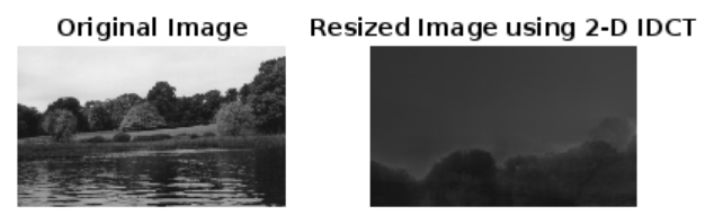
在示例中,我们有:
- imread 函数用于从文件(在本例中为“autumn.tif”)读取图像并将其存储在变量 img 中。
- 如果图像为彩色图像(即,它具有红色、绿色和蓝色的三个通道),则使用 rgb2gray 函数将其转换为灰度图像。此步骤很重要,因为二维 DCT 通常应用于灰度图像。
- dct2 函数计算图像的二维 DCT。结果存储在变量 dct_img 中。DCT 以频域表示图像,其中图像的不同频率由不同的系数表示。
- 为了调整图像大小,我们将 DCT 系数矩阵 (dct_img) 调整为更小的尺寸。这是使用 imresize 函数完成的,指定新尺寸为原始尺寸的一半 (new_size = size(img) / 2)。这有效地减少了图像的频域表示。
- idct2 函数计算调整大小后的 DCT 系数 (dct_resized) 的逆二维 DCT。此操作有效地从其调整大小后的频域表示中重建调整大小后的空间域图像。
- 最后,使用 imshow 函数并排显示原始图像和调整大小后的图像。原始图像显示在左侧,调整大小后的图像(使用二维 IDCT 获得)显示在右侧。
执行后的输出为:
示例 3:使用二维逆离散余弦变换 (IDCT) 调整矩阵大小
我们的代码如下:
% Create a sample matrix A
A = [
    10, 20, 30, 40;
    50, 60, 70, 80;
    90, 100, 110, 120;
    130, 140, 150, 160
];

% Display the original matrix A
disp('Original Matrix A:');
disp(A);

% Compute the 2-D IDCT of A and resize it to a 3x2 matrix
B = idct2(A, [3, 2]);

% Display the resized matrix B
disp('Resized Matrix B (3x2):');
disp(B);
在此示例中,我们创建了一个 4×4 的示例矩阵 A。然后,我们将二维 IDCT 应用于 A 并将结果调整为 3×2 矩阵 [m, n] = [3, 2]。变换后的调整大小后的矩阵 B 将被显示。
我们得到的输出如下:
Original Matrix A:
    10    20    30    40
    50    60    70    80
    90   100   110   120
   130   140   150   160

Resized Matrix B (3x2):
  122.0957  -11.9692
  -97.4491    1.6910
   12.0957   -1.9692