
- SwiftUI 教程
- SwiftUI - 首页
- SwiftUI - 概述
- SwiftUI vs UIKit
- SwiftUI 环境
- SwiftUI - 环境设置
- SwiftUI - 基本组件
- SwiftUI - 创建第一个应用程序
- SwiftUI 视图
- SwiftUI - 视图
- SwiftUI - 自定义文本视图
- SwiftUI - 自定义图像视图
- SwiftUI - 堆栈
- SwiftUI 绘制形状
- SwiftUI - 形状
- SwiftUI - 绘制直线
- SwiftUI - 绘制矩形
- SwiftUI - 绘制圆角矩形
- SwiftUI - 绘制三角形
- SwiftUI - 绘制圆形
- SwiftUI - 绘制五角星
- SwiftUI - 绘制多边形
- SwiftUI - 绘制饼图
- SwiftUI - 使用内置形状
- SwiftUI - 文本
- SwiftUI - 文本视图
- SwiftUI - 文本输入和输出
- SwiftUI - 颜色
- SwiftUI - 颜色
- SwiftUI - 颜色选择器
- SwiftUI - 渐变
- SwiftUI - 调整颜色
- SwiftUI - 特效
- SwiftUI - 特效
- SwiftUI - 混合特效
- SwiftUI - 模糊特效
- SwiftUI - 阴影特效
- SwiftUI - 悬停特效
- SwiftUI - 动画
- SwiftUI - 动画
- SwiftUI - 创建动画
- SwiftUI - 创建显式动画
- SwiftUI - 多个动画
- SwiftUI - 转场动画
- SwiftUI - 非对称转场动画
- SwiftUI - 自定义转场动画
- SwiftUI - 图片
- SwiftUI - 图像
- SwiftUI - 图片作为背景
- SwiftUI - 旋转图像
- SwiftUI - 媒体
- SwiftUI - 视图布局
- SwiftUI - 视图布局
- SwiftUI - 视图大小
- SwiftUI - 视图间距
- SwiftUI - 视图填充
- SwiftUI - 列表和表格
- SwiftUI - 列表
- SwiftUI - 静态列表
- SwiftUI - 动态列表
- SwiftUI - 自定义列表
- SwiftUI - 表格
- SwiftUI - 表单
- SwiftUI - 表单
- SwiftUI - 将表单分成多个部分
- SwiftUI 有用资源
- SwiftUI - 有用资源
- SwiftUI - 讨论
SwiftUI - 绘制五角星
五角星是一种形状,类似于宇宙中的星星。它是一个封闭的形状,通过连接正多边形的非相邻顶点创建。在 SwiftUI 中,五角星形状用于评分系统中表示评分,在书签系统中标记收藏项,也可以用于指示各种状态或成就。
它也用于导航等。它还有助于为 Apple 的应用程序创建引人入胜且具有吸引力的用户界面。
在 SwiftUI 中绘制五角星形状
SwiftUI 没有提供任何直接创建五角星形状的内置方法,因此我们将在此讨论如何借助 path(in:) 和 addLine(to:) 方法创建自定义五角星形状。此处,path(in:) 方法用于计算五角星的点,而 addLine(to:) 方法用于通过绘制线将它们连接起来。
语法
以下是语法:
addLine(to end: CGPoint)
参数
end:此参数表示线段端点在用户空间坐标中的位置。
按照以下步骤在 SwiftUI 中绘制五角星:
在 SwiftUI 中绘制五角星的步骤
步骤 1:定义五角星的形状
创建一个符合 Shape 协议的五角星形状结构体。在这个结构体中,我们实现 path(in:) 和 addLine(to:) 方法来查找点并连接它们。
struct MyStar: Shape {
   func path(in rect: CGRect) -> Path {
      let Scenter = CGPoint(x: rect.width / 2, y: rect.height / 2)
      let StarVertices = 5
      let SinnerRadius = rect.width / 5
      let SouterRadius = rect.width / 2

      var path = Path()

      let AIncrement = .pi * 2 / CGFloat(StarVertices)
      let halfAngleIncrement = AIncrement / 2

      for p in 0..<StarVertices {
         let angle = CGFloat(p) * AIncrement
         let outerPoint = CGPoint(
            x: Scenter.x + cos(angle) * SouterRadius, y: Scenter.y + sin(angle) * SouterRadius)
         let innerPoint = CGPoint(
            x: Scenter.x + cos(angle + halfAngleIncrement) * SinnerRadius,
            y: Scenter.y + sin(angle + halfAngleIncrement) * SinnerRadius)

         if p == 0 {
            path.move(to: outerPoint)
         } else {
            path.addLine(to: outerPoint)
         }

         path.addLine(to: innerPoint)
      }

      path.closeSubpath()

      return path
   }
}
步骤 2:在视图中指定五角星形状
现在将五角星形状结构体插入 ContentView 以在屏幕上显示该形状。
struct ContentView: View {
   var body: some View {
      VStack {
         MyStar()
      }
   }
}
步骤 3:自定义五角星形状
我们可以借助 SwiftUI 提供的各种修饰符(例如 fill()、frame()、background() 等)来自定义五角星形状。
struct ContentView: View {
   var body: some View {
      VStack {
         MyStar()
           .fill(Color.pink)
           .frame(width: 150, height: 150)
           .background(Color.yellow)
           .clipShape(Circle())
      }
   }
}
示例 1
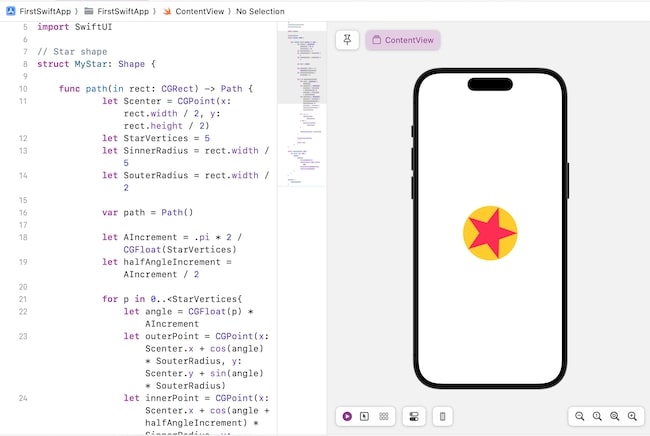
以下 SwiftUI 程序用于绘制具有圆形背景的五角星形状。
import SwiftUI

// Star shape
struct MyStar: Shape {

  func path(in rect: CGRect) -> Path {
    let Scenter = CGPoint(x: rect.width / 2, y: rect.height / 2)
    let StarVertices = 5
    let SinnerRadius = rect.width / 5
    let SouterRadius = rect.width / 2

    var path = Path()

    let AIncrement = .pi * 2 / CGFloat(StarVertices)
    let halfAngleIncrement = AIncrement / 2

    for p in 0..<StarVertices {
      let angle = CGFloat(p) * AIncrement
      let outerPoint = CGPoint(
        x: Scenter.x + cos(angle) * SouterRadius, y: Scenter.y + sin(angle) * SouterRadius)
      let innerPoint = CGPoint(
        x: Scenter.x + cos(angle + halfAngleIncrement) * SinnerRadius,
        y: Scenter.y + sin(angle + halfAngleIncrement) * SinnerRadius)

      if p == 0 {
         path.move(to: outerPoint)
      } else {
         path.addLine(to: outerPoint)
      }
       path.addLine(to: innerPoint)
    }
    path.closeSubpath()
    return path
  }
}
struct ContentView: View {
   var body: some View {
      VStack {
         MyStar()
            .fill(Color.pink)
            .frame(width: 150, height: 150)
            .background(Color.yellow)
            .clipShape(Circle())
      }
   }
}

#Preview {
   ContentView()
}
输出
示例 2
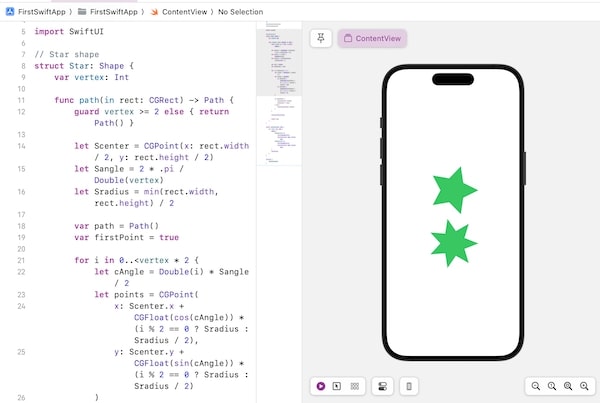
以下 SwiftUI 程序用于绘制具有不同顶点数的多个五角星形状。
import SwiftUI

// Star shape
struct Star: Shape {
   var vertex: Int

   func path(in rect: CGRect) -> Path {
      guard vertex >= 2 else { return Path() }

      let Scenter = CGPoint(x: rect.width / 2, y: rect.height / 2)
      let Sangle = 2 * .pi / Double(vertex)
      let Sradius = min(rect.width, rect.height) / 2

      var path = Path()
      var firstPoint = true

      for i in 0..<vertex * 2 {
         let cAngle = Double(i) * Sangle / 2
         let points = CGPoint(
            x: Scenter.x + CGFloat(cos(cAngle)) * (i % 2 == 0 ? Sradius : Sradius / 2),
            y: Scenter.y + CGFloat(sin(cAngle)) * (i % 2 == 0 ? Sradius : Sradius / 2)
         )

         if firstPoint {
            path.move(to: points)
            firstPoint = false
         } else {
            path.addLine(to: points)
         }
      }

      path.closeSubpath()

      return path
   }
}

struct ContentView: View {
   var body: some View {
      VStack {
         Star(vertex: 5)
            .fill(Color.green)
            .frame(width: 150, height: 150)
         Star(vertex: 7)
            .fill(Color.green)
            .frame(width: 150, height: 150)
      }.padding()
   }
}
#Preview {
   ContentView()
}
输出
广告