
- Mahotas 教程
- Mahotas - 首页
- Mahotas - 简介
- Mahotas - 计算机视觉
- Mahotas - 历史
- Mahotas - 特性
- Mahotas - 安装
- Mahotas 处理图像
- Mahotas - 处理图像
- Mahotas - 加载图像
- Mahotas - 加载灰度图像
- Mahotas - 显示图像
- Mahotas - 显示图像形状
- Mahotas - 保存图像
- Mahotas - 图像质心
- Mahotas - 图像卷积
- Mahotas - 创建RGB图像
- Mahotas - 图像欧拉数
- Mahotas - 图像中零值的比例
- Mahotas - 获取图像矩
- Mahotas - 图像局部最大值
- Mahotas - 图像椭圆轴
- Mahotas - 图像RGB拉伸
- Mahotas 颜色空间转换
- Mahotas - 颜色空间转换
- Mahotas - RGB到灰度转换
- Mahotas - RGB到LAB转换
- Mahotas - RGB到褐色转换
- Mahotas - RGB到XYZ转换
- Mahotas - XYZ到LAB转换
- Mahotas - XYZ到RGB转换
- Mahotas - 增加伽马校正
- Mahotas - 拉伸伽马校正
- Mahotas 标注图像函数
- Mahotas - 标注图像函数
- Mahotas - 图像标注
- Mahotas - 区域过滤
- Mahotas - 边界像素
- Mahotas - 形态学操作
- Mahotas - 形态学算子
- Mahotas - 查找图像均值
- Mahotas - 裁剪图像
- Mahotas - 图像偏心率
- Mahotas - 图像叠加
- Mahotas - 图像圆度
- Mahotas - 图像缩放
- Mahotas - 图像直方图
- Mahotas - 图像膨胀
- Mahotas - 图像腐蚀
- Mahotas - 分水岭算法
- Mahotas - 图像开运算
- Mahotas - 图像闭运算
- Mahotas - 填充图像孔洞
- Mahotas - 条件膨胀图像
- Mahotas - 条件腐蚀图像
- Mahotas - 条件分水岭图像
- Mahotas - 图像局部最小值
- Mahotas - 图像区域最大值
- Mahotas - 图像区域最小值
- Mahotas - 高级概念
- Mahotas - 图像阈值化
- Mahotas - 设置阈值
- Mahotas - 软阈值
- Mahotas - Bernsen局部阈值化
- Mahotas - 小波变换
- 制作图像小波中心
- Mahotas - 距离变换
- Mahotas - 多边形工具
- Mahotas - 局部二值模式
- 阈值邻域统计
- Mahotas - Haralick特征
- 标注区域的权重
- Mahotas - Zernike特征
- Mahotas - Zernike矩
- Mahotas - 排序滤波器
- Mahotas - 2D拉普拉斯滤波器
- Mahotas - 多数滤波器
- Mahotas - 均值滤波器
- Mahotas - 中值滤波器
- Mahotas - Otsu方法
- Mahotas - 高斯滤波
- Mahotas - 击中击不中变换
- Mahotas - 标注最大数组
- Mahotas - 图像均值
- Mahotas - SURF密集点
- Mahotas - SURF积分图像
- Mahotas - Haar变换
- 突出显示图像最大值
- 计算线性二值模式
- 获取标签的边界
- 反转Haar变换
- Riddler-Calvard方法
- 标注区域的大小
- Mahotas - 模板匹配
- 加速鲁棒特征
- 移除边界标注
- Mahotas - Daubechies小波
- Mahotas - Sobel边缘检测
Mahotas - 创建RGB图像
RGB图像是一种数字图像,它使用红、绿、蓝颜色模型来表示颜色。RGB图像中的每个像素都由三个颜色通道表示——红色、绿色和蓝色,它们存储每个颜色的强度值(范围从0到255)。
例如,所有三个通道都具有全强度(255、255、255)的像素表示白色,而所有三个通道都具有零强度(0、0、0)的像素表示黑色。
在Mahotas中创建RGB图像
在Mahotas中,RGB图像是一个形状为(h,w,3)的三维数组;其中h和w分别是图像的高度和宽度,3表示三个通道:红色、绿色和蓝色。
要使用Mahotas创建RGB图像,您需要定义图像的尺寸,创建一个具有所需尺寸的空NumPy数组,并设置每个通道的像素值。
Mahotas没有直接创建RGB图像的函数。但是,您可以使用NumPy和Mahotas库来创建RGB图像。
示例
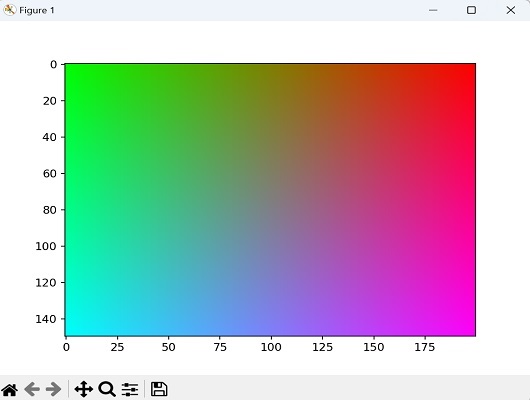
以下是如何在Mahotas中创建从红色到绿色水平渐变、从蓝色到白色垂直渐变的RGB图像的示例:
import mahotas as mh
import numpy as np
from pylab import imshow, show
# Define the dimensions of the image
width = 200
height = 150
# Create an empty numpy array with the desired dimensions
image = np.zeros((height, width, 3), dtype=np.uint8)
# Set the pixel values for each channel
# Here, we'll create a gradient from red to green horizontally and blue to
white vertically
for y in range(height):
   for x in range(width):
      # Red channel gradient
      r = int(255 * x / width)
      # Green channel gradient
      g = int(255 * (width - x) / width)
      # Blue channel gradient
      b = int(255 * y / height)
      # Set pixel values
      image[y, x] = [r, g, b]
# Save the image
mh.imsave('rgb_image.png', image)
# Display the image
imshow(image)
show()
输出
以下是上述代码的输出:
从颜色强度创建RGB图像
颜色强度是指表示图像中每个颜色通道的强度或幅度的值。较高的强度值会导致更亮或更饱和的颜色,而较低的强度值会导致更暗或更不饱和的颜色。
要使用Mahotas从颜色强度创建RGB图像,您需要创建单独的数组来表示红色、绿色和蓝色颜色通道的强度。这些数组应该与所需的输出图像具有相同的尺寸。
示例
在下面的示例中,我们从随机生成的色彩强度创建了一个随机的RGB噪声图像:
import mahotas as mh
import numpy as np
from pylab import imshow, show
# Create arrays for red, green, and blue color intensities
red_intensity = np.random.randint(0, 256, size=(100, 100), dtype=np.uint8)
green_intensity = np.random.randint(0, 256, size=(100, 100), dtype=np.uint8)
blue_intensity = np.random.randint(0, 256, size=(100, 100), dtype=np.uint8)
# Stack color intensities to create an RGB image
rgb_image = np.dstack((red_intensity, green_intensity, blue_intensity))
# Display the RGB image
imshow(rgb_image)
show()
输出
执行上述代码后,我们将得到以下输出:

从单一颜色创建RGB图像
要从单一颜色创建RGB图像,您可以使用所需尺寸初始化一个数组,并将相同的RGB值分配给每个像素。这会导致整个图像呈现统一的颜色外观。
示例
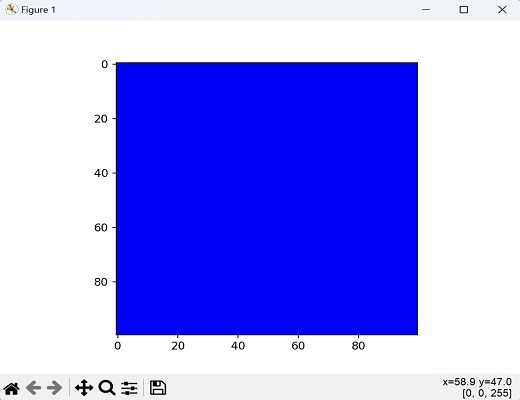
在这里,我们通过将颜色设置为蓝色(使用RGB值(0, 0, 255))来创建单色图像:
import mahotas as mh
import numpy as np
from pylab import imshow, show
# Define the dimensions of the image
width, height = 100, 100
# Create a single color image (blue in this case)
blue_image = np.full((height, width, 3), (0, 0, 255), dtype=np.uint8)
# Display the blue image
imshow(blue_image)
show()
输出
获得的图像如下:
广告