
- TypeScript 基础
- TypeScript - 首页
- TypeScript - 路线图
- TypeScript - 概述
- TypeScript - 环境设置
- TypeScript - 基本语法
- TypeScript vs. JavaScript
- TypeScript - 特性
- TypeScript - 变量
- TypeScript - let & const
- TypeScript - 运算符
- TypeScript 基本类型
- TypeScript - 类型
- TypeScript - 类型注解
- TypeScript - 类型推断
- TypeScript - 数字
- TypeScript - 字符串
- TypeScript - 布尔值
- TypeScript - 数组
- TypeScript - 元组
- TypeScript - 枚举
- TypeScript - any
- TypeScript - never
- TypeScript - 联合类型
- TypeScript - 字面量类型
- TypeScript - Symbol
- TypeScript - null vs. undefined
- TypeScript - 类型别名
- TypeScript 控制流
- TypeScript - 决策
- TypeScript - if 语句
- TypeScript - if else 语句
- TypeScript - 嵌套 if 语句
- TypeScript - switch 语句
- TypeScript - 循环
- TypeScript - for 循环
- TypeScript - while 循环
- TypeScript - do while 循环
- TypeScript 函数
- TypeScript - 函数
- TypeScript - 函数类型
- TypeScript - 可选参数
- TypeScript - 默认参数
- TypeScript - 匿名函数
- TypeScript - 函数构造器
- TypeScript - rest 参数
- TypeScript - 参数解构
- TypeScript - 箭头函数
- TypeScript 接口
- TypeScript - 接口
- TypeScript - 接口扩展
- TypeScript 类和对象
- TypeScript - 类
- TypeScript - 对象
- TypeScript - 访问修饰符
- TypeScript - 只读属性
- TypeScript - 继承
- TypeScript - 静态方法和属性
- TypeScript - 抽象类
- TypeScript - 访问器
- TypeScript - 鸭子类型
- TypeScript 高级类型
- TypeScript - 交叉类型
- TypeScript - 类型守卫
- TypeScript - 类型断言
- TypeScript 类型操作
- TypeScript - 从类型创建类型
- TypeScript - keyof 类型运算符
- TypeScript - typeof 类型运算符
- TypeScript - 索引访问类型
- TypeScript - 条件类型
- TypeScript - 映射类型
- TypeScript - 模板字面量类型
- TypeScript 泛型
- TypeScript - 泛型
- TypeScript - 泛型约束
- TypeScript - 泛型接口
- TypeScript - 泛型类
- TypeScript 其他
- TypeScript - 三斜线指令
- TypeScript - 命名空间
- TypeScript - 模块
- TypeScript - 环境声明
- TypeScript - 装饰器
- TypeScript - 类型兼容性
- TypeScript - Date 对象
- TypeScript - 迭代器和生成器
- TypeScript - Mixin
- TypeScript - 实用程序类型
- TypeScript - 装箱和拆箱
- TypeScript - tsconfig.json
- 从 JavaScript 到 TypeScript
- TypeScript 有用资源
- TypeScript - 快速指南
- TypeScript - 有用资源
- TypeScript - 讨论
TypeScript - 接口
接口是一种语法约定,实体应该符合该约定。换句话说,接口定义了任何实体必须遵守的语法。
接口定义属性、方法和事件,这些是接口的成员。接口只包含成员的声明。派生类负责定义成员。它通常有助于提供派生类将遵循的标准结构。
让我们考虑一个对象:
var person = {
   FirstName:"Tom",
   LastName:"Hanks",
   sayHi: ()=>{ return "Hi"}
};
如果我们考虑对象的签名,它可能是:
{
   FirstName:string,
   LastName:string,
   sayHi()=>string
}
为了在对象之间重用签名,我们可以将其定义为接口。
声明接口
interface 关键字用于声明接口。以下是声明接口的语法:
语法
interface interface_name {
}
示例:接口和对象
interface IPerson {
   firstName:string,
   lastName:string,
   sayHi: ()=>string
}

var customer:IPerson = {
   firstName:"Tom",
   lastName:"Hanks",
   sayHi: ():string =>{return "Hi there"}
}

console.log("Customer Object ")
console.log(customer.firstName)
console.log(customer.lastName)
console.log(customer.sayHi())

var employee:IPerson = {
   firstName:"Jim",
   lastName:"Blakes",
   sayHi: ():string =>{return "Hello!!!"}
}

console.log("Employee  Object ")
console.log(employee.firstName);
console.log(employee.lastName);
此示例定义了一个接口。customer 对象是 IPerson 类型。因此,它现在将绑定到对象以定义接口中指定的所有属性。
另一个具有以下签名的对象仍然被认为是 IPerson,因为该对象是根据其大小或签名来处理的。
编译后,它将生成以下 JavaScript 代码。
//Generated by typescript 1.8.10
var customer = { firstName: "Tom", lastName: "Hanks",
   sayHi: function () { return "Hi there"; }
};
console.log("Customer Object ");
console.log(customer.firstName);
console.log(customer.lastName);
console.log(customer.sayHi());
var employee = { firstName: "Jim", lastName: "Blakes",
   sayHi: function () { return "Hello!!!"; } };

console.log("Employee  Object ");
console.log(employee.firstName);
console.log(employee.lastName);
上述示例代码的输出如下:
Customer object
Tom
Hanks
Hi there
Employee  object
Jim
Blakes
Hello!!!
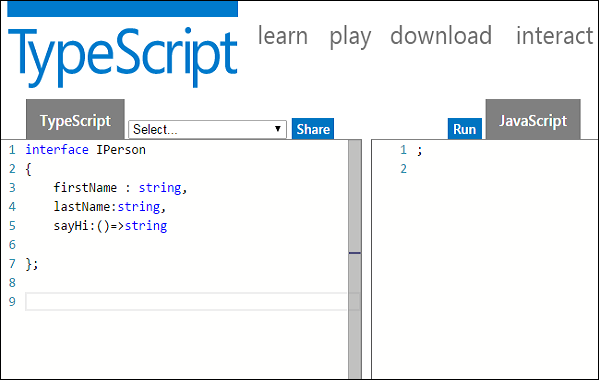
接口不会转换为 JavaScript。它只是 TypeScript 的一部分。如果您查看 TS Playground 工具的屏幕截图,声明接口时不会发出 JavaScript 代码,不像类那样。因此,接口对运行时 JavaScript 的影响为零。
联合类型和接口
以下示例显示了联合类型和接口的用法:
interface RunOptions {
   program:string;
   commandline:string[]|string|(()=>string);
}

//commandline as string
var options:RunOptions = {program:"test1",commandline:"Hello"};
console.log(options.commandline)

//commandline as a string array
options = {program:"test1",commandline:["Hello","World"]};
console.log(options.commandline[0]);
console.log(options.commandline[1]);

//commandline as a function expression
options = {program:"test1",commandline:()=>{return "**Hello World**";}};

var fn:any = options.commandline;
console.log(fn());
编译后,它将生成以下 JavaScript 代码。
//Generated by typescript 1.8.10
//commandline as string
var options = { program: "test1", commandline: "Hello" };
console.log(options.commandline);

//commandline as a string array
options = { program: "test1", commandline: ["Hello", "World"] };
console.log(options.commandline[0]);
console.log(options.commandline[1]);

//commandline as a function expression
options = { program: "test1", commandline: function () { return "**Hello World**"; } };
var fn = options.commandline;
console.log(fn());
其输出如下:
Hello
Hello
World
**Hello World**
接口和数组
接口可以定义数组使用的键类型和包含的条目类型。索引可以是字符串类型或数字类型。
示例
interface namelist {
   [index:number]:string
}

var list2:namelist = ["John",1,"Bran"] //Error. 1 is not type string
interface ages {
   [index:string]:number
}

var agelist:ages;
agelist["John"] = 15   // Ok
agelist[2] = "nine"   // Error
接口和继承
接口可以被其他接口扩展。换句话说,接口可以继承自其他接口。TypeScript 允许接口继承自多个接口。
使用 extends 关键字在接口之间实现继承。
语法:单接口继承
Child_interface_name extends super_interface_name
语法:多接口继承
Child_interface_name extends super_interface1_name,
super_interface2_name,…,super_interfaceN_name
示例:简单的接口继承
interface Person {
   age:number
}

interface Musician extends Person {
   instrument:string
}

var drummer = <Musician>{};
drummer.age = 27
drummer.instrument = "Drums"
console.log("Age:  "+drummer.age) console.log("Instrument:  "+drummer.instrument)
编译后,它将生成以下 JavaScript 代码。
//Generated by typescript 1.8.10
var drummer = {};
drummer.age = 27;
drummer.instrument = "Drums";
console.log("Age:  " + drummer.age);
console.log("Instrument:  " + drummer.instrument);
其输出如下:
Age: 27
Instrument: Drums
示例:多接口继承
interface IParent1 {
   v1:number
}

interface IParent2 {
   v2:number
}

interface Child extends IParent1, IParent2 { }
var Iobj:Child = { v1:12, v2:23}
console.log("value 1: "+this.v1+" value 2: "+this.v2)
Iobj 对象是 leaf 接口类型。leaf 接口由于继承,现在分别具有 v1 和 v2 两个属性。因此,Iobj 对象现在必须包含这些属性。
编译后,它将生成以下 JavaScript 代码。
//Generated by typescript 1.8.10
var Iobj = { v1: 12, v2: 23 };
console.log("value 1: " + this.v1 + " value 2: " + this.v2);
上述代码的输出如下:
value 1: 12 value 2: 23