
- Kivy 教程
- Kivy - 首页
- Kivy 基础
- Kivy - 入门
- Kivy - 安装
- Kivy - 架构
- Kivy - 文件语法
- Kivy - 应用
- Kivy - Hello World
- Kivy - 应用生命周期
- Kivy - 事件
- Kivy - 属性
- Kivy - 输入
- Kivy - 行为
- Kivy 按钮
- Kivy - 按钮
- Kivy - 按钮事件
- Kivy - 按钮颜色
- Kivy - 按钮大小
- Kivy - 按钮位置
- Kivy - 圆形按钮
- Kivy - 禁用按钮
- Kivy - 图片按钮
- Kivy 组件
- Kivy - 组件
- Kivy - 标签
- Kivy - 文本输入
- Kivy - 画布
- Kivy - 线
- Kivy - 复选框
- Kivy - 下拉列表
- Kivy - 窗口
- Kivy - 滚动视图
- Kivy - 走马灯
- Kivy - 滑块
- Kivy - 图片
- Kivy - 弹出窗口
- Kivy - 开关
- Kivy - 微调器
- Kivy - 分隔器
- Kivy - 进度条
- Kivy - 气泡
- Kivy - 标签页面板
- Kivy - 散点图
- Kivy - 手风琴
- Kivy - 文件选择器
- Kivy - 颜色选择器
- Kivy - 代码输入
- Kivy - 模态视图
- Kivy - 切换按钮
- Kivy - 相机
- Kivy - 树形视图
- Kivy - reStructuredText
- Kivy - 操作栏
- Kivy - 播放器
- Kivy - 模板视图
- Kivy - 虚拟键盘
- Kivy - 触摸涟漪
- Kivy - 音频
- Kivy - 视频
- Kivy - 拼写检查
- Kivy - 效果
- Kivy - 输入录制器
- Kivy - OpenGL
- Kivy - 文本
- Kivy - 文本标记
- Kivy - 设置
- Kivy 布局
- Kivy - 布局
- Kivy - 浮动布局
- Kivy - 网格布局
- Kivy - 箱式布局
- Kivy - 堆叠布局
- Kivy - 锚点布局
- Kivy - 相对布局
- Kivy - 页面布局
- Kivy - 回收布局
- Kivy - 布局嵌套布局
- Kivy 高级概念
- Kivy - 配置对象
- Kivy - 图集
- Kivy - 数据加载器
- Kivy - 缓存管理器
- Kivy - 控制台
- Kivy - 动画
- Kivy - 多笔划
- Kivy - 时钟
- Kivy - SVG
- Kivy - UrlRequest
- Kivy - 剪贴板
- Kivy - 工厂
- Kivy - 手势
- Kivy - 语言
- Kivy - 图形
- Kivy - 绘制
- Kivy - 打包
- Kivy - 花园
- Kivy - 存储
- Kivy - 矢量
- Kivy - 工具函数
- Kivy - 检查器
- Kivy - 工具
- Kivy - 日志记录器
- Kivy - 帧缓冲区
- Kivy 应用和项目
- Kivy - 绘图应用
- Kivy - 计算器应用
- Kivy - 计时器应用
- Kivy - 相机处理
- Kivy - 图片查看器
- Kivy - 贝塞尔曲线
- Kivy - 画布压力测试
- Kivy - 圆形绘制
- Kivy - 组件动画
- Kivy - 其他
- Kivy 有用资源
- Kivy - 快速指南
- Kivy - 有用资源
- Kivy - 讨论
Kivy - 计时器应用
在本章中,我们将使用 Python 的 Kivy GUI 框架构建一个计时器应用。计时器测量从事件开始到事件结束之间经过的时间。例如,用于测量运动员完成 100 米跑所需时间的计时器。
该应用的 GUI 设计应类似于下图所示:
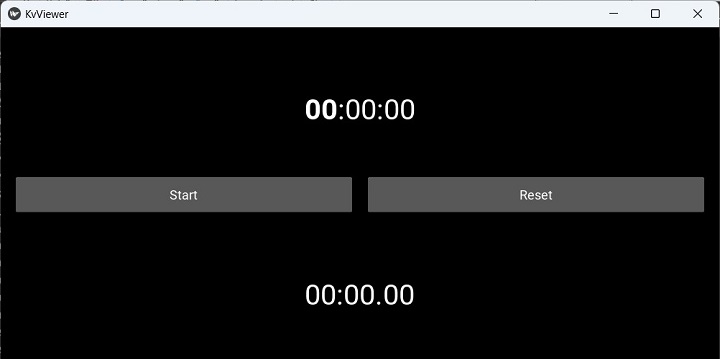
以下“kv”脚本用于放置两个标签和两个按钮,如上图所示。顶部标签用于显示当前时间,底部标签用于显示计时器启动后经过的时间。左侧按钮用于启动/停止计时器。右侧按钮将计时器重置为 0。
BoxLayout:
   orientation: 'vertical'

   Label:
      id: time
      font_size:40
      markup:True
      text: '[b]00[/b]:00:00'

   BoxLayout:
      orientation: 'horizontal'
      padding: 20
      spacing: 20
      height: 90
      size_hint: (1, None)

      Button:
         text: 'Start'
         id: start_stop
         on_press : app.start_stop()

      Button:
         id: reset
         text: 'Reset'
         on_press: app.reset()
   Label:
      id: stopwatch
      font_size:40
      markup:True
      text:'00:00.[size=40]00[/size]'
在应用程序代码中,我们定义了一个 on_stop() 事件处理程序,该处理程序在 GUI 填充后立即调用。它调度一个时间事件处理程序,该处理程序每秒更新标签的当前时间。
def on_start(self):
   Clock.schedule_interval(self.update_time, 0)
update_time() 方法更新顶部标签(id 为 time)上显示的当前时间,以及底部标签(id 为 stopwatch)上经过的时间(如果计时器已启动)。
def update_time(self, t):
   if self.sw_started:
      self.sw_seconds += t
   minutes, seconds = divmod(self.sw_seconds, 60)
   part_seconds = seconds * 100 % 100
   self.root.ids.stopwatch.text = "{:2d} : {:2d}.{:2d}".format(int(minutes), int(seconds), int(part_seconds))
   self.root.ids.time.text = strftime('[b]%H[/b]:%M:%S')
id 为 start 的按钮绑定到 start_stop() 方法,该方法存储计时器是否已启动或停止的状态,并相应地更新启动按钮(id 为 start_stop)的标题。
def start_stop(self):
   self.root.ids.start_stop.text = 'Start' if
self.sw_started else 'Stop'
   self.sw_started = not self.sw_started
右侧按钮将时间计数器重置为 0,将另一个按钮的标题设置为“开始”,并将底部标签的标题重置为“0:0.0”。
def reset(self):
   if self.sw_started:
      self.root.ids.start_stop.text = 'Start'
      self.sw_started = False
   self.sw_seconds = 0
示例
整个编码逻辑如下所示:
from time import strftime
from kivy.clock import Clock
from kivy.app import App
from kivy.core.window import Window

Window.size = (720, 400)

class StopWatchApp(App):
   sw_seconds = 0
   sw_started = False

   def update_time(self, t):
      if self.sw_started:
         self.sw_seconds += t
      minutes, seconds = divmod(self.sw_seconds, 60)
      part_seconds = seconds * 100 % 100

      self.root.ids.stopwatch.text = "{:2d} : {:2d}.{:2d}".format(int(minutes), int(seconds), int(part_seconds))
      self.root.ids.time.text = strftime('[b]%H[/b]:%M:%S')

   def on_start(self):
      Clock.schedule_interval(self.update_time, 0)

   def start_stop(self):
      self.root.ids.start_stop.text = 'Start' if self.sw_started else 'Stop'
      self.sw_started = not self.sw_started

   def reset(self):
      if self.sw_started:
         self.root.ids.start_stop.text = 'Start'
         self.sw_started = False
      self.sw_seconds = 0

StopWatchApp().run()
输出
由于上述代码中 App 类的名称为 StopWatchApp,因此其“kv”语言设计脚本必须命名为“StopWatch.kv”,然后运行程序。
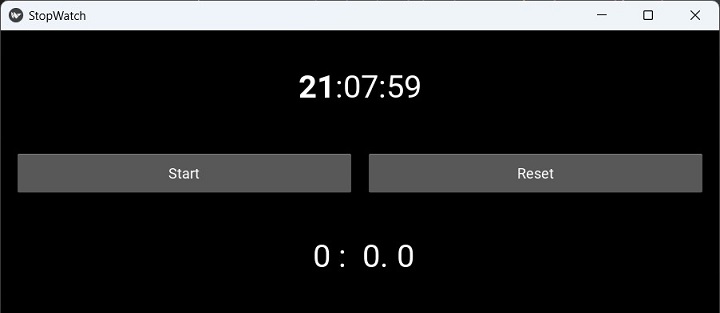
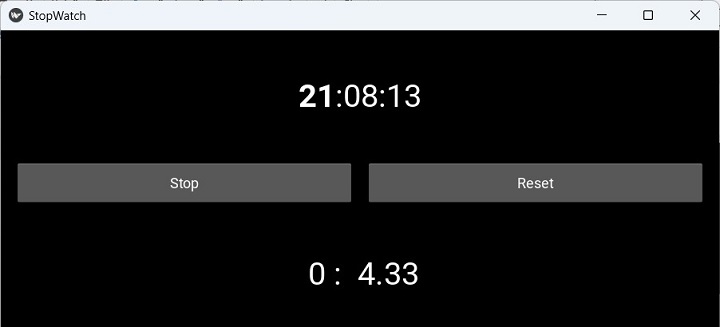
按下“开始”按钮。计数器将开始,在底部标签上显示经过的时间。标题更改为“停止”。再次按下它以停止时钟运行。点击“重置”按钮将标签恢复为“0”。
广告