
- JavaFX 教程
- JavaFX - 首页
- JavaFX - 概述
- JavaFX 安装和架构
- JavaFX - 环境
- JavaFX - 使用 Netbeans 安装
- JavaFX - 使用 Eclipse 安装
- JavaFX - 使用 Visual Studio Code 安装
- JavaFX - 架构
- JavaFX - 应用
- JavaFX 二维图形
- JavaFX - 二维图形
- JavaFX - 绘制直线
- JavaFX - 绘制矩形
- JavaFX - 绘制圆角矩形
- JavaFX - 绘制圆形
- JavaFX - 绘制椭圆
- JavaFX - 绘制多边形
- JavaFX - 绘制折线
- JavaFX - 绘制三次贝塞尔曲线
- JavaFX - 绘制二次贝塞尔曲线
- JavaFX - 绘制弧形
- JavaFX - 绘制 SVG 路径
- JavaFX 二维对象属性
- JavaFX - 笔触类型属性
- JavaFX - 笔触宽度属性
- JavaFX - 笔触填充属性
- JavaFX - 笔触属性
- JavaFX - 笔触连接属性
- JavaFX - 笔触斜接限制属性
- JavaFX - 笔触端点属性
- JavaFX - 平滑属性
- JavaFX 路径对象
- JavaFX - 路径对象
- JavaFX - LineTo 路径对象
- JavaFX - HLineTo 路径对象
- JavaFX - VLineTo 路径对象
- JavaFX - QuadCurveTo 路径对象
- JavaFX - CubicCurveTo 路径对象
- JavaFX - ArcTo 路径对象
- JavaFX 颜色和纹理
- JavaFX - 颜色
- JavaFX - 线性渐变图案
- JavaFX - 径向渐变图案
- JavaFX 文本
- JavaFX - 文本
- JavaFX 效果
- JavaFX - 效果
- JavaFX - 颜色调整效果
- JavaFX - 颜色输入效果
- JavaFX - 图片输入效果
- JavaFX - 混合效果
- JavaFX - 光晕效果
- JavaFX - 辉光效果
- JavaFX - 方框模糊效果
- JavaFX - 高斯模糊效果
- JavaFX - 运动模糊效果
- JavaFX - 反射效果
- JavaFX - 棕褐色效果
- JavaFX - 阴影效果
- JavaFX - 投影阴影效果
- JavaFX - 内阴影效果
- JavaFX - 光照效果
- JavaFX - 远光源效果
- JavaFX - 聚光灯效果
- JavaFX - 点光源效果
- JavaFX - 位移贴图
- JavaFX - 透视变换
- JavaFX 动画
- JavaFX - 动画
- JavaFX - 旋转转换
- JavaFX - 缩放转换
- JavaFX - 平移转换
- JavaFX - 淡入淡出转换
- JavaFX - 填充转换
- JavaFX - 笔触转换
- JavaFX - 顺序转换
- JavaFX - 并行转换
- JavaFX - 暂停转换
- JavaFX - 路径转换
- JavaFX 图片
- JavaFX - 图片
- JavaFX 三维图形
- JavaFX - 三维图形
- JavaFX - 创建长方体
- JavaFX - 创建圆柱体
- JavaFX - 创建球体
- JavaFX 事件处理
- JavaFX - 事件处理
- JavaFX - 使用便捷方法
- JavaFX - 事件过滤器
- JavaFX - 事件处理器
- JavaFX UI 控件
- JavaFX - UI 控件
- JavaFX - 列表视图
- JavaFX - 手风琴
- JavaFX - 按钮栏
- JavaFX - 选择框
- JavaFX - HTML 编辑器
- JavaFX - 菜单栏
- JavaFX - 分页
- JavaFX - 进度指示器
- JavaFX - 滚动窗格
- JavaFX - 分隔符
- JavaFX - 滑块
- JavaFX - 微调器
- JavaFX - 分割窗格
- JavaFX - 表格视图
- JavaFX - 标签页窗格
- JavaFX - 工具栏
- JavaFX - 树视图
- JavaFX - 标签
- JavaFX - 复选框
- JavaFX - 单选按钮
- JavaFX - 文本字段
- JavaFX - 密码字段
- JavaFX - 文件选择器
- JavaFX - 超链接
- JavaFX - 工具提示
- JavaFX - 警报
- JavaFX - 日期选择器
- JavaFX - 文本区域
- JavaFX 图表
- JavaFX - 图表
- JavaFX - 创建饼图
- JavaFX - 创建折线图
- JavaFX - 创建面积图
- JavaFX - 创建条形图
- JavaFX - 创建气泡图
- JavaFX - 创建散点图
- JavaFX - 创建堆叠面积图
- JavaFX - 创建堆叠条形图
- JavaFX 布局面板
- JavaFX - 布局面板
- JavaFX - HBox 布局
- JavaFX - VBox 布局
- JavaFX - BorderPane 布局
- JavaFX - StackPane 布局
- JavaFX - TextFlow 布局
- JavaFX - AnchorPane 布局
- JavaFX - TilePane 布局
- JavaFX - GridPane 布局
- JavaFX - FlowPane 布局
- JavaFX CSS
- JavaFX - CSS
- JavaFX 多媒体
- JavaFX - 处理多媒体
- JavaFX - 播放视频
- JavaFX 有用资源
- JavaFX - 快速指南
- JavaFX - 有用资源
- JavaFX - 讨论
JavaFX - 聚光灯效果
聚光灯源效果模拟节点上的聚光灯。通过将此效果应用于节点,会在其上投射灯光,就像它是由聚光灯生成的。
聚光灯源 - 此光源的光线向各个方向衰减。光线的强度取决于物体与光源的距离。
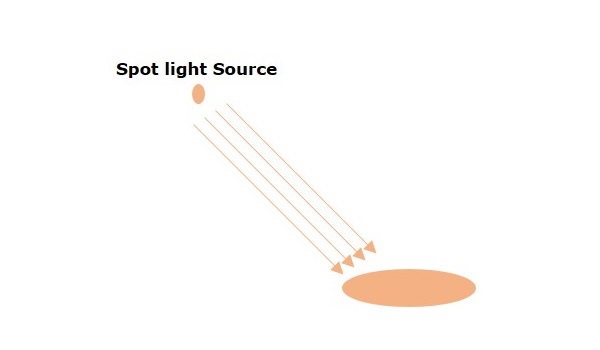
名为Light.Spot的类,属于javafx.scene.effect包,表示远光源。此类包含四个属性:
pointsAtX - 此属性的类型为 double,它表示此光线矢量方向的 x 坐标。
pointsAtY - 此属性的类型为 double,它表示此光线矢量方向的 y 坐标。
pointsAtZ - 此属性的类型为 double,它表示此光线矢量方向的 z 坐标。
specularExponent - 此属性的类型为 double,它表示镜面指数,控制此光源的焦点。
示例
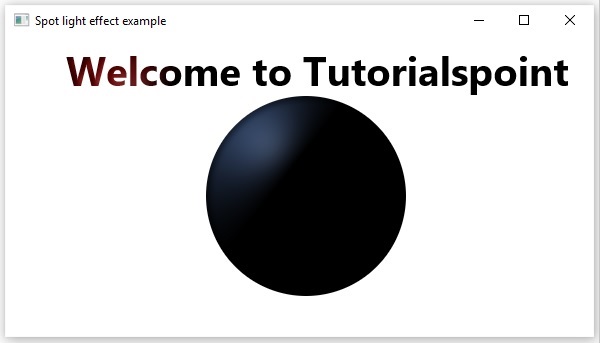
以下程序是一个演示 JavaFX 光照效果的示例。在这里,我们在场景中绘制文本“欢迎来到 Tutorialspoint”和一个圆形。
我们将光照效果应用于这些图形,其中光线由聚光灯发出。
将此代码保存在名为SpotLightExample.java的文件中。
import javafx.application.Application;
import javafx.scene.Group;
import javafx.scene.Scene;
import javafx.scene.effect.Light;
import javafx.scene.effect.Lighting;
import javafx.scene.paint.Color;
import javafx.scene.shape.Circle;
import javafx.stage.Stage;
import javafx.scene.text.Font;
import javafx.scene.text.FontWeight;
import javafx.scene.text.Text;

public class SpotLightExample extends Application {
   @Override
   public void start(Stage stage) {
      //Creating a Text object
      Text text = new Text();

      //Setting font to the text
      text.setFont(Font.font(null, FontWeight.BOLD, 40));

      //setting the position of the text
      text.setX(60);
      text.setY(50);

      //Setting the text to be embedded.
      text.setText("Welcome to Tutorialspoint");

      //Setting the color of the text
      text.setFill(Color.RED);

      //Drawing a Circle
      Circle circle = new Circle();

      //Setting the centre of the circle
      circle.setCenterX(300.0f);
      circle.setCenterY(160.0f);

      //Setting the radius of the circle
      circle.setRadius(100.0f);

      //setting the fill color of the circle
      circle.setFill(Color.CORNFLOWERBLUE);

      //Instantiating the Light.Spot class
      Light.Spot light = new Light.Spot();

      //Setting the color of the light
      light.setColor(Color.GRAY);

      //setting the position of the light
      light.setX(70);
      light.setY(55);
      light.setZ(45);

      //Instantiating the Lighting class
      Lighting lighting = new Lighting();

      //Setting the light source
      lighting.setLight(light);

      //Applying lighting effect to the text
      text.setEffect(lighting);

      //Applying lighting effect to the circle
      circle.setEffect(lighting);

      //Creating a Group object
      Group root = new Group(text,circle);

      //Creating a scene object
      Scene scene = new Scene(root, 600, 300);

      //Setting title to the Stage
      stage.setTitle("Spot light effect example");

      //Adding scene to the stage
      stage.setScene(scene);

      //Displaying the contents of the stage
      stage.show();
   }
   public static void main(String args[]){
      launch(args);
   }
}
使用以下命令从命令提示符编译并执行保存的 java 文件。
javac --module-path %PATH_TO_FX% --add-modules javafx.controls SpotLightExample.java
java --module-path %PATH_TO_FX% --add-modules javafx.controls SpotLightExample
输出
执行上述程序后,将生成一个如下图所示的 JavaFX 窗口。
广告