- Matplotlib 基础
- Matplotlib - 首页
- Matplotlib - 简介
- Matplotlib - 与Seaborn对比
- Matplotlib - 环境配置
- Matplotlib - Anaconda发行版
- Matplotlib - Jupyter Notebook
- Matplotlib - Pyplot API
- Matplotlib - 简单绘图
- Matplotlib - 保存图形
- Matplotlib - 标记
- Matplotlib - 图形
- Matplotlib - 样式
- Matplotlib - 图例
- Matplotlib - 颜色
- Matplotlib - 颜色映射
- Matplotlib - 颜色映射归一化
- Matplotlib - 选择颜色映射
- Matplotlib - 颜色条
- Matplotlib - 文本
- Matplotlib - 文本属性
- Matplotlib - 子图标题
- Matplotlib - 图像
- Matplotlib - 图像蒙版
- Matplotlib - 注释
- Matplotlib - 箭头
- Matplotlib - 字体
- Matplotlib - 什么是字体?
- 全局设置字体属性
- Matplotlib - 字体索引
- Matplotlib - 字体属性
- Matplotlib - 刻度
- Matplotlib - 线性和对数刻度
- Matplotlib - 对称对数和logit刻度
- Matplotlib - LaTeX
- Matplotlib - 什么是LaTeX?
- Matplotlib - LaTeX用于数学表达式
- Matplotlib - LaTeX在注释中的文本格式
- Matplotlib - PostScript
- 启用注释中的LaTeX渲染
- Matplotlib - 数学表达式
- Matplotlib - 动画
- Matplotlib - 绘图元素
- Matplotlib - 使用Cycler进行样式设置
- Matplotlib - 路径
- Matplotlib - 路径效果
- Matplotlib - 变换
- Matplotlib - 刻度和刻度标签
- Matplotlib - 弧度刻度
- Matplotlib - 日期刻度
- Matplotlib - 刻度格式化器
- Matplotlib - 刻度定位器
- Matplotlib - 基本单位
- Matplotlib - 自动缩放
- Matplotlib - 反转坐标轴
- Matplotlib - 对数坐标轴
- Matplotlib - Symlog
- Matplotlib - 单位处理
- Matplotlib - 带单位的椭圆
- Matplotlib - 脊柱
- Matplotlib - 坐标轴范围
- Matplotlib - 坐标轴比例
- Matplotlib - 坐标轴刻度
- Matplotlib - 格式化坐标轴
- Matplotlib - Axes类
- Matplotlib - 双坐标轴
- Matplotlib - Figure类
- Matplotlib - 多图
- Matplotlib - 网格
- Matplotlib - 面向对象接口
- Matplotlib - PyLab模块
- Matplotlib - subplots()函数
- Matplotlib - subplot2grid()函数
- Matplotlib - 固定位置的绘图元素
- Matplotlib - 手动等高线
- Matplotlib - 坐标报告
- Matplotlib - AGG滤镜
- Matplotlib - 飘带框
- Matplotlib - 填充螺旋线
- Matplotlib - findobj演示
- Matplotlib - 超链接
- Matplotlib - 图像缩略图
- Matplotlib - 使用关键字绘图
- Matplotlib - 创建Logo
- Matplotlib - 多页PDF
- Matplotlib - 多进程
- Matplotlib - 打印标准输出
- Matplotlib - 复合路径
- Matplotlib - Sankey类
- Matplotlib - MRI与EEG
- Matplotlib - 样式表
- Matplotlib - 背景颜色
- Matplotlib - Basemap
- Matplotlib 事件处理
- Matplotlib - 事件处理
- Matplotlib - 关闭事件
- Matplotlib - 鼠标移动
- Matplotlib - 点击事件
- Matplotlib - 滚动事件
- Matplotlib - 按键事件
- Matplotlib - 选择事件
- Matplotlib - 视镜
- Matplotlib - 路径编辑器
- Matplotlib - 多边形编辑器
- Matplotlib - 定时器
- Matplotlib - viewlims
- Matplotlib - 缩放窗口
- Matplotlib 小部件
- Matplotlib - 光标小部件
- Matplotlib - 带注释的光标
- Matplotlib - 按钮小部件
- Matplotlib - 复选框
- Matplotlib - 套索选择器
- Matplotlib - 菜单小部件
- Matplotlib - 鼠标光标
- Matplotlib - 多光标
- Matplotlib - 多边形选择器
- Matplotlib - 单选按钮
- Matplotlib - 范围滑块
- Matplotlib - 矩形选择器
- Matplotlib - 椭圆选择器
- Matplotlib - 滑块小部件
- Matplotlib - 区间选择器
- Matplotlib - 文本框
- Matplotlib 绘图
- Matplotlib - 条形图
- Matplotlib - 直方图
- Matplotlib - 饼图
- Matplotlib - 散点图
- Matplotlib - 箱线图
- Matplotlib - 小提琴图
- Matplotlib - 等高线图
- Matplotlib - 3D绘图
- Matplotlib - 3D等高线
- Matplotlib - 3D线框图
- Matplotlib - 3D曲面图
- Matplotlib - 矢羽图
- Matplotlib 有用资源
- Matplotlib - 快速指南
- Matplotlib - 有用资源
- Matplotlib - 讨论
Matplotlib - 数学表达式
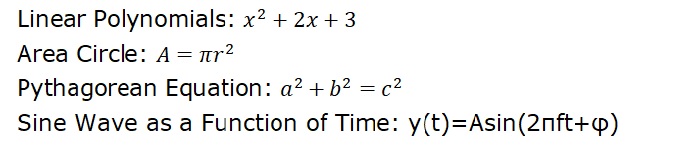
一般来说,数学表达式是在给定的数学环境中遵循特定规则的符号组合。这些符号可以表示数字、变量、运算、函数等等。数学表达式的结构遵循确定运算顺序和其他逻辑语法方面的规则。
以下是一些数学表达式的例子:
Matplotlib中的数学表达式
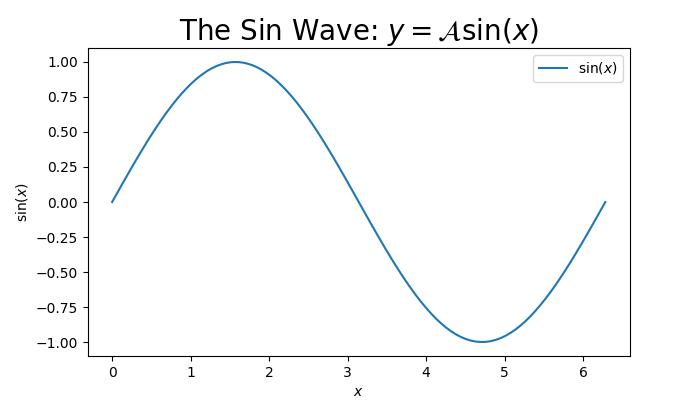
Matplotlib允许用户在文本元素(文本对象)中包含数学表达式,以增强绘图和图形中数学元素的可视化表示。
下图显示了在matplotlib绘图中包含数学表达式:
Matplotlib中的Mathtext
Matplotlib使用名为Mathtext的模块来渲染绘图中的数学表达式。它是一个轻量级的TeX表达式解析器和布局引擎,用于在Matplotlib中渲染数学表达式。
Mathtext的关键特性
Mathtext支持各种特性,例如:
符号
特殊字符
下标、上标和标准函数名
分数和二项式
根式
不同的字体等等
Mathtext表达式应括在美元符号('$')中,可以包含各种符号和命令。文本对象(如标题、标签、注释和图形文本)是Matplotlib中包含数学表达式的常见位置。
基本的数学文本
基本的数学文本可以包含像‘+’、‘-’、‘*’……这样的二元运算符,来表示两个元素之间的各种数学运算。
示例
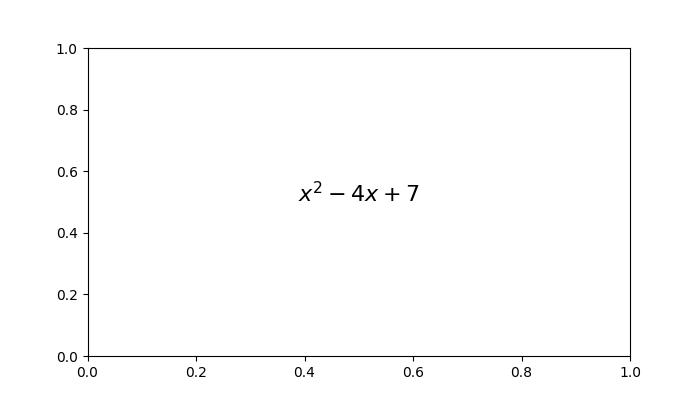
此示例演示了包含像+,−这样的二元运算符,分别表示加法和减法。
import matplotlib.pyplot as plt

# Create a plot
fig = plt.figure(figsize=(7, 4))

# Displaying basic mathematical text
plt.text(.5, .5, r"$x^2 - 4x + 7$", fontsize=16, ha='center')

# Show the plot
plt.show()
输出
执行上述代码后,我们将得到以下输出:
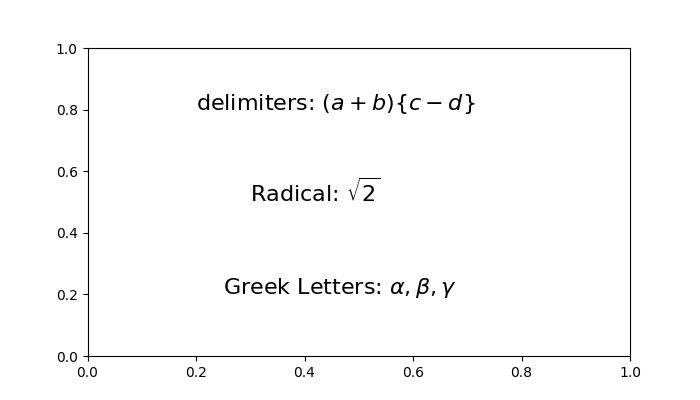
根式、希腊字母和定界符
根式、希腊字母和定界符是数学表达式中的关键组成部分。
根式用平方根符号(√)表示,表示一个数字或表达式的根。
希腊字母,例如α(alpha)、β(beta)、γ(gamma)等等,是用于表示标准数学符号的符号。
定界符,包括括号、方括号和花括号,用于对表达式进行分组,同时保持数学语句中正确的运算顺序。
示例
这是一个包含带根式、希腊字母和定界符的数学表达式的例子。
import matplotlib.pyplot as plt

# Create a figure
fig = plt.figure(figsize=(7, 4))

# Add Greek Letters within the plots
plt.text(0.25, 0.2, r'Greek Letters: $\alpha, \beta, \gamma$', fontsize=16)

# Radicals
plt.text(0.3, 0.5, r'Radical: $\sqrt{2}$', fontsize=16)

# delimiters
plt.text(0.2, 0.8, r'delimiters: $(a + b) \left\{c - d\right\}$', fontsize=16)

# Show the plot
plt.show()
输出
执行上述代码后,我们将得到以下输出:
分数、二项式和叠加数字
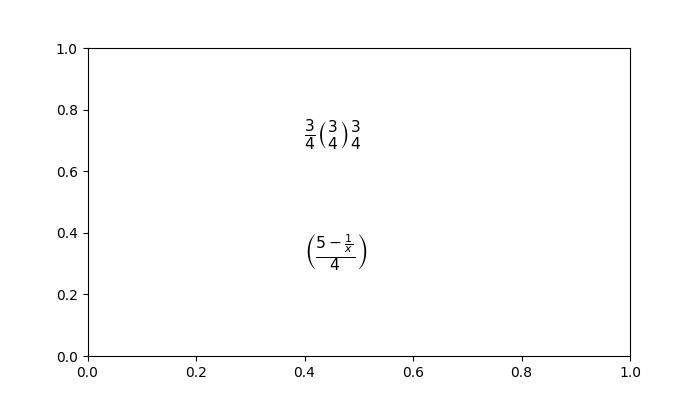
分数是两个数字的比率,写成一个数字在另一个数字之上,表示一个量除以另一个量。
二项式包含两项的表达式,通常用加法或减法连接。在二项式系数的上下文中,二项式可以表示集合中的组合或选择。
叠加数字是指数值的垂直对齐,通常出现在数学符号中,例如指数或嵌套表达式。
示例
这是一个包含带分数、二项式和叠加数字的数学表达式的例子。
import matplotlib.pyplot as plt

# Create a plot
fig = plt.figure(figsize=(7, 4))

# Fractions, binomials, and stacked numbers
plt.text(0.4, 0.7, r'$\frac{3}{4} \binom{3}{4} \genfrac{}{}{0}{}{3}{4}$', fontsize=16)
plt.text(0.4, 0.3, r'$\left(\frac{5 - \frac{1}{x}}{4}\right)$', fontsize=16)

plt.show()
输出
上述示例产生以下输出:
下标、上标和标准函数名
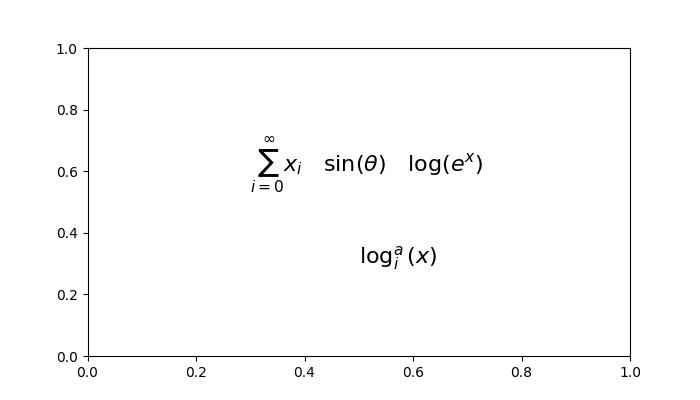
在数学符号中,下标和上标分别用于表示索引或指数。而标准函数名是常用的数学函数,例如正弦、余弦、对数和求和,通常用特定的符号或缩写表示。
示例
这是一个包含带下标、上标和标准函数名的数学表达式的例子。
import matplotlib.pyplot as plt

# Create a figure
fig = plt.figure(figsize=(7, 4))

# Add mathmetical expression with Subscripts, Superscripts and Standard Function Names
plt.text(0.3, 0.6, r'$\sum_{i=0}^\infty x_i \quad \sin(\theta) \quad \log(e^x)$', fontsize=16)

# Subscripts and superscripts
plt.text(0.5, 0.3, r'$\log^a_i (x)$', fontsize=16)

# Show the plot
plt.show()
输出
以下是上述示例的输出:
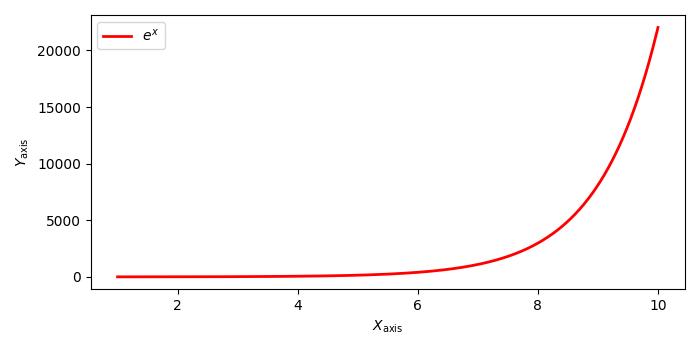
示例
这是另一个在坐标轴标签和图例中编写下标文本的示例。
import numpy as np
import matplotlib.pyplot as plt

# Adjust figure size and autolayout
plt.rcParams["figure.figsize"] = [7.00, 3.50]
plt.rcParams["figure.autolayout"] = True

# Generate data
x = np.linspace(1, 10, 1000)
y = np.exp(x)

# Plot data
plt.plot(x, y, label=r'$e^x$', color="red", linewidth=2)

# Set axis labels
plt.xlabel("$X_{\mathrm{axis}}$")
plt.ylabel("$Y_{\mathrm{axis}}$")

# Set legend
plt.legend(loc='upper left')

# Display plot
plt.show()
输出
执行上述代码后,您将得到以下输出: