
- Selenium 教程
- Selenium - 首页
- Selenium - 概述
- Selenium - 组件
- Selenium - 自动化测试
- Selenium - 环境设置
- Selenium - 远程控制
- Selenium IDE 教程
- Selenium - IDE 简介
- Selenium - 特性
- Selenium - 限制
- Selenium - 安装
- Selenium - 创建测试
- Selenium - 创建脚本
- Selenium - 控制流
- Selenium - 存储变量
- Selenium - 警报和弹出窗口
- Selenium - Selenese 命令
- Selenium - 操作命令
- Selenium - 访问器命令
- Selenium - 断言命令
- Selenium - Assert/Verify 方法
- Selenium - 定位策略
- Selenium - 脚本调试
- Selenium - 验证点
- Selenium - 模式匹配
- Selenium - JSON 数据文件
- Selenium - 浏览器执行
- Selenium - 用户扩展
- Selenium - 代码导出
- Selenium - 代码输出
- Selenium - JavaScript 函数
- Selenium - 插件
- Selenium WebDriver 教程
- Selenium - 简介
- Selenium WebDriver 与 RC
- Selenium - 安装
- Selenium - 第一个测试脚本
- Selenium - 驱动程序会话
- Selenium - 浏览器选项
- Selenium - Chrome 选项
- Selenium - Edge 选项
- Selenium - Firefox 选项
- Selenium - Safari 选项
- Selenium - 双击
- Selenium - 右键单击
- Python 中的 HTML 报告
- 处理编辑框
- Selenium - 单个元素
- Selenium - 多个元素
- Selenium Web 元素
- Selenium - 文件上传
- Selenium - 定位器策略
- Selenium - 相对定位器
- Selenium - 查找器
- Selenium - 查找所有链接
- Selenium - 用户交互
- Selenium - WebElement 命令
- Selenium - 浏览器交互
- Selenium - 浏览器命令
- Selenium - 浏览器导航
- Selenium - 警报和弹出窗口
- Selenium - 处理表单
- Selenium - 窗口和选项卡
- Selenium - 处理链接
- Selenium - 输入框
- Selenium - 单选按钮
- Selenium - 复选框
- Selenium - 下拉框
- Selenium - 处理 IFrame
- Selenium - 处理 Cookie
- Selenium - 日期时间选择器
- Selenium - 动态 Web 表格
- Selenium - Actions 类
- Selenium - Action 类
- Selenium - 键盘事件
- Selenium - 键上/下
- Selenium - 复制和粘贴
- Selenium - 处理特殊键
- Selenium - 鼠标事件
- Selenium - 拖放
- Selenium - 笔事件
- Selenium - 滚动操作
- Selenium - 等待策略
- Selenium - 显式/隐式等待
- Selenium - 支持功能
- Selenium - 多选
- Selenium - 等待支持
- Selenium - 选择支持
- Selenium - 颜色支持
- Selenium - ThreadGuard
- Selenium - 错误和日志记录
- Selenium - 异常处理
- Selenium - 其他
- Selenium - 处理 Ajax 调用
- Selenium - JSON 数据文件
- Selenium - CSV 数据文件
- Selenium - Excel 数据文件
- Selenium - 跨浏览器测试
- Selenium - 多浏览器测试
- Selenium - 多窗口测试
- Selenium - JavaScript 执行器
- Selenium - 无头执行
- Selenium - 捕获屏幕截图
- Selenium - 捕获视频
- Selenium - 页面对象模型
- Selenium - 页面工厂
- Selenium - 记录和回放
- Selenium - 框架
- Selenium - 浏览上下文
- Selenium - DevTools
- Selenium Grid 教程
- Selenium - 概述
- Selenium - 架构
- Selenium - 组件
- Selenium - 配置
- Selenium - 创建测试脚本
- Selenium - 测试执行
- Selenium - 端点
- Selenium - 自定义节点
- Selenium 报告工具
- Selenium - 报告工具
- Selenium - TestNG
- Selenium - JUnit
- Selenium - Allure
- Selenium & 其他技术
- Selenium - Java 教程
- Selenium - Python 教程
- Selenium - C# 教程
- Selenium - Javascript 教程
- Selenium - Kotlin 教程
- Selenium - Ruby 教程
- Selenium - Maven & Jenkins
- Selenium - 数据库测试
- Selenium - LogExpert 日志记录
- Selenium - Log4j 日志记录
- Selenium - Robot Framework
- Selenium - AutoIT
- Selenium - Flash 测试
- Selenium - Apache Ant
- Selenium - Github 教程
- Selenium - SoapUI
- Selenium - Cucumber
- Selenium - IntelliJ
- Selenium - XPath
- Selenium 其他概念
- Selenium - IE 驱动程序
- Selenium - 自动化框架
- Selenium - 基于关键字驱动的框架
- Selenium - 数据驱动框架
- Selenium - 混合驱动框架
- Selenium - SSL 证书错误
- Selenium - 替代方案
- Selenium 有用资源
- Selenium - 问答
- Selenium - 快速指南
- Selenium - 有用资源
- Selenium - 自动化实践
- Selenium - 讨论
Selenium - 基于关键字驱动的框架
Selenium Webdriver 可用于开发基于关键字驱动框架的测试脚本。关键字驱动框架主要用于创建功能测试用例,在这些用例中,测试用例的设计和开发之间有明确的界限。
关键字驱动框架包含一组关键字和操作,这些关键字和操作执行一组操作。这些关键字可以在同一个测试用例中重复使用多次。关键字的命名使其具有自解释性,并描述了它们旨在对被测应用程序执行的操作。因此,关键字驱动可以非常容易地应用于自动化测试用例。
关键字驱动测试框架
关键字测试或关键字驱动框架是一组在自动化测试用例时遵循的准则,其中实现逻辑和技术信息被隐藏。关键字驱动框架的使用和维护非常容易。
必须将一组特定且有目的的顺序的关键字作为测试用例准备的一部分,以便在应用程序上执行特定任务或任务。所有这些关键字都描述在公共存储库或可重用库中。
关键字驱动测试框架的必要性
在关键字驱动测试框架中,测试用例和测试自动化的编码逻辑之间存在清晰的划分。它具有以下用途 -
任何人都可以使用关键字驱动框架有效地执行操作,而无需技术专业知识。团队中的每个成员都可以参与测试,这有助于确保产品质量并更快地开发测试用例。
如果需要更新,则可以在实现逻辑中进行更改,无需重写或修改测试用例。
在关键字驱动框架中,整个测试用例中使用有意义且一致的关键字,从而确保测试用例的统一性。
通过简单地更新、合并或更改关键字的顺序,可以在关键字驱动框架中轻松创建新的测试用例。
创建关键字驱动测试框架的工具
以下工具可用于创建关键字驱动框架 -
Robot Framework
Selenium
Playwright
关键字驱动测试框架的优势
以下是关键字驱动测试框架的优势 -
无需技术知识即可创建、执行和维护基于关键字驱动测试框架构建的测试用例。
在关键字驱动测试框架中,测试用例可以在很大程度上重复使用。
测试用例、数据和实现逻辑与函数之间有明确的区分,因此任何一个部分所需的更改都不会影响其他部分。
在关键字驱动测试框架上开发的测试用例没有任何实现逻辑可用,因此它使测试用例具有可读性。
关键字驱动测试框架的缺点
以下是关键字驱动测试框架的缺点 -
关键字驱动测试框架及其逻辑的实施需要较高的技术技能。
在关键字驱动测试框架中创建的不必要的关键字可能会造成混淆。
在初始阶段需要进行广泛的计划和准备。
在关键字驱动测试框架中,需要定期维护测试用例级别和实现层。
关键字驱动测试框架包含什么?
关键字驱动框架包含以下项目 -
包含关键字的 Excel 表格。
包含元素定位器的对象存储库。
包含关键字实现逻辑的关键字库。
包含框架中常用函数的库。
包含测试用例所需数据的数据文件。
控制并与测试用例通信的驱动程序引擎。
任何支持创建关键字驱动框架的工具,例如 Selenium。
用于测试应用程序的测试用例。
示例
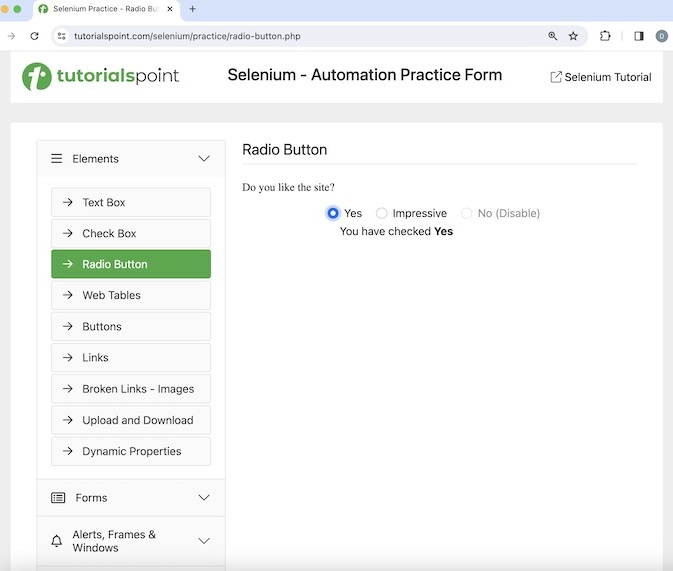
让我们以以下页面为例,在该页面中,我们将使用关键字驱动测试框架检索并验证单击“是”旁边的单选按钮后获得的消息 - **您已选中是**。
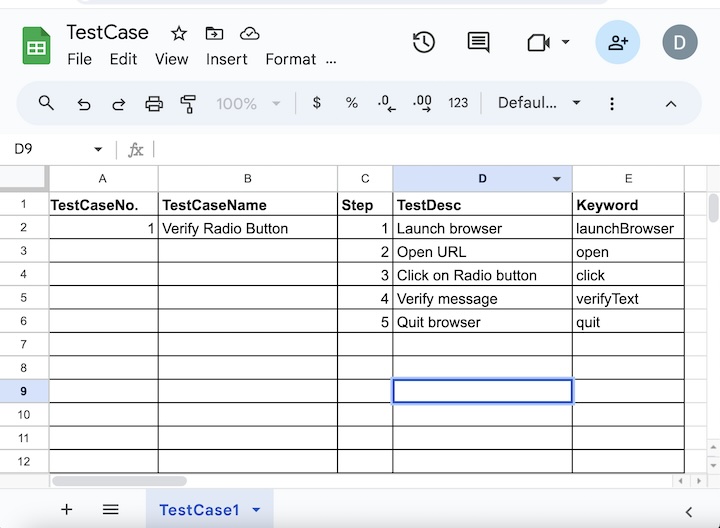
**步骤 1** - 首先,我们将准备一个名为 **TestCase.xlsx** 的 Excel 文件,如下面的图片所示,其中包含所有关键字,如 launchBrowser、open、click、verifyTest 和 quit,以示例的形式组成一个测试用例。我们将此文件放在项目中的 **excel** 包中。
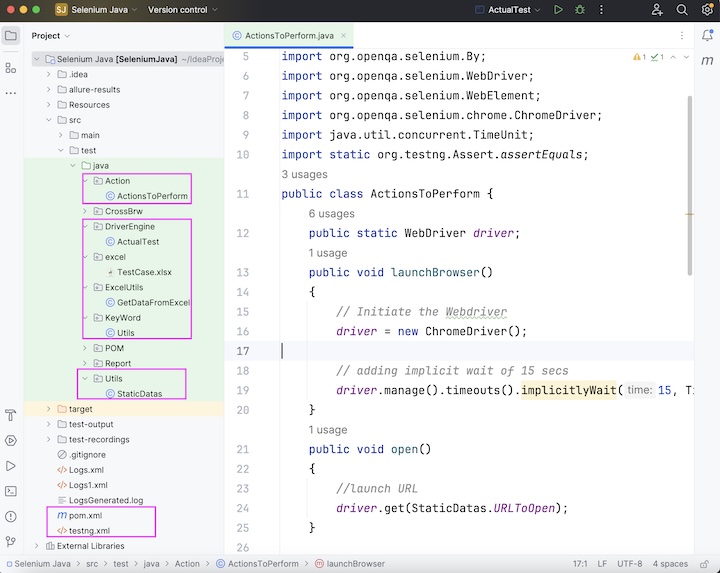
**步骤 2** - 我们将在 **Utils** 包下的类文件 **StaticDatas.java** 中存储 **TestCase.xlsx** 的路径和其他环境值,例如应用程序 URL。
**StaticDatas.java** 中的代码实现
package Utils;

public class StaticDatas {
   public static final String exeData = "TestCase.xlsx";
   public static final String URLToOpen = "https://tutorialspoint.com/selenium/practice/radio-button.php";
}
**步骤 3** - 我们将在 **Action** 包下的类文件 **ActionsToPerform.java** 中为 **TestCase.xlsx** 中识别的关键字创建方法,以执行要执行的操作。
**ActionsToPerform.java** 中的代码实现
package Action;

import Utils.StaticDatas;
import org.openqa.selenium.By;
import org.openqa.selenium.WebDriver;
import org.openqa.selenium.WebElement;
import org.openqa.selenium.chrome.ChromeDriver;
import java.util.concurrent.TimeUnit;
import static org.testng.Assert.assertEquals;

public class ActionsToPerform {
   public static WebDriver driver;
   public void launchBrowser(){

      // Initiate the Webdriver
      driver = new ChromeDriver();

      // adding implicit wait of 15 secs
      driver.manage().timeouts().implicitlyWait(15, TimeUnit.SECONDS);
   }
   public void open(){

      //launch URL
      driver.get(StaticDatas.URLToOpen);
   }
   public void click(){

      // identify element then click
      WebElement radioBtn = driver.findElement(By.xpath("/html/body/main/div/div/div[2]/form/div[1]/input"));
      radioBtn.click();
   }
   public void verifyText(){

      // identify element
      WebElement chkMessage = driver.findElement(By.xpath("//*[@id='check']"));

      // get element text
      String text = chkMessage.getText();
      System.out.println("Message is: " + text);

      // verify message
      assertEquals("You have checked Yes", text);
   }
   public void quit(){

      // quitting browser
      driver.quit();
   }
}
**步骤 4** - 我们需要读取 **TestCase.xlsx** 文件(使用 Apache POI 库)以获取要对应用程序执行的已识别关键字,为此,我们将创建 **ExcelUtils** 包下的类文件 **GetDataFromExcel.java**。
**GetDataFromExcel.java** 中的代码实现
package ExcelUtils;

import Utils.StaticDatas;
import org.apache.poi.xssf.usermodel.XSSFSheet;
import org.apache.poi.xssf.usermodel.XSSFWorkbook;
import org.apache.poi.ss.usermodel.Cell;
import org.apache.poi.ss.usermodel.Row;
import java.io.File;
import java.io.FileInputStream;
import java.io.IOException;
import java.util.ArrayList;
import java.util.Iterator;

public class GetDataFromExcel {
   public ArrayList getExcel(int c) throws IOException {

      // get excel file path
      String f = StaticDatas.exeData;

      // load the excel file
      File fl = new File(f);
      FileInputStream fileInputStream = new FileInputStream(fl);

      // instance of XSSFWorkbook
      XSSFWorkbook w = new XSSFWorkbook(fileInputStream);

      // create sheet in XSSFWorkbook with name TestCase1
      XSSFSheet s = w.getSheet("TestCase1");

      // iterating through rows in sheet
      Iterator r = s.rowIterator();

      // moving to next row
      r.next();
      ArrayList<String> arr = new ArrayList();

      // iterate till next row data exists
      while(r.hasNext()){
         Row rw = (Row) r.next();

         // move to next cell in same row
         Cell cell = rw.getCell(c);

         // get cell data
         String cellValue = cell.getStringCellValue();

         // store cell data in arraylist
         arr.add(cellValue);

         // store all cell data in subsequent rows in arraylist
         arr.add(((Row) r.next()).getCell(c).getStringCellValue());
      }
      System.out.println("Get all cell data in the list : " + arr);
      return arr;
   }
   public void getFile(int j) {
   }
}
**步骤 5** - 我们需要从 **GetDataFromExcel** 类文件调用方法 **getExcel** 来读取 **TestCase.xlsx** 文件,以及 **ActionsToPerform** 类文件的方法,为此,我们将创建 **DriveEngine** 包下的类文件 **ActualTest.java**。
**ActualTest.java** 中的代码实现
package DriverEngine;

import Action.ActionsToPerform;
import ExcelUtils.GetDataFromExcel;

public class ActualTest {
   public static void main(String[] args) {

      GetDataFromExcel  getDataFromExcel = new GetDataFromExcel();

      // get column number of containing keywords in the excel
      getDataFromExcel.getFile(4);

      // get the keyword actions
      ActionsToPerform actionsToPerform = new ActionsToPerform();

      // execute the test steps starting with browser launch
      actionsToPerform.launchBrowser();

      // open URL
      actionsToPerform.open();

      // click radio button
      actionsToPerform.click();

      // verify message
      actionsToPerform.verifyText();

      // quit browser
      actionsToPerform.quit();
      System.out.println("Keyword driven testing framework executed successfully");
   }
}
步骤 6 − 将依赖项添加到 pom.xml 文件中。
<?xml version="1.0" encoding="UTF-8"?>
<project xmlns="http://maven.apache.org/POM/4.0.0"
   xmlns:xsi="http://www.w3.org/2001/XMLSchema-instance"
   xsi:schemaLocation="http://maven.apache.org/POM/4.0.0
   http://maven.apache.org/xsd/maven-4.0.0.xsd">

   <modelVersion>4.0.0</modelVersion>
   <groupId>org.example</groupId>
   <artifactId>SeleniumJava</artifactId>
   <version>1.0-SNAPSHOT</version>

   <properties>
      <maven.compiler.source>16</maven.compiler.source>
      <maven.compiler.target>16</maven.compiler.target>
      <project.build.sourceEncoding>UTF-8</project.build.sourceEncoding>
   </properties>

   <!-- https://mvnrepository.com/artifact/org.seleniumhq.selenium/selenium-java -->
   <dependencies>
      <dependency>
         <groupId>org.seleniumhq.selenium</groupId>
         <artifactId>selenium-java</artifactId>
         <version>4.11.0</version>
      </dependency>

      <!-- https://mvnrepository.com/artifact/org.apache.poi/poi -->
      <dependency>
         <groupId>org.apache.poi</groupId>
         <artifactId>poi</artifactId>
         <version>5.2.5</version>
      </dependency>

      <!-- https://mvnrepository.com/artifact/org.apache.poi/poi-ooxml -->
      <dependency>
         <groupId>org.apache.poi</groupId>
         <artifactId>poi-ooxml</artifactId>
         <version>5.2.5</version>
      </dependency>

      <!-- https://mvnrepository.com/artifact/org.testng/testng -->
      <dependency>
         <groupId>org.testng</groupId>
         <artifactId>testng</artifactId>
         <version>7.9.0</version>
         <scope>test</scope>
      </dependency>
   </dependencies>
</project>
输出
Message is: You have checked Yes
Keyword driven testing framework executed successfully

Process finished with exit code 0
在上面的示例中,我们实现了一个关键字驱动的测试框架,以验证并在控制台中获取消息 - 您已选中是。
最终,收到了消息进程已结束,退出代码为 0,表示代码已成功执行。
至此,我们对 Selenium Webdriver 关键字驱动框架教程的全面概述就结束了。我们从描述什么是关键字驱动框架、为什么要使用关键字驱动框架、哪些工具用于关键字驱动框架、关键字驱动框架的优缺点、关键字驱动框架包含哪些内容开始,并逐步演示了如何使用 Selenium Webdriver 实现关键字驱动框架的示例。
这使您深入了解了 Selenium Webdriver 中的关键字驱动框架。建议您持续练习所学内容,并探索与 Selenium 相关的其他内容,以加深理解并拓宽视野。